214733 99 Revision A
3.17.6 Activating Control Locks
All header functions are factory-set to the unlocked position, but certain functions can be locked to prevent changes. This
feature can be used to maintain preferred settings when there are multiple Operators.
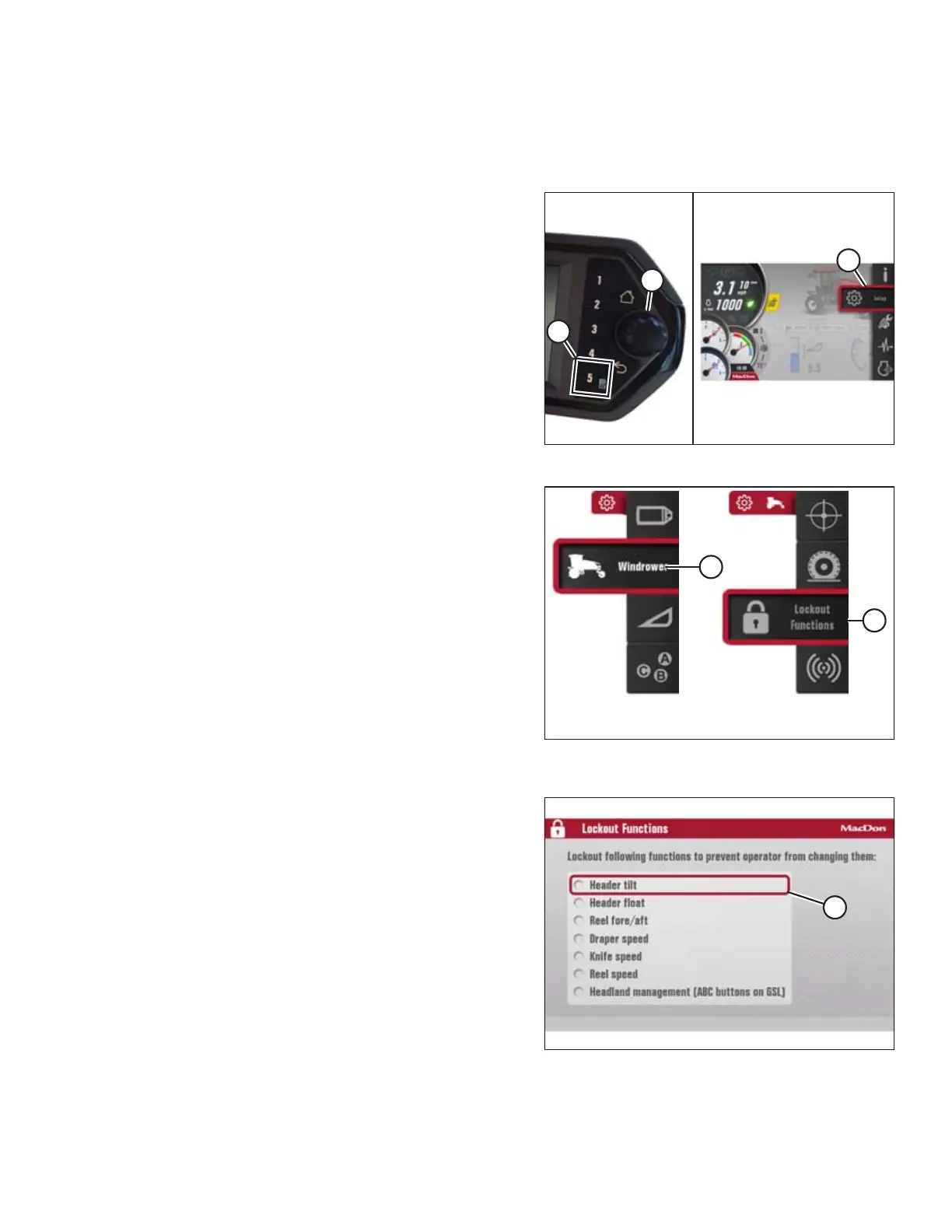
Figure 3.115: Displaying the Main Menu
1. Press soft key 5 (A) to display the main menu.
2. To scroll to the setting icon (C), use the Harvest
Performance Tracker (HPT) scroll knob (B) or the ground
speed lever (GSL) scroll wheel (not shown).
3. Press the HPT scroll knob (B) or the GSL SELECT button (not
shown) to activate the settings menu options.
Figure 3.116: Windrower Settings Icon and Tires
Submenu Icon
4. Scroll to the WINDROWER SETTINGS icon (A) and
press SELECT.
5. Scroll to the CONTROL LOCKS icon (B), and press SELECT to
display the adjustment window.
NOTE:
The F3 shortcut button on the operator’s console will also
display the windrower settings menu.
Figure 3.117: Lockout Functions Page
6. On the LOCKOUT FUNCTIONS PAGE, use the scroll knob on
the HPT to move the cursor (A) to the desired function(s)
to lock.
7. Press SELECT to activate the lock.
OPERATOR’S STATION



 To Next Page