214733 289 Revision A
5.7.2 Fuel/Water Separator
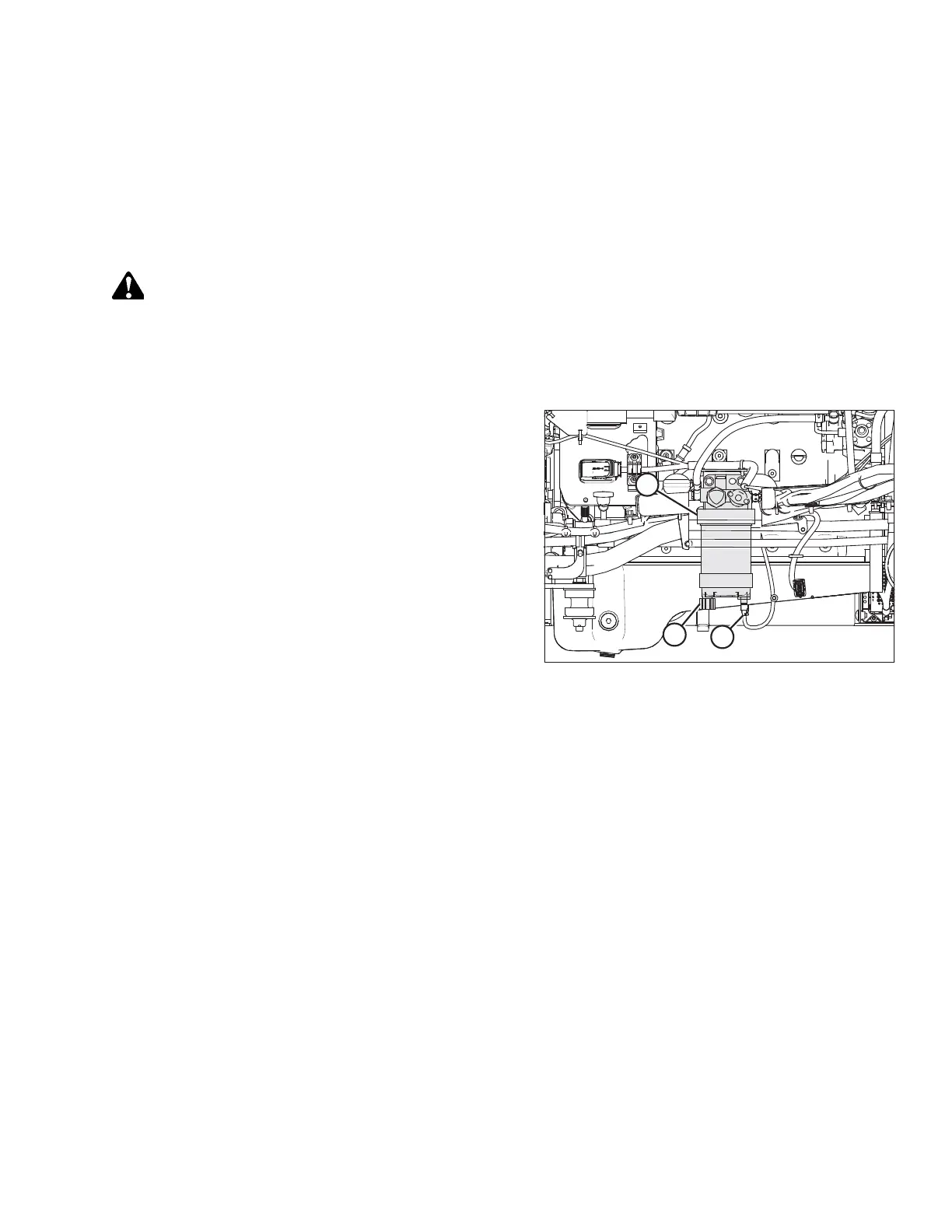
A fuel/water separator is incorporated into the primary fuel filter. The separator is equipped with a drain and a sensor that
detects water in the fuel and displays an alert on the HPT display. Drain the water and sediment from the separator daily or
at any time the Water In Fuel (WIF) light illuminates on the HPT display.
To remove water from the fuel system, refer to Removing Water from Fuel System, page 289.
Removing Water from Fuel System
WARNING
To avoid bodily injury or death from unexpected startup of the machine, always stop the engine and remove the key
from the ignition before leaving the operator’s seat for any reason.
1. Stop the engine and remove the key.
2. Open the hood. Refer to 5.3.1 Opening Hood, page 256.
Figure 5.53: Fuel System
A - Primary Fuel Filter
B - Water in Fuel (WIF) Sensor
C - Drain Valve
3. Place a container under the filter (A) to catch spilled fluid.
4. Turn drain valve (C) by hand 1-1/2 to 2 turns
counterclockwise until draining occurs.
5. Drain the filter sump of water and sediment until clear fuel
is visible.
6. Turn the valve clockwise to close the drain.
7. Dispose of fluid safely.
8. Close the hood. Refer to 5.3.2 Closing Hood, page 257.
MAINTENANCE AND SERVICING



 To Next Page