214733 348 Revision A
Removing a Battery
CAUTION
Do not attempt to service battery unless you have the proper equipment and experience to perform the job. Have it
done by a qualified Dealer.
WARNING
To avoid bodily injury or death from unexpected startup of the machine, always stop the engine and remove the key
from the ignition before leaving the operator’s seat for any reason.
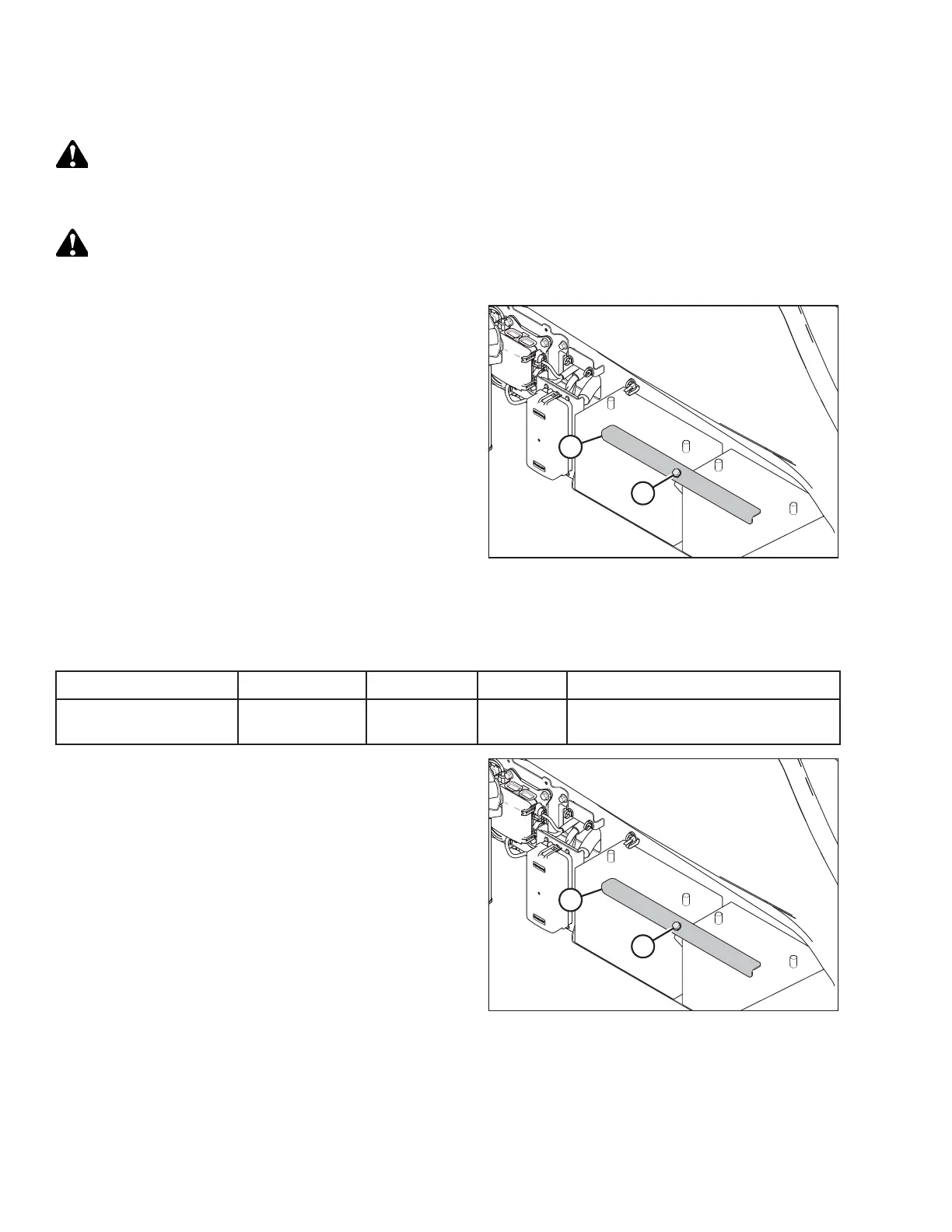
Figure 5.138: Battery Location
1. Stop the engine and remove the key.
2. Open the battery cover. Refer to Opening Battery Cover,
page 343.
3. Disconnect the battery harness. Refer to Disconnecting a
Battery, page 349.
4. Loosen bolt (A) until securing strap (B) can be removed.
5. Lift batteries off the support.
Installing a Battery
Table 5.7 Battery Specification
Rating
Group
CCA (min)
Volt
Maximum Dimension
Heavy duty, off-road,
vibration resistant
31A 760 12
334 x 188 x 232 mm
(13 x 7.4 x 9.13 in.)
Figure 5.139: Battery Location
1. Position new batteries on battery support.
NOTE:
Ensure that positive terminal is positioned on the right side
of the battery when facing them.
2. Install strap (B) with secure with bolts (A).
3. Connect battery cables. Refer to Connecting Batteries, page
350.
4. Close battery cover. Refer to Closing Battery Cover, page
343.
MAINTENANCE AND SERVICING



 To Next Page