214733 135 Revision A
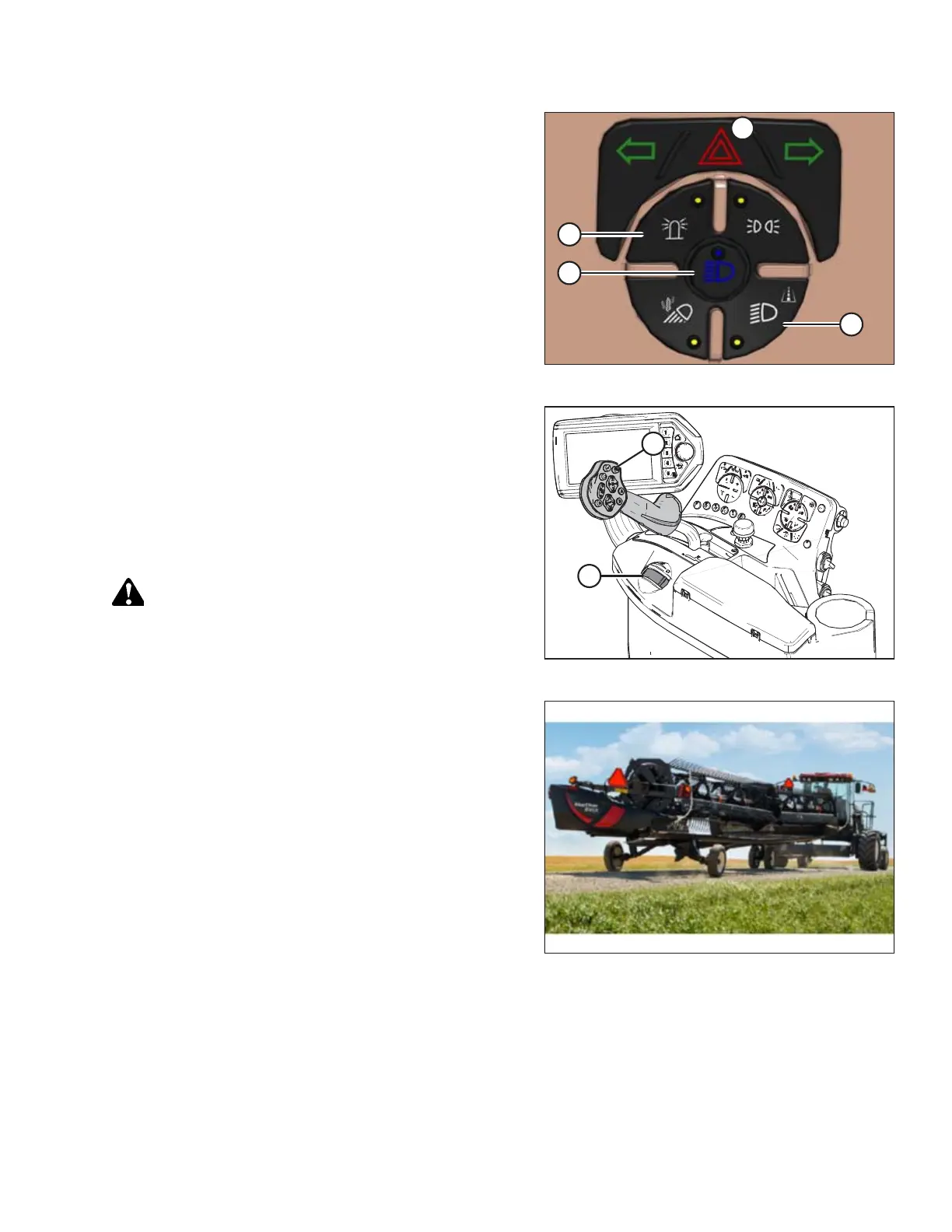
Figure 4.47: Light Switches
8. Press switch (A) for road lights. Always use these lights
when driving windrower on roads.
9. Press switch (B) for high/low beams as required when other
vehicles are approaching.
IMPORTANT:
Do NOT use field lights on the road; other drivers may be
confused by them.
10. Press switch (C) to activate beacons.
11. Press switch (D) to activate hazard lights.
Figure 4.48: Operator Console
12. Set the desired maximum ground speed limit. Refer to
Adjusting Ground Speed Limit, page 125.
NOTE:
Maximum ground speed can be set while the windrower is
moving. Anticipate acceleration or deceleration if changing
maximum speed while moving.
13. Slowly push throttle (A) to full forward (operating speed).
CAUTION
Check to be sure all bystanders have cleared the area.
15. Move the GSL (B) out of PARK and slowly forward to
desired speed.
Figure 4.49: Towing a Header
16. If towing a header, refer to Towing Header with Windrower,
page 139.
OPERATION



 To Next Page