214733 285 Revision A
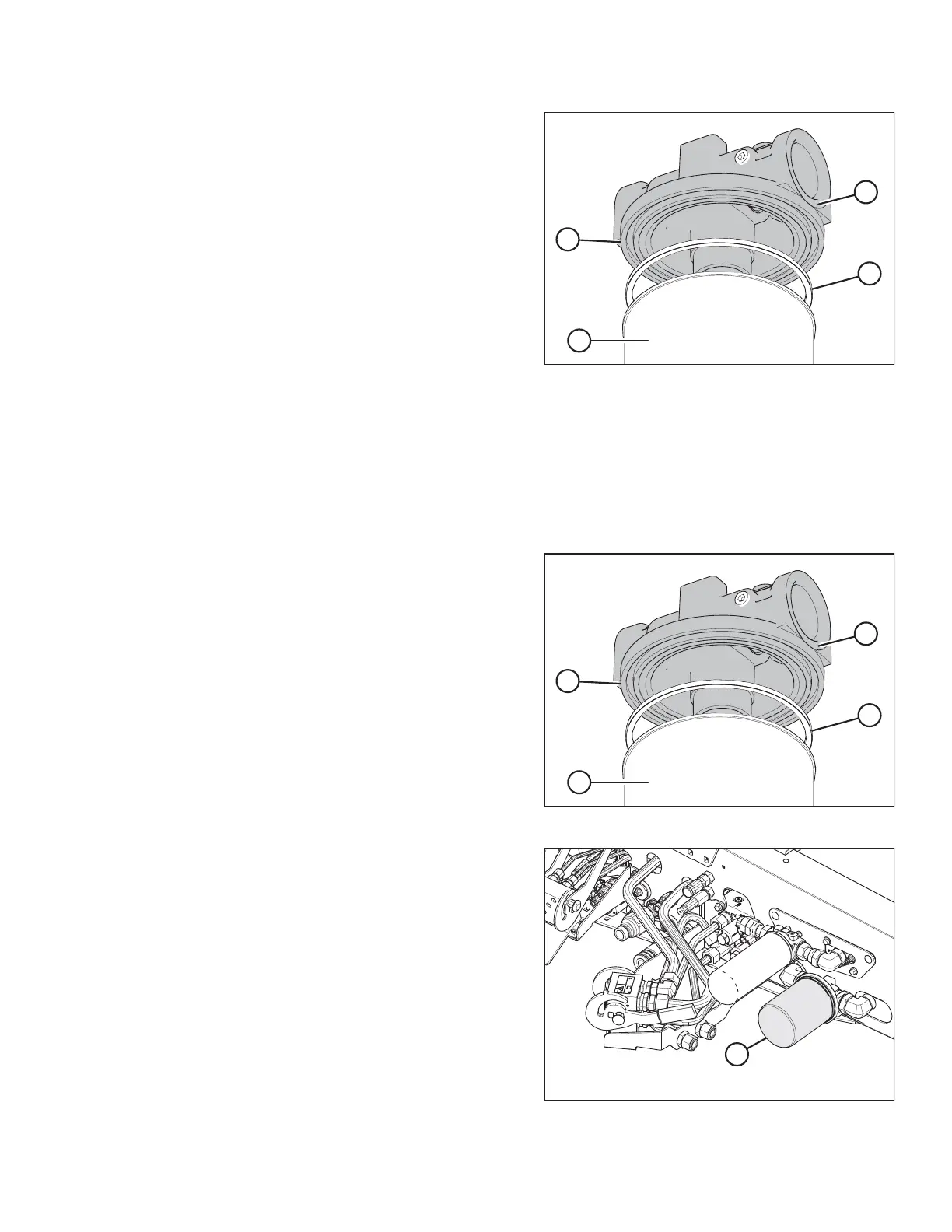
Figure 5.47: Return Filter
NOTE:
Image showing filter head removed to show
component clarity.
7. Remove and discard gasket (C) from groove (B) in filter
head (A). Filter (D) shown for context.
Installing Return Oil Filter
NOTE:
For filter specifications, refer to 5.1.4 Filter Part Numbers, page 251.
NOTE:
Image shows filter head removed for component clarity.
Figure 5.48: Return Filter
1. Clean the gasket groove (B) in the filter head (A).
2. Apply a thin film of clean oil to the new filter gasket (C).
IMPORTANT:
Do NOT pre-fill filter before installation as this may
potentially introduce unfiltered oil into the system.
3. Install new gasket (C) into the groove (B) in the filter
head (A).
4. Screw the new filter (D) onto the filter head until the gasket
just contacts the filter.
Figure 5.49: Return Filter
5. Tighten filter (A) an additional 3/4 turn by hand.
IMPORTANT:
Do NOT use a filter wrench to install oil filter.
Overtightening can damage gasket and filter.
6. Check hydraulic fluid levels. Refer to 5.7.3 Checking
Hydraulic Oil, page 290. For capacity level, refer to 5.1.3
Lubricants, Fluids, and System Capacities, page 249.
MAINTENANCE AND SERVICING



 To Next Page