OPERATOR’S STATION
NOTE:
Contact your MacDon Dealer for information regarding software updates to the electronic modules. Your Dealer
will have the necessary interface tools and access to the latest software upgrades.
NOTE:
The f ollowing
menus are available when ignition key is set to RUN:
• WINDROWER SE
TUP
• CAB DISPLAY S
ETUP
• DIAGNOSTIC M
ODE
The CAL IBR A
TE SENSORS menu is available only when engine is running.
3.19.6 Cab Display O ptions
The display and sound features of the cab display module (CDM) can be adjusted to suit each particular O perator.
NOTE:
The proced
ures listed in this section are current for cab display module (CDM) software version C417and
windrowe
r control module (WCM) M221. The WCM is supplied pre-loaded with the latest released version of the
operatin
g software. Any subsequent updates will be made available via internet download from the MacDon
web site:
macdondealers.com.
NOTE:
Screens may appear differently if running newer or older versions of software, and not all features are available
for every ma chine.
Settin
g the Cab Display Langu age
1. Turn ignition key to RUN, or start the engine.
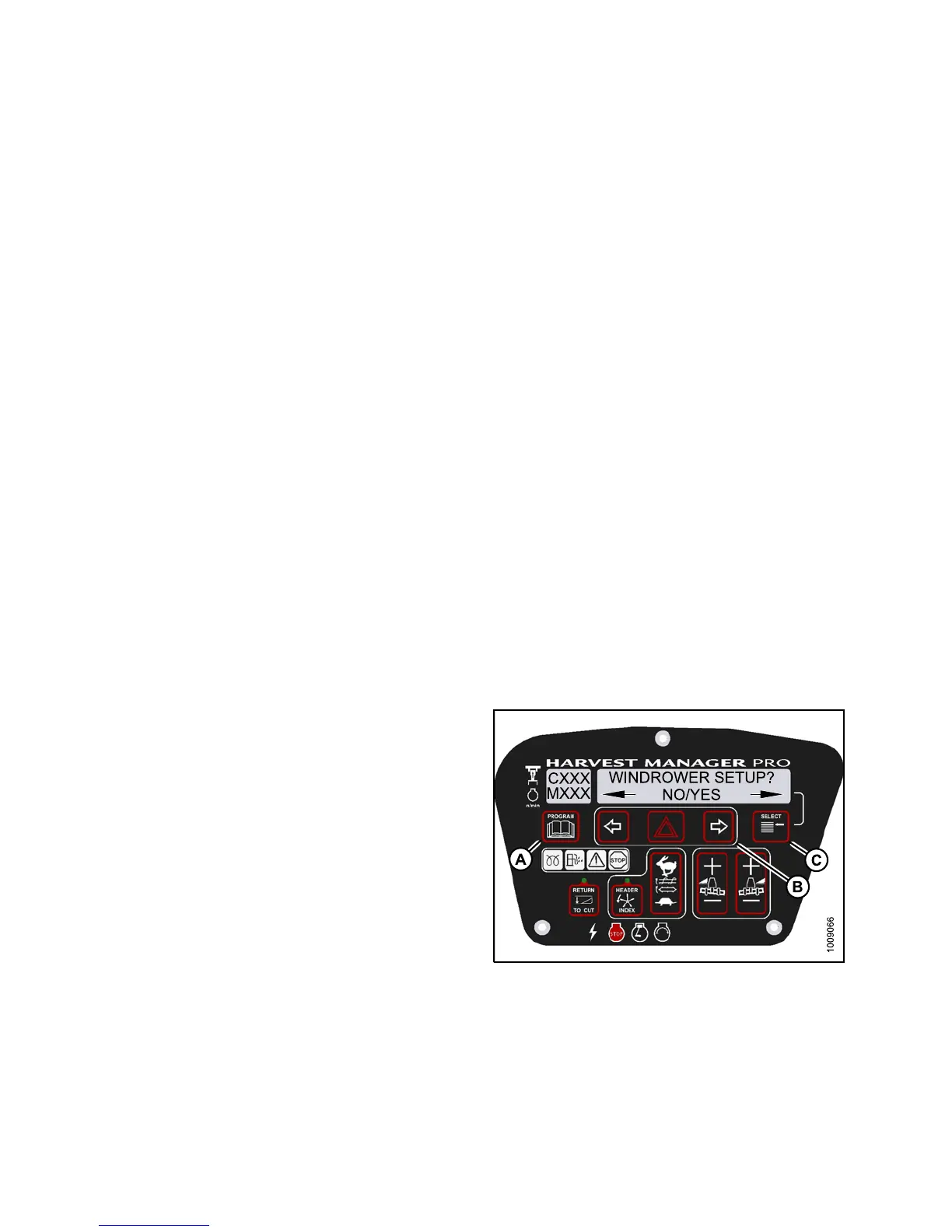
2. Press PROGRAM (A) and SELECT (C) on cab display
module (CDM) to enter Programming Mode.
• WINDROWER SETUP? is displayed on the
upper line.
• NO/YES is displayed on the lower line.
Figure 3.70: M155 CDM Programming Buttons
147649 90 Revision A



 To Next Page