OPERATION
4.5 Attaching and Detaching Headers
4.5.1 Attaching a D-Series Header
D50, D60, and D
65 headers can be attached to an M155 or M205 Self-Propelled Windrow er. For a ttachment
procedure, re
fer to the section for your specific windrower model.
Refer to the f
ollowing instruc tio ns based on the type of center-link installed on yo u r windrower:
• Attaching a D
-Series Header: Hyd raulic Center-Link with Optional Se lf-Alignment, page 214
• AttachingaD
-Series Header: Hydraulic Center-Link without Self-Alignment, page 219
• Attaching a
D-Series Header: Mechanical Center-Link, page 225
Attaching H
eader Boots
Header boots are required to attach a D-Series draper header to the windrower. Attach header boots (supplied
with header) to w indrower lift linkage if not already installed.
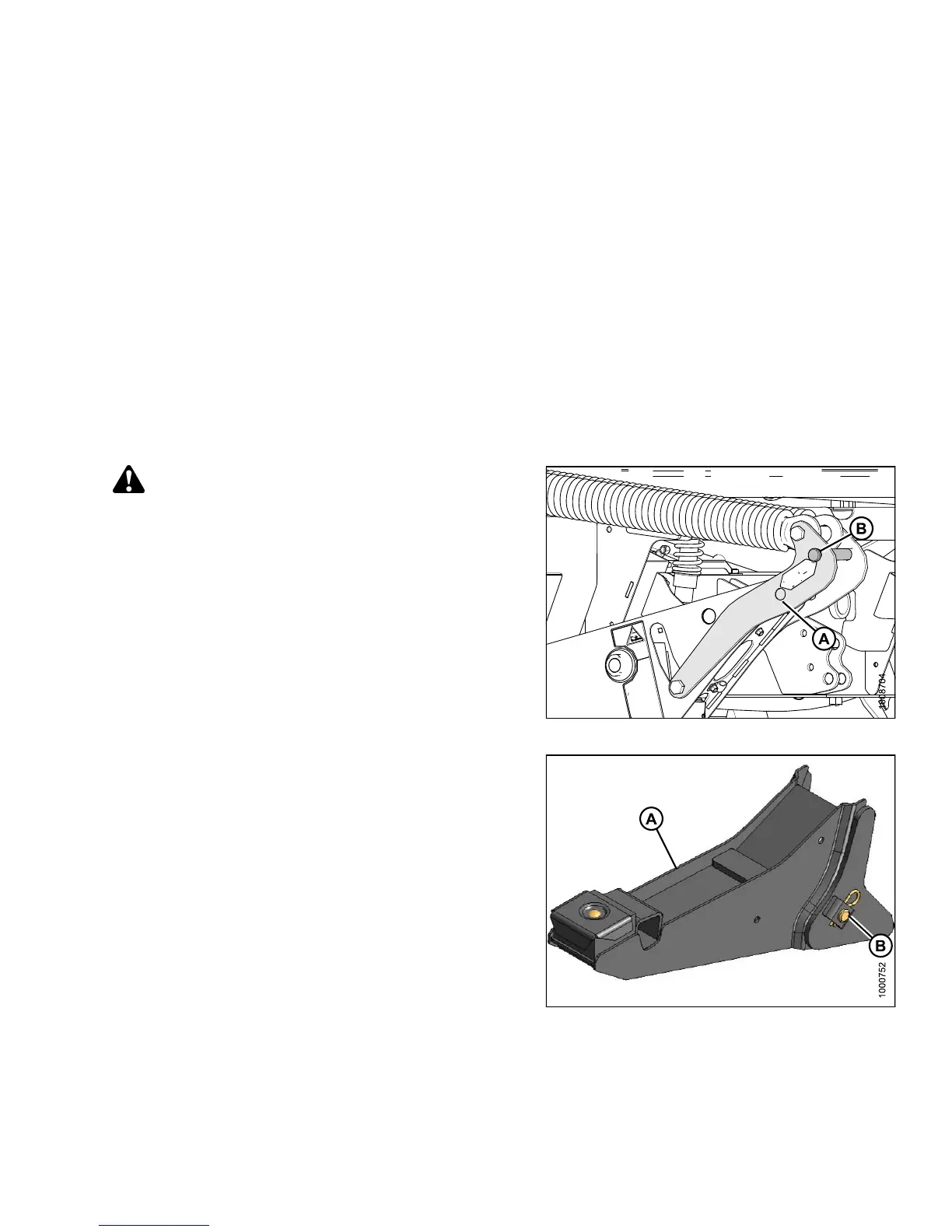
CAUTION
To prevent damage to the lift system when lowering
header lift linkages without a header or weight
box attached to the windrower, ensure the float
engagement pin is installed in storage position (B)
and NOT in engaged position (A).
Figure 4.108: Header Float Linkage
1. Remov
e pin (B) from boot (A).
Figure 4.109: Header Boot
147649 213 Revision A



 To Next Page