OPERATOR’S STATION
3.18 Header Controls
All header controls are conveniently located on the operator’s console and on the ground speed lever (GSL) handle.
NOTE:
Some controls are optional equipment and may not be present in your unit. Some controls may be installed but
nonfunctional for certain headers.
Refer to specific header sections in this manual for detailed operating procedures of all header controls.
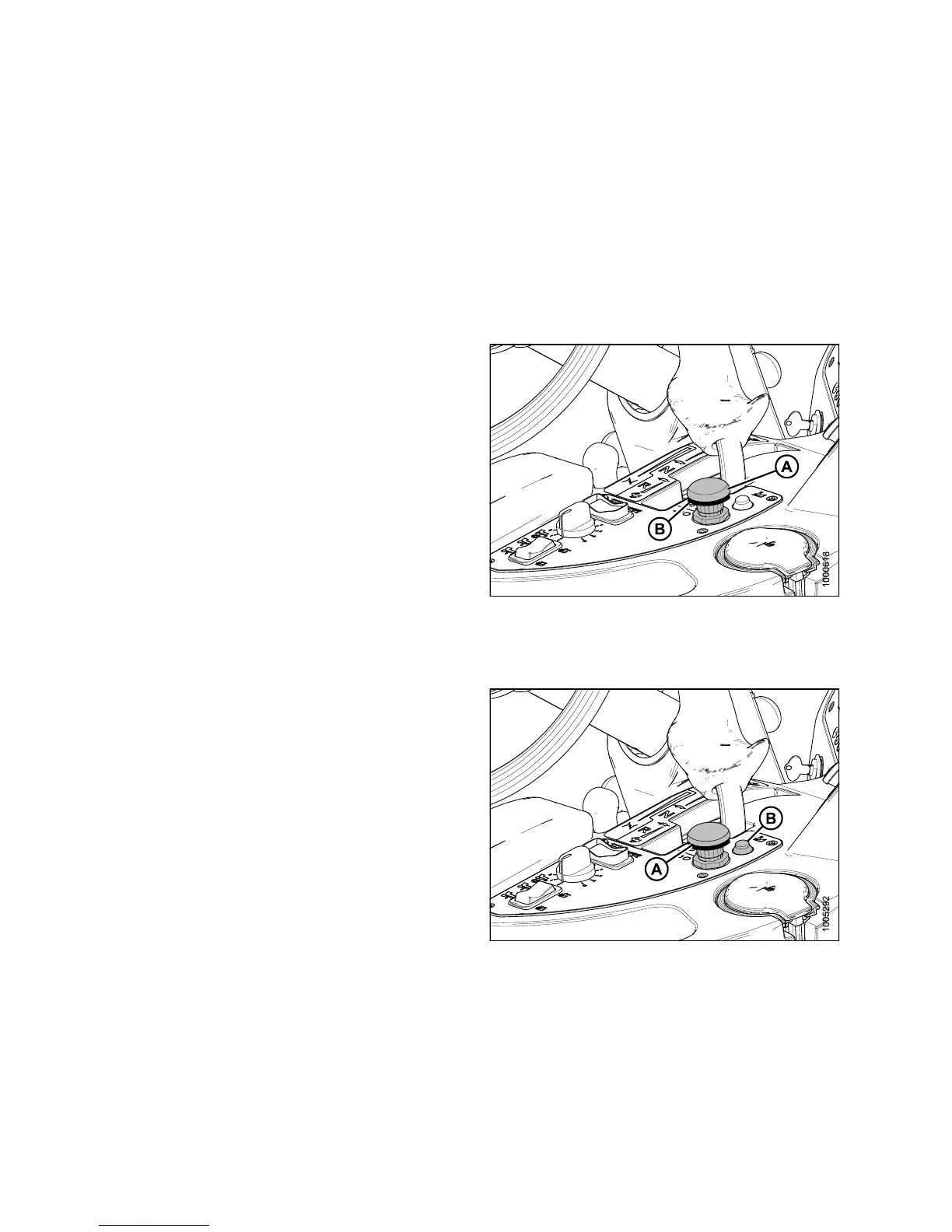
3.18.1 Header Drive Switch
The HEADER DRIVE switch (A) engages and disengages
the header drive.
To engage the header drive, pull up on the collar (B) and
push down on the switch (A).
To disengage the header drive, push the switch down.
IMPORTANT:
Always move throttle lever back to IDLE before engaging
header drive. Do NOT engage header with engine at
full rpm.
Figure 3.53: Header Drive S witch
3.18.2 Header Drive Reverse Button
NOTE:
The optiona l hy draulic reversing kit must be installed on
draper headers with a conditioner and on auger headers.
• ENGAGE: Push and hold REVERSER button (B) and
engage header with Switch (A)
• DISENGAGE: Release REVERSER Button (B)
NOTE:
To re-
engage in forward operation, Switch (A) must be
pushe
d down and then up again.
Figure 3.54: Header Drive Switches
147649 68 Revision A



 To Next Page