OPERATOR’S STATION
Setting the Auto Raise Height
For more information on the Auto Raise Height feature, refer to 4.4.8 Auto Raise Height, page 209.
NOTE:
The header MUS
T be attached to the windrower to perform this procedure. The cab display module (CDM)
automatical
ly adjusts its programming for each header.
1. Turn ignition key to RUN, or start the engine.
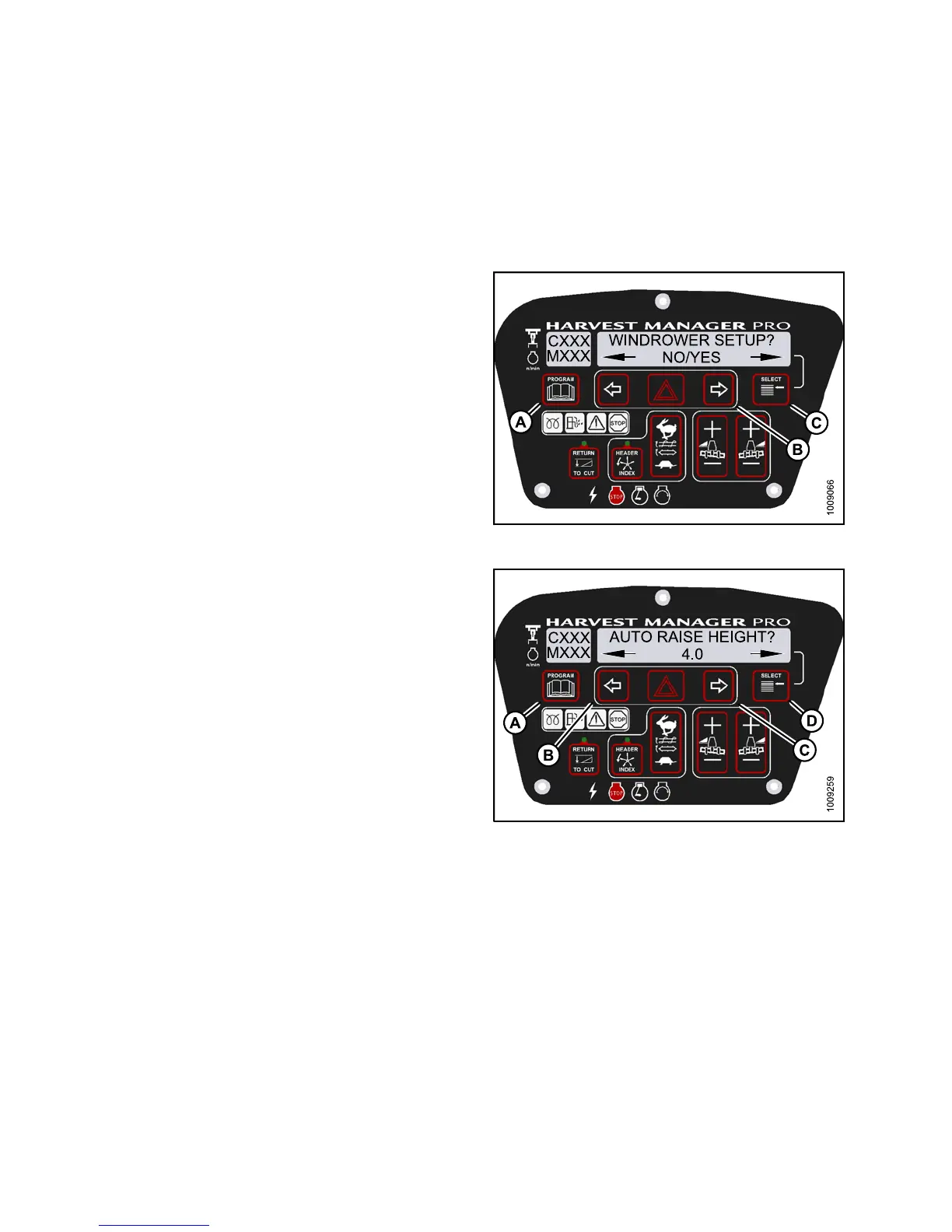
2. Press PROGRAM (A) and SELECT (C) on cab display
module (CDM) to enter Programming Mode.
• WINDROWER SETUP? is displayed on the
upper line.
• NO/YES is displayed on the lower line.
3. Press right (B) arrow to select YES. Press SELECT (C).
• SET KNIFE SPEED? is displayed on the upper line.
Figure 3.119: M155 CDM Programming Buttons
4. Press SELECT (D) until AUTO RAISE HEIGHT? is
displayed on the upper line.
• Last measurement is displayed on the lower line.
NOTE:
The auto raise height ranges from 4.0 (minimum)
to 9.5 (maximum), in 0.5 increments. A setting of
10 disables the auto raise function.
5. Press left (B) arrow or right (C) arrow to change
auto-raise height.
6. Press PROGRAM (A) to exit Programming Mode or
press SELECT (D ) to proceed to next WINDROWER
SETUP action.
Figur
e 3.120: M155 Auto Raise Height
Acti
vating the Hay Conditioner
NOTE:
• This proce d ure is for draper h eaders only.
• The header MUST be attach ed to the windrower to perform this proce du re. The cab display module (CDM)
automatically adjusts its programming for each header.For more information, refer to 4.5 Attaching and Detaching
Headers, page 213.
147649
1
12
Revision A



 To Next Page