OPERATOR’S STATION
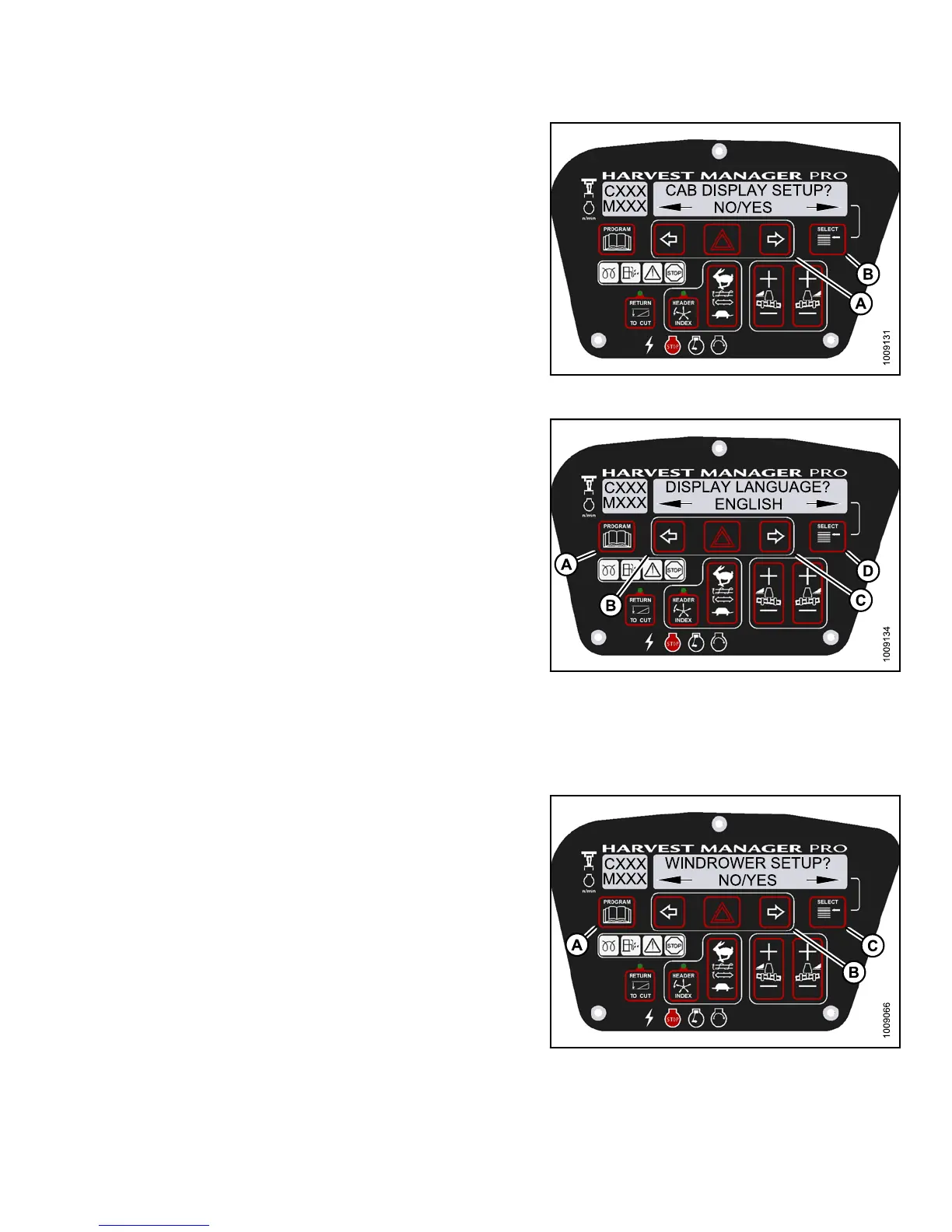
3. Press SELECT (B) until CAB DISPLAY SETUP? is
displayed on the upper line.
• NO/YES is displayed on the lower line .
Figure 3.71
: M155 Cab Display Setup
4. Press right (C) arrow select YES. Press S ELE CT (D).
• DISPLAY LANGUAGE? is displayed on the
upper line.
• Default langua g e is disp layed on the lowe r line .
5. Press left (B) or right (C) arrow to select
preferred language.
NOTE:
English
, Russian, and Spanish language options
are avai
lable on windrowers. Not a ll op tio ns are
availab
le on all windrowers.
6. Press PR
OGRAM (A) to exit Programming Mode or
press S
ELECT (D) to proceed to next CAB DISPLAY
SETUP?
action.
Figure 3.72: M155 Display Language
Changing the Windrower Display U nits
1. Turn ignitio
n key to RUN, or start the engine.
2. Press PROGRA
M (A) and SELECT (C) on cab display
module (CDM)
to enter Programming Mode.
•WINDROWERSE
TUP? is d isp layed on the
upper line.
• NO/YES is di
splayed on the lowe r line.
Figure 3.73: M155 CDM Programming Buttons
147649 91 Revision A



 To Next Page