MAINTENANCE AND S ERVICING
Replacing the Cabin Dome Light
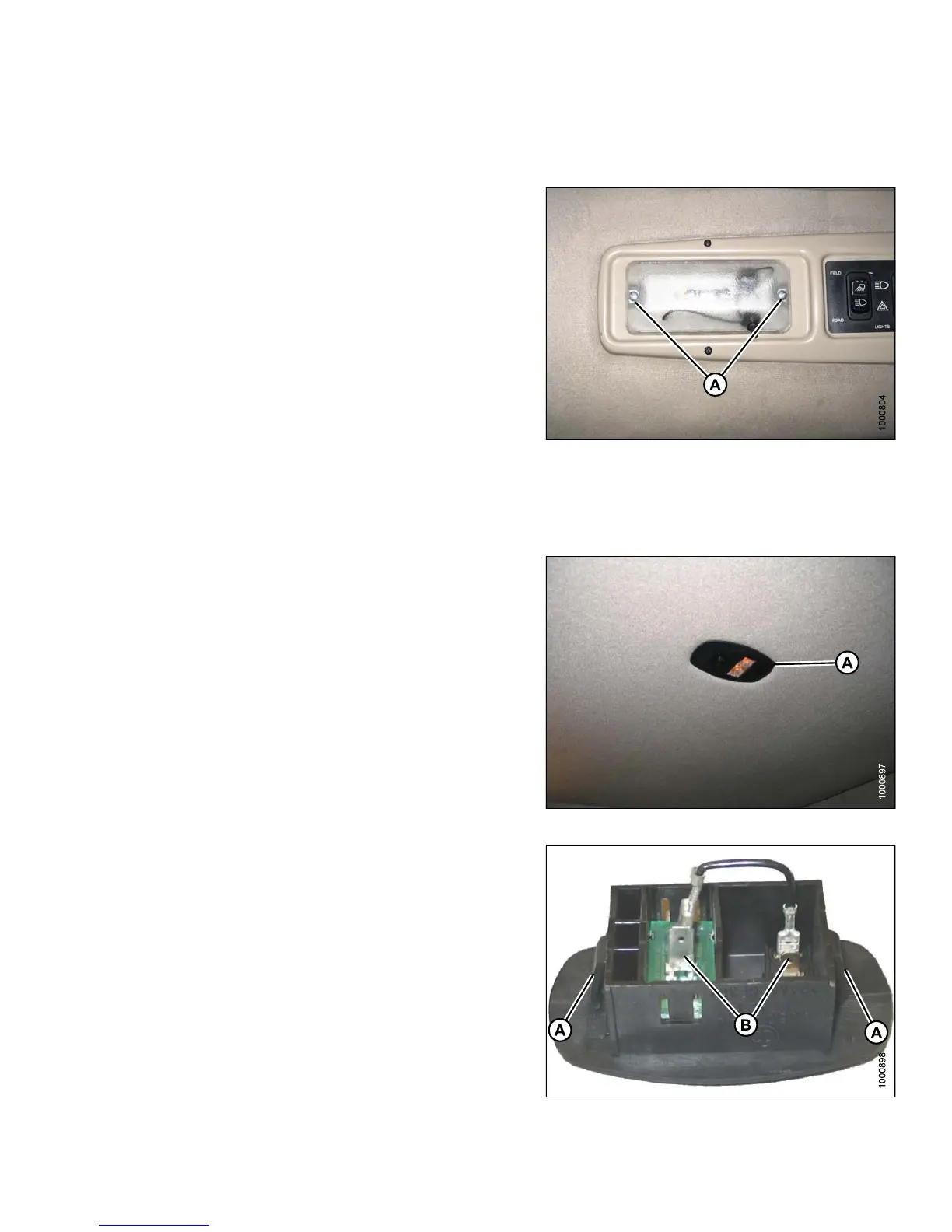
To replace a cabin dome light, follow these steps:
1. Shut down engine.
2. Remove two screws (A) from the dome light assembly
and remove the assembly.
3. Disconnect the old dome light assembly from the
wiring harness .
4. Connect the new dome light (MD #183413) to the
wiring harness .
5. Install the new dome light with two screws (A).
Figure 5.1
72: C abin Dome Light
Replacin
g the Ambient Ligh t F ixture
To replace the ambient light fixture, follow these steps:
1. Shut down engine.
2. Locate the ambient light fixture(A)intheroofliner.
Figure 5.173: Ambient Light Fixture
3. Push against tabs (A) with a screwdriver and pull
ambient light fixture out of cab roof.
4. Remove wires from connectors (B).
5. Connect wires to new light fixture.
6. Push into place in cab roof until tabs hold fixture
in place.
Figure 5.174: Ambient Light Fixture
147649 395 Revision A



 To Next Page