OPERATION
Float O ptions
For draper headers without the deck shift option, auger headers, and rotary headers, the float can be
preprogrammed for three types of windrowing conditions.
Example:
• Position 1: B
order
• Position 2: N
ormal
• Position 3: R
ocky
Set float pre
sets as follows:
1. Engage head
er.
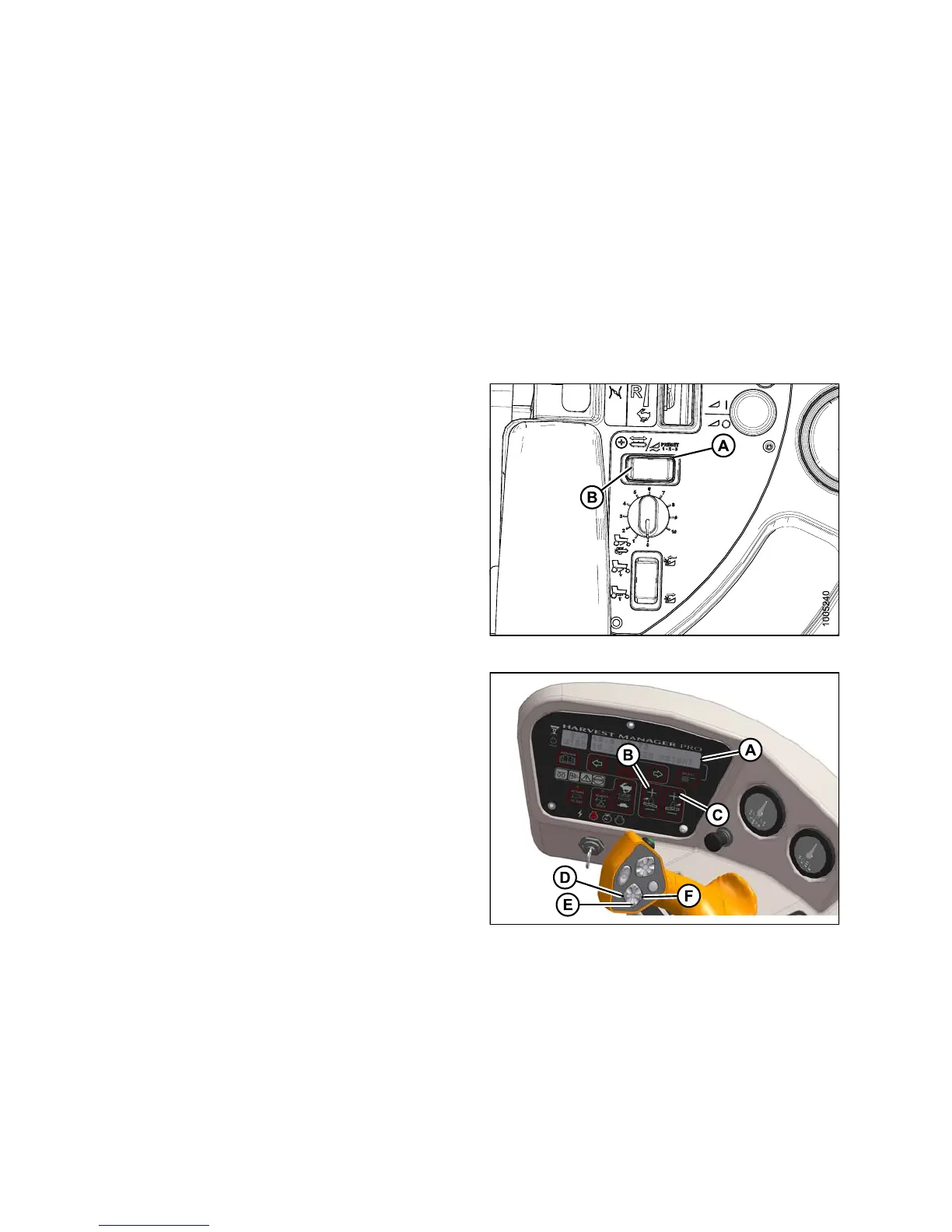
2. Push FLOAT PRESET SWITCH (A) to Position 1 (B).
Figure 4.80: Fl
oatPresetSwitch
3. Using HEADER TILT switches (D, F) , set center-link to
mid-range position (5.0 on C DM [A]).
4. Using H EADER DOWN switch (E), lo we r header fully
with lift cylinders fully retracted.
5. Set left (B) and right (C) float fine adjustments on CDM
to approximately 5.0 as follows:
a. Using FLOAT SELECTOR switch ( B), push + to
increase float or – to decrease float on left side of
header. CDM display (A) will indicate selected float
for left side, for example (5.0 L FLOAT R XX.X).
b. Repeat for rig ht side float with switch (C).
Display will indicate float for both sides, for
example (5.0 L FLOAT R 5.0).
Figure 4.81
:OperatorConsole
A - CDM Display B - Adjust Left F loat
C - Adjust Right Float
D - Header Tilt Down
E - Lower Header F - Header Tilt Up
147649 198 Revision A



 To Next Page