OPERATION
NOTE:
If the header cannot return to the p reset h eight or angle within 30 seconds, the RETURN TO CUT feature will
deactivate to prevent the hydraulic oil from overheating. Push the RETURN TO CUT switch (A) to reactivate.
4.4.8 A uto Raise Height
The header ca
n be automatically raised if programmed into the cab display module (CDM).
Refer to the f
ollowing topics:
• Programming
the Auto R aise Height Feature, page 209
• Using the Au
to Raise Height Feature, page 210
Programmi
ng the Auto Raise Height Feature
Figu
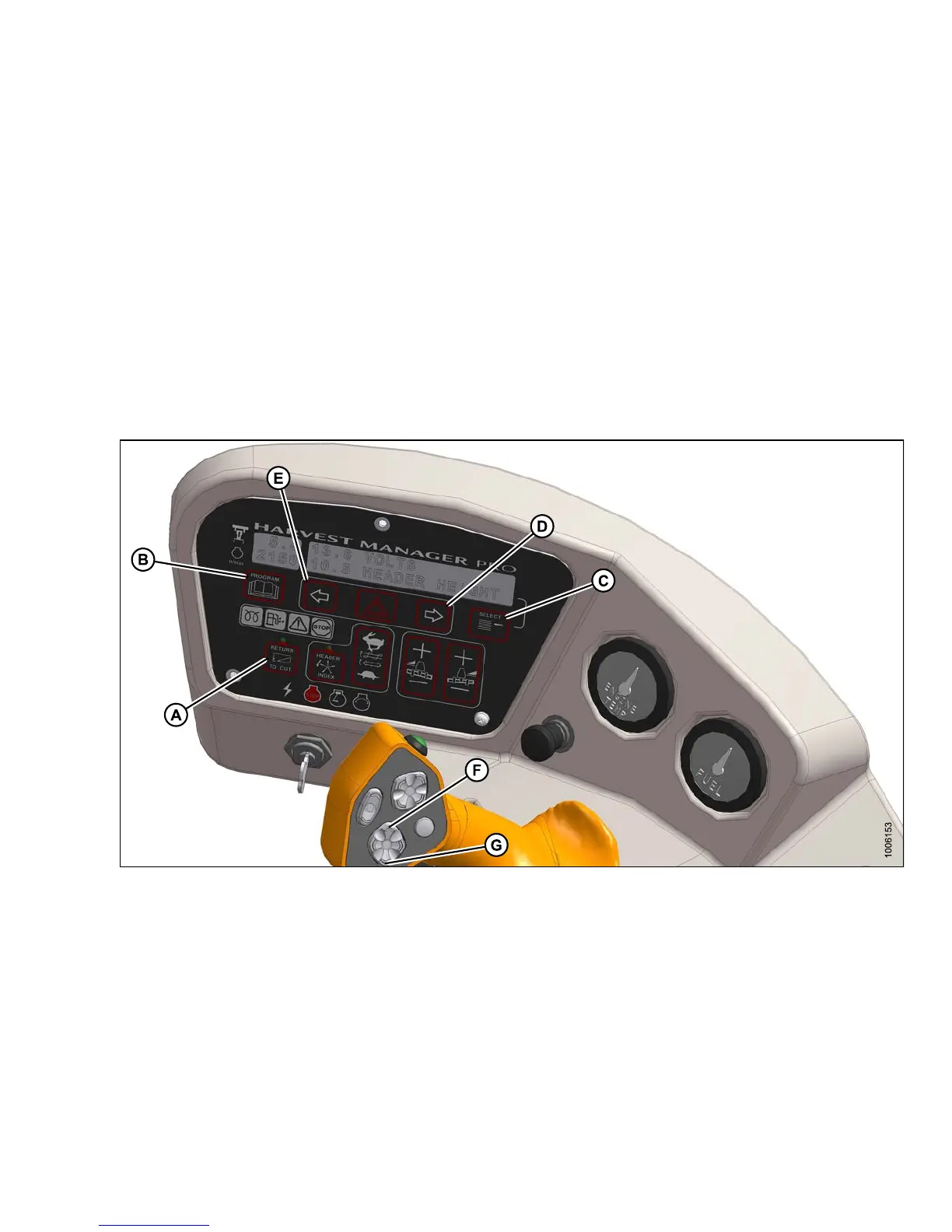
re 4.100: Operator Console
A - Return to Cut
B-Program
C - Select
D - Right Arrow
E-LeftArrow
F - Header Up
G - Header Down
Prog
ram the AU TO RAISE HEIGHT feature as follows:
NOTE:
RETURNTOCUTswitch(A)canbeOFForON.
1. Turn ignition ON or run engine.
2. Press PROGRAM (B) and SELECT (C) on cab display module (CDM) to enter programming mode.
3. Press SELECT (C). WINDROWER SETUP? is displayed on upper line (B).
147649 209 Revision A



 To Next Page