OPERATOR’S STATION
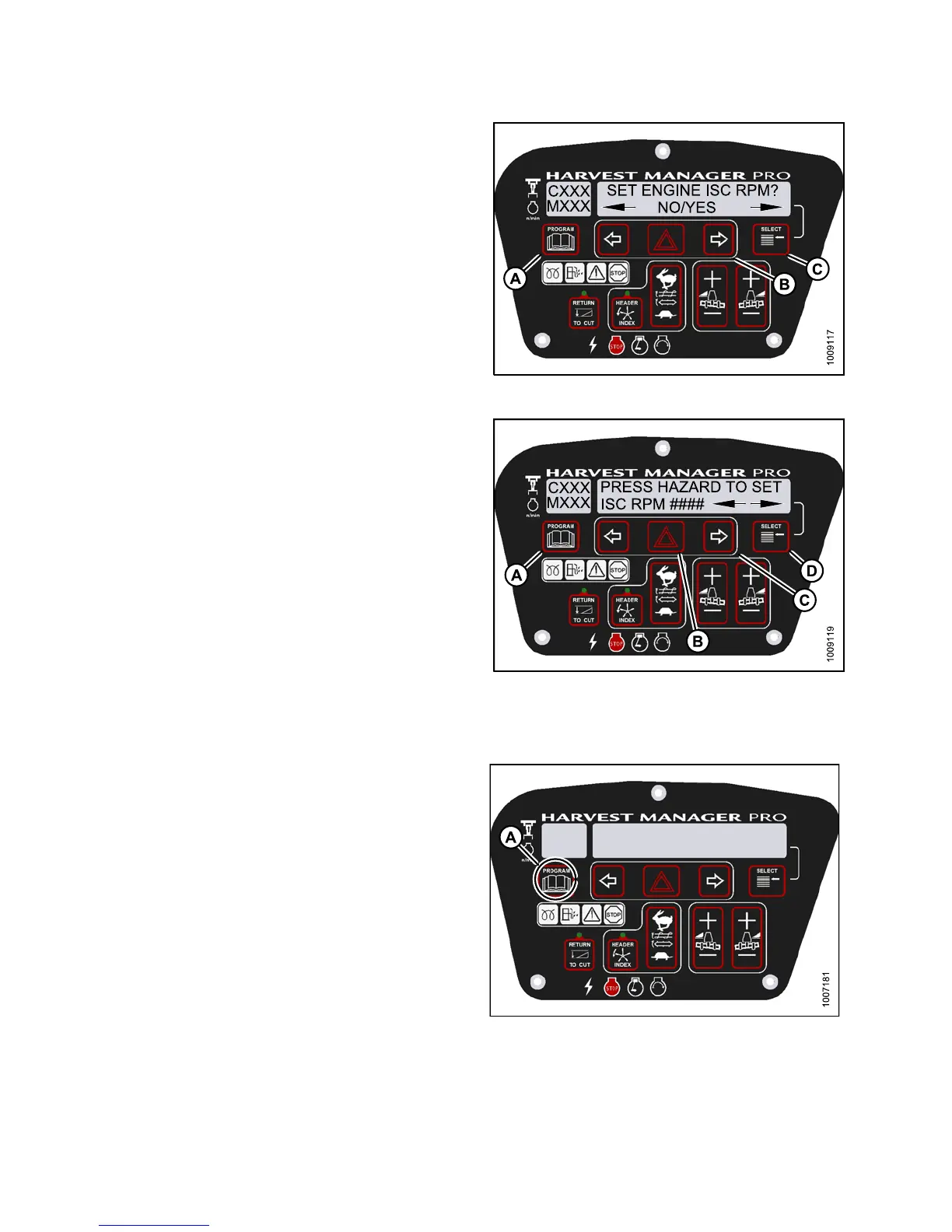
4. Press SELECT (C) until SET ENGINE ISC RPM? is
displayed on the upper line.
• NO/YES is displayed on the lower line.
5. Press right (B) arrow to select YES. Press SELECT (C).
• PRESS H AZARD TO SET is displayed on the
upper line.
• ISC RPM #### is displayed on the lower line.
NOTE:
The previously selected ISC rpm will be flashing.
Figure 3.12
8: M155 Engine ISC RPM
6. Press right (C) arrow to cycle between rpm options.
Press HAZARD (B) to set.
7. Press Select (D).
• EXIT ENGINE ISC? is displayed on the upper line.
• NO/YES is displayed on the lower line.
8. Press right (C) arrow to select YES. Press
SELECT (D).
9. Press PROGRAM (A) to exit Programming Mode.
Figure 3.129: M155 ISC RPM
Clearing Sub-Acres
1. With the key “ON”, and the operators station is in
cab forward position. Press SELECT until the CDM
displays sub-acres on the bottom line. Then press and
hold the PROGRAM (A) button on the CDM until the
sub-acres are clea re d .
Fig
ure 3.130: Cab Display Module (CDM )
147649 116 Revision A



 To Next Page