OPERATOR’S STATION
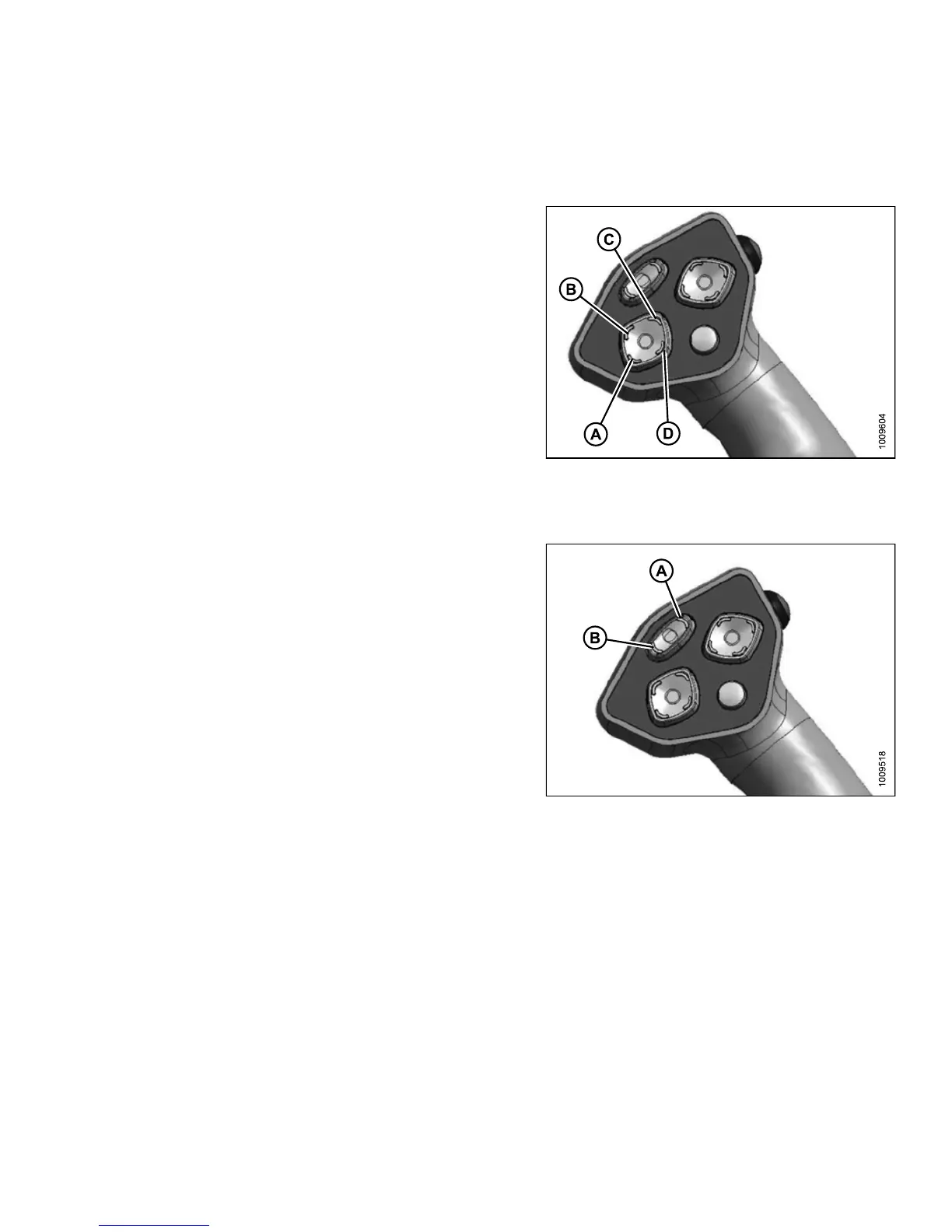
Header Position Switches
Use the header position switches on the ground speed lever (GSL) to adjust the position of the header, relative to
the ground.
• To lower the header down, press switch (A)
• To raise the header up, p ress switch (C)
• To tilt the header down, press s witch (B)
• To tilt the header up, press switch (D)
Release switch at desired position.
NOTE:
Refer to the
section in this manual that is specific to your
header for
detailed switch operating modes.
Figure 3.5
9: Ground Speed Lever
Reel and D
isc Speed Switches
Press and
hold switch (A) to increase the reel or disc speed.
Press and
hold switch (B) to d ecrease the reel or disc
speed. R
elease s witch at desired speed.
Auger He
ader
• A-30 hea
der: Not applicable
•A-40he
ader: Auger speed is automatically maintained
when re
el speed is changed
IMPORTAN T:
Reel speed on auger header MUST NOT EXCEED
85 rpm. Auger speed MUST NOT EXCEED 320 rpm.
Figure 3.60: Ground Speed Lever
Draper Header
• Reel speed is limited in IND EX HEADER SPEED mode
Rotary Disc Header
• Conditioner speed automatically adjusts when DISC
SPEED is changed
147649
7
1
Revision A



 To Next Page