OPERATOR’S STATION
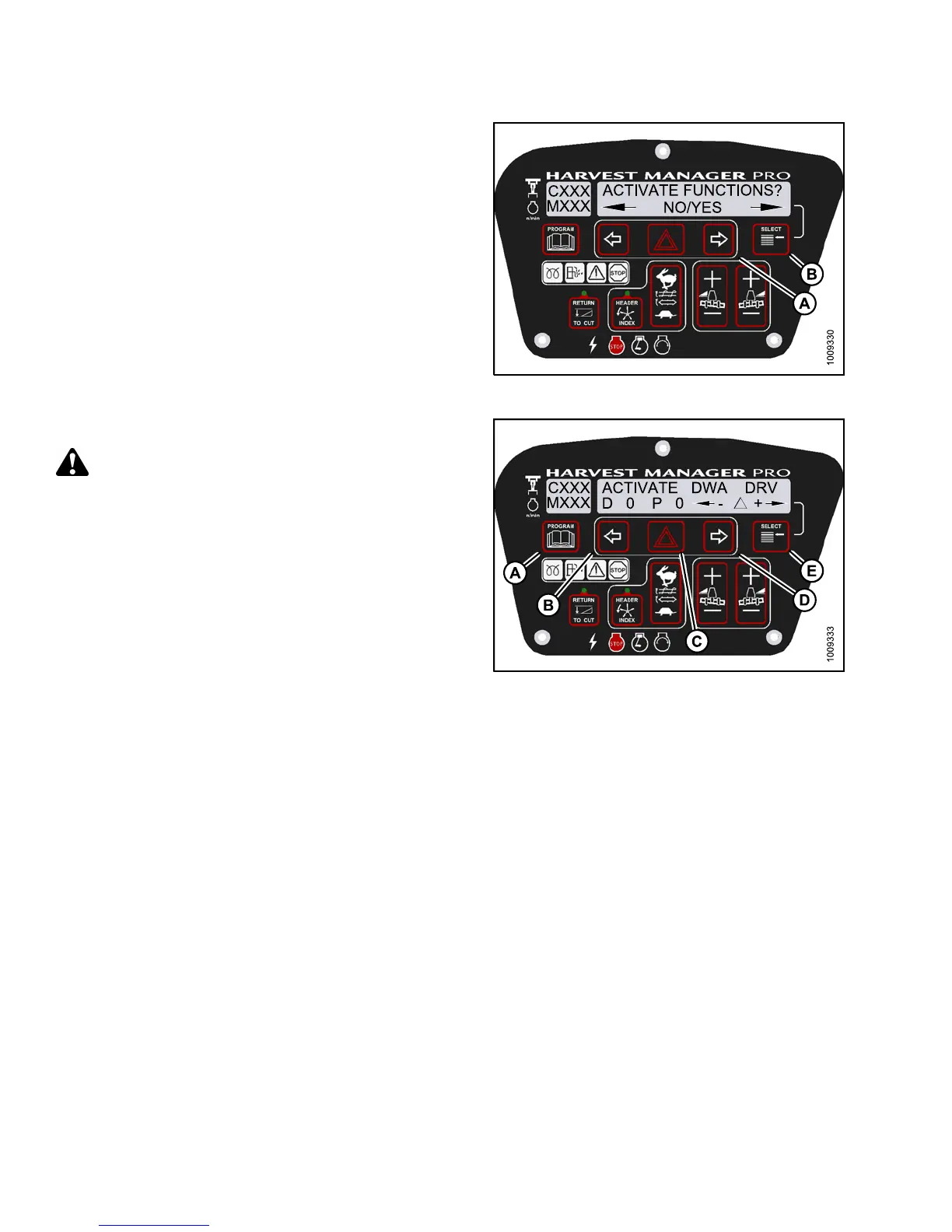
5. Press SELEC T (B) until ACTIVATE FUN CTIONS? is
displayed on the upper line.
• NO/YES is displayed on the lower line.
6. Press right (A) arrow to select YES. Press SELECT (B).
• ACTIVATE HEADER HT is displayed on the
upper line.
Figure 3.21
1: M155 Functions
7. Press SELECT (E) until ACTIVATE DWA DRV is
displayed on the upper line.
CAUTION
Check to be sure a ll bystanders have cleared the area.
IMPORTANT:
Do NOT over speed the DWA drive.
8. Press and hold HAZARD (C) button.
• Press left (B) arrow to decrease DWA drive speed.
• Press right (D) arrow to increase DWA drive speed.
Verify the DWA drive is functioning properly.
9. Release the HAZARD (C) button. The DWA drive
will stop.
10. Press PROGRAM (A) to exit Programming
Mode or press SELECT (E) to proceed to next
ACTIVATE FUNCTION.
Figure 3.212: M155 DWA Drive
3.19.13 Engine Error Codes
The cab display module (CDM) displays error codes when there is a fault with one of the several sensors that
monitor and control engine operation, to assist the Operator or Technician in locating a specific problem with engine
operation. Refer to 8.4 Engine Error Codes, page 469.
3.19.14 Cab Display Module (CDM) and Windrower Control Module (WCM)
Fault Codes
The CDM displays fault codes when there is a fault with one of the sensors that monitor and control windrower
operation, to assist the Operator or Technician in locating a specific problem with the windrower. Refer to 8.5 C ab
Display Module (CDM) Error Codes, page 481.
147649 152 Revision A



 To Next Page