■ The Publish button saves the selected bookmarks, current shelf
bookmarks, or all bookmark(s) as image files on your disk.
■ Clicking on a bookmark icon changes the view to that bookmark.
This is the same as clicking a bookmark in the Viewing Panel.
■ Clicking the right mouse button in an empty part of the Bookmark
Lister, and choosing New shelf from the drop down menu creates
a new shelf.
13 Close the Bookmark Lister.
14 Hold the Shift and Alt (Windows) or Shift and Command (Mac) keys in the
Perspective window to show the Viewing Panel.
Notice your new names in the BookMarks section.
See also Windows > Bookmark Lister.
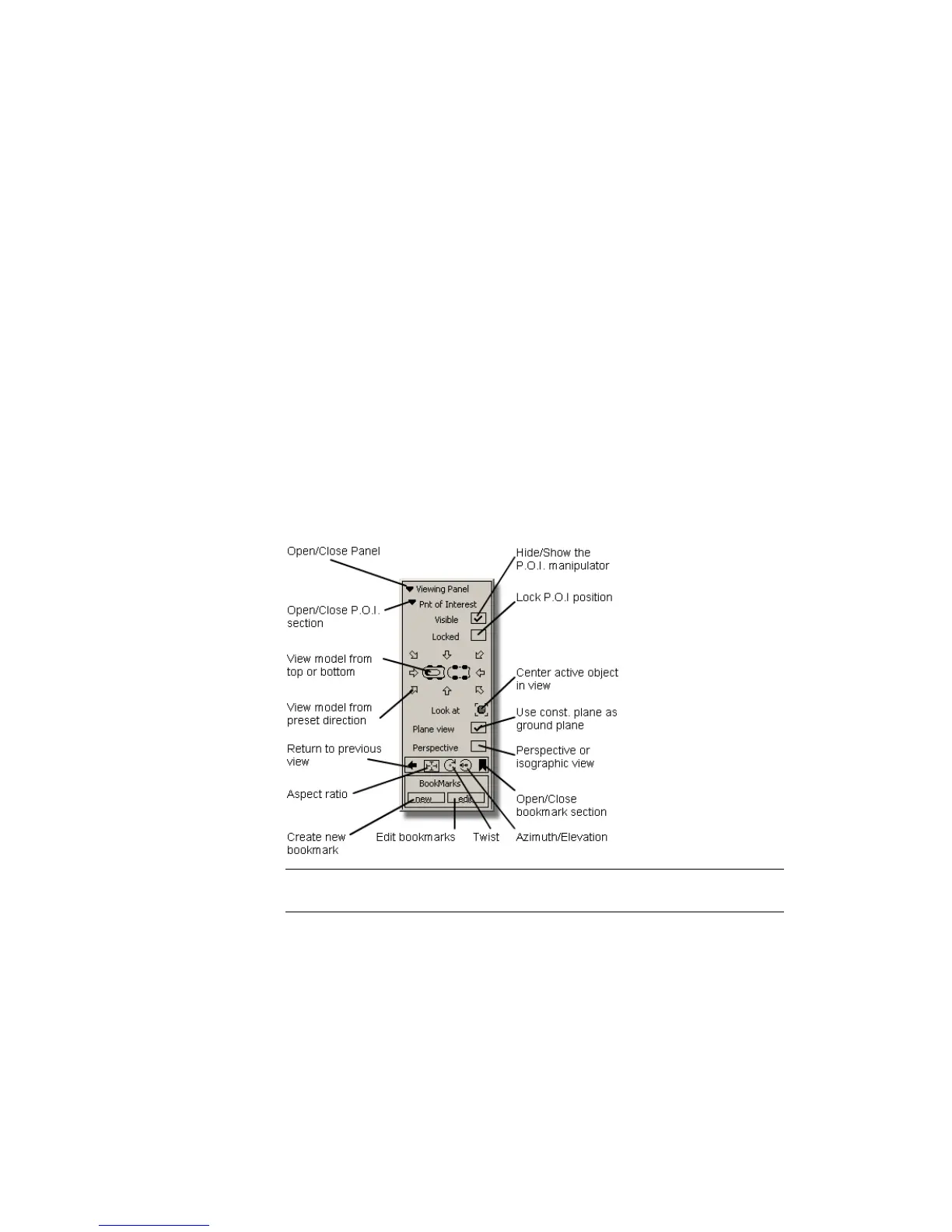
Use the following overview illustration as a reminder of the different controls
on the Viewing Panel.
NOTE The Twist and Azimuth/Elevation tools rotate the view around the
point of interest.
See also:
■ Use the view panel
Using the Viewing Panel | 75



 To Next Page