214733 96 Revision A
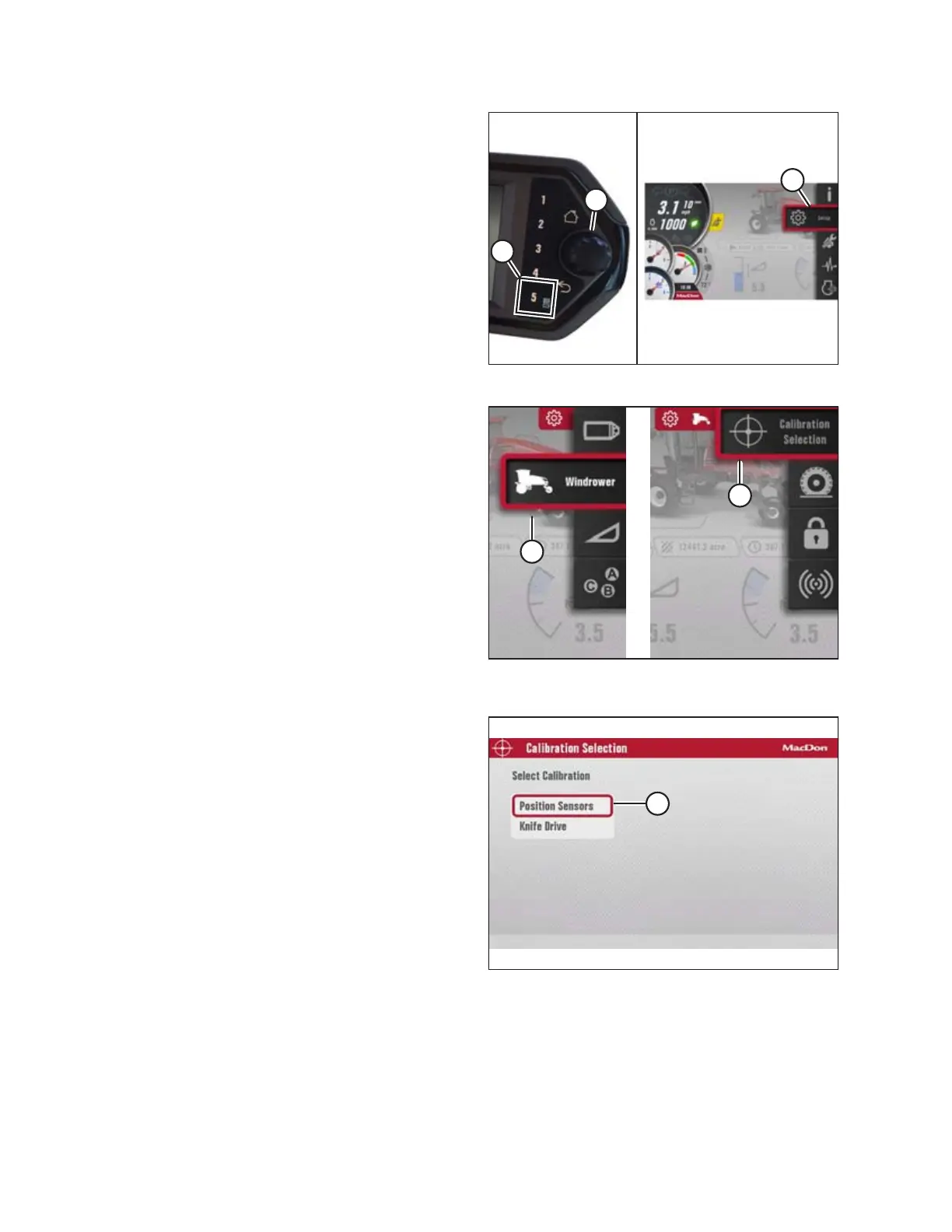
Figure 3.106: Opening the Main Menu
1. Start the engine, and engage the header.
2. Press soft key 5 (A) to open the main menu.
3. To scroll to the settings icon (C), use the HPT scroll knob (B)
or the ground speed lever (GSL) scroll wheel (not shown).
4. Press the HPT scroll knob (B) or the GSL SELECT button (not
shown) to activate the settings menu options.
Figure 3.107: Windrower Settings Icon and Calibration
Submenu Icon
5. Scroll to the WINDROWER SETTINGS icon (A) and press
SELECT.
6. Scroll to the CALIBRATION icon (B), and press SELECT to
open the adjustment page.
NOTE:
The F3 shortcut button on the operator’s console will also
open the WINDROWER SETTINGS menu.
Figure 3.108: Calibration Options
7. Select POSITION SENSORS (A).
OPERATOR’S STATION



 To Next Page