OPERATION
Adjusting R eel Only Speed
The A40 reel drive is hydraulically driven. Adjusting reel speed also changes auger speed, unless the auger speed
is initially set at a predetermined value. The following procedure sets the auger speed so that subsequent reel
speed adjus tments will only affect the reel.
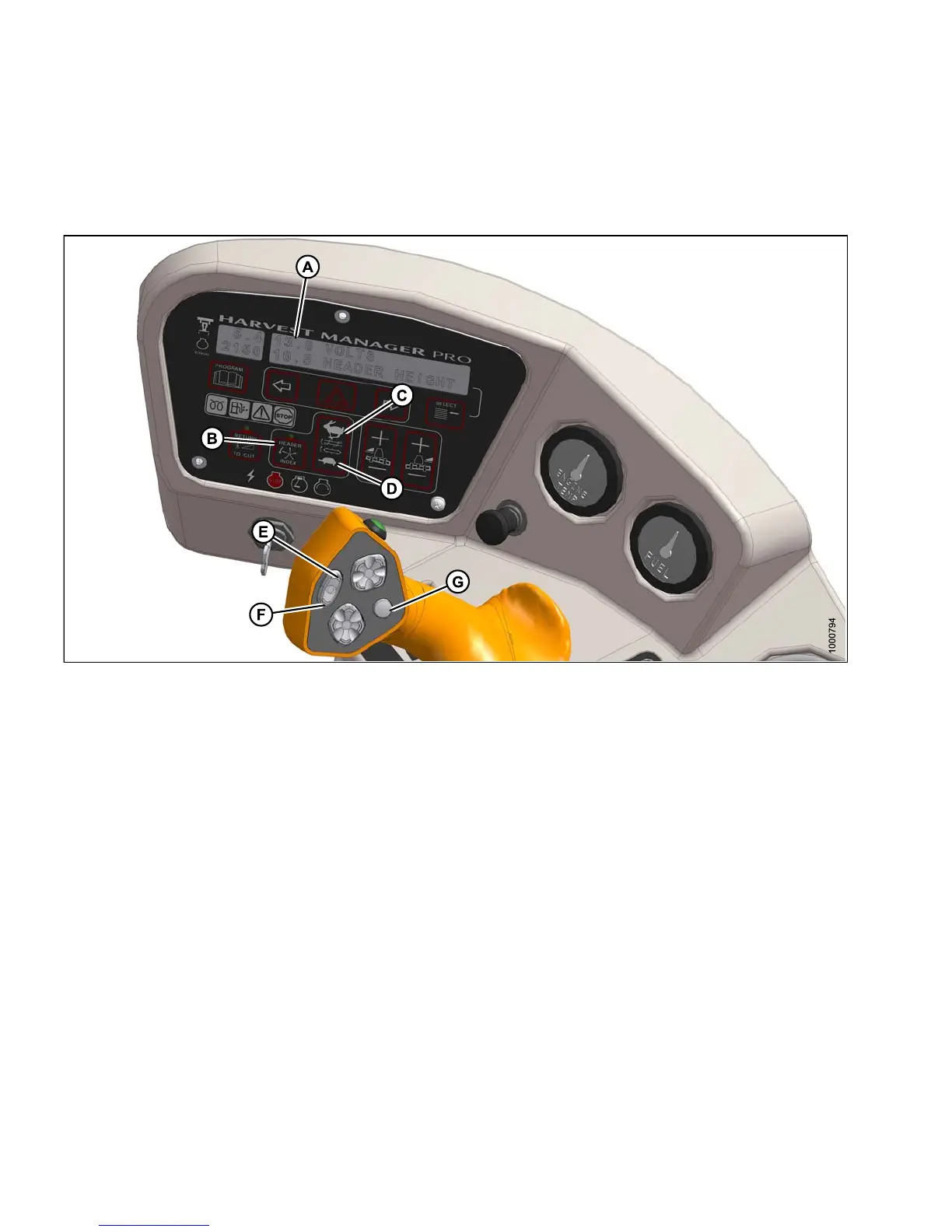
Figure 4.297: Operator Console
A-Displ
ay
B-Heade
r Index
C - Auger Fast
D-AugerSlow
E - Fast
F-Slow
G - Display Selector
IMPORTANT:
To prevent over-speeding the auger, initially set the speed of the reel and auger as follows: Subsequent
adjustments to reel speed do NOT affect auger speed.
1. Engage header.
2. Set HEADER IN DEX SWITCH (B) to OFF.
3. On ground s peed lever (GSL) press REEL SLOW switch (F) until a beep is heard.
4. Display (A) shows ##.## REEL RPM.
5. On cab display mo d ule (C DM) press AUGE R SLOW (D) or FAST (C) switch to set de sired auger speed.
6. Display (A) sho ws ##.# AUGER SPEED.
7. On GS L press REEL SLOW (F) or FAST (E) switch to set desired reel speed.
8. Display (A) shows ##.## REEL RPM.
NOTE:
The auger speed will NOT change if the reel speed is adjusted.
147649 296 Revision A



 To Next Page