6 Vehicles Autopilot system calibration
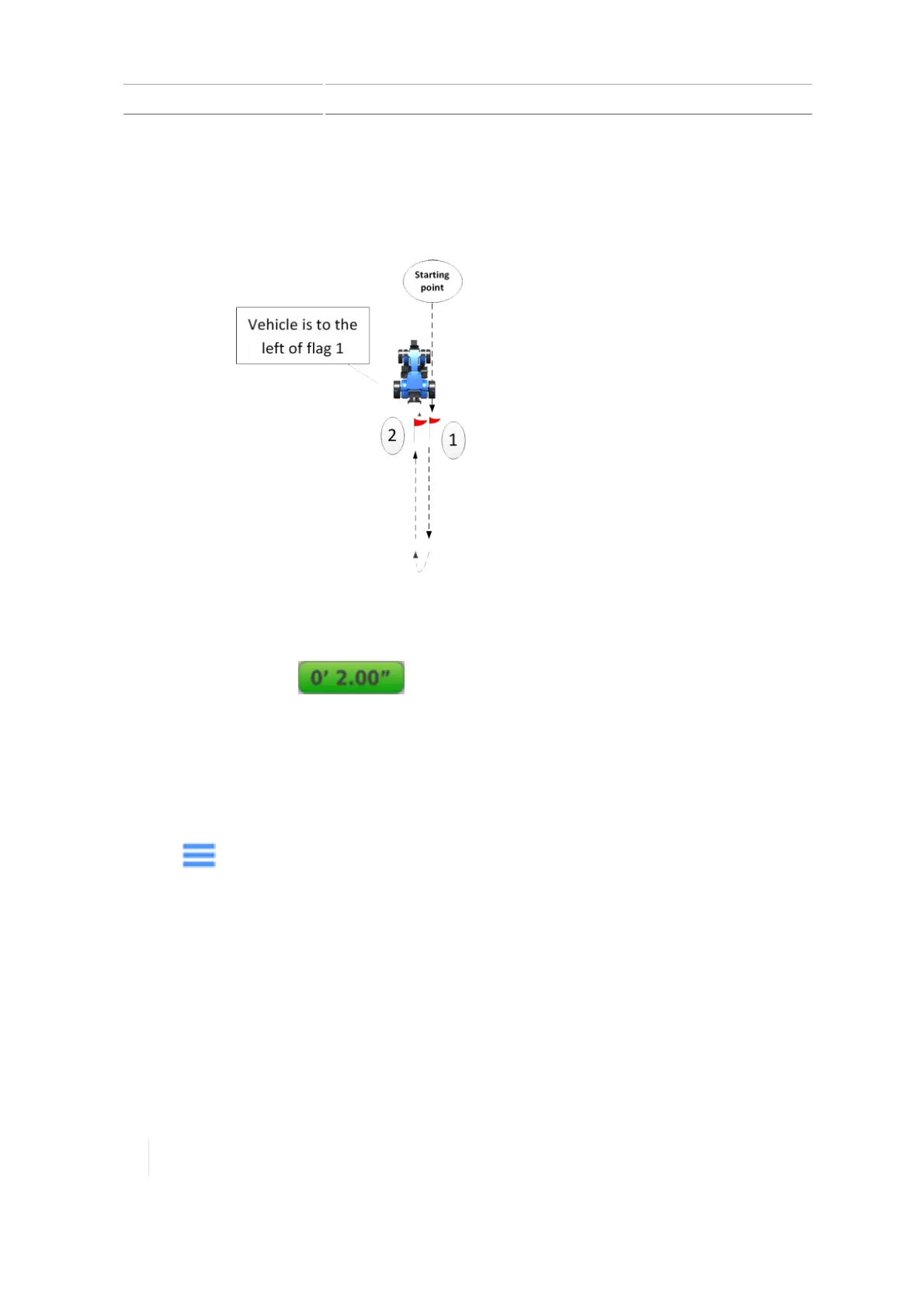
d. Also note where the vehicle's current position is in
relation to flag 1 (in other words, the vehicle is either
to the right or left of flag 1). The diagram, this example
shows the vehicle is to the left of flag 1.
Vehicle is to right or left of flag 2
(step d):
____________________________
e. Return to the cab and in the Run screen note the
cross-track error (the number on the on-screen
lightbar).
Cross-track error (number on Run
screen) (step e):
____________________________
f. Note the direction highlighted on the lightbar (left or
right).
Direction highlighted on lightbar
(left or right) (step f):
____________________________
11.
Tap and then tap Diagnostics.
12. Tap Autopilot performance and tap the Advanced tab.
13.
At the Roll Offset entry box and Vehicle Position selection box:
ll
Calculate the roll offset and enter it in the display.
Refer to your notes and compare them to the following table to determine how to
calculate roll offset.
l
Determine the direction of the Vehicle Position and enter it on the display.
Refer to your notes and compare them with the following table to find which Vehicle
Position to select.
164 TMX-2050 Display User Guide Version 1.075, Revision C



 To Next Page