EZ-Steer system setup 6 Vehicles
Steering Sensor
Setting
Description
Motor Direction The direction the EZ-Steer system motor is installed:
ll Standard Mount
l Reversed Mount
External Switch Select a switching option if an external switch is connected to the system:
ll Disabled (Default)
l Seat Disengage
l Seat Engage Only
l Remote Engage
Advanced
Advanced settings include:
ll Roll OffsetAngle
l Estimated Steering Angle Bias
l Dynamic Approach Angle
l Steering acceleration limit
l Steering slew limit
Note – Do not adjust the Advanced Settings. Advance Settings are
provided for support and advanced troubleshooting only.
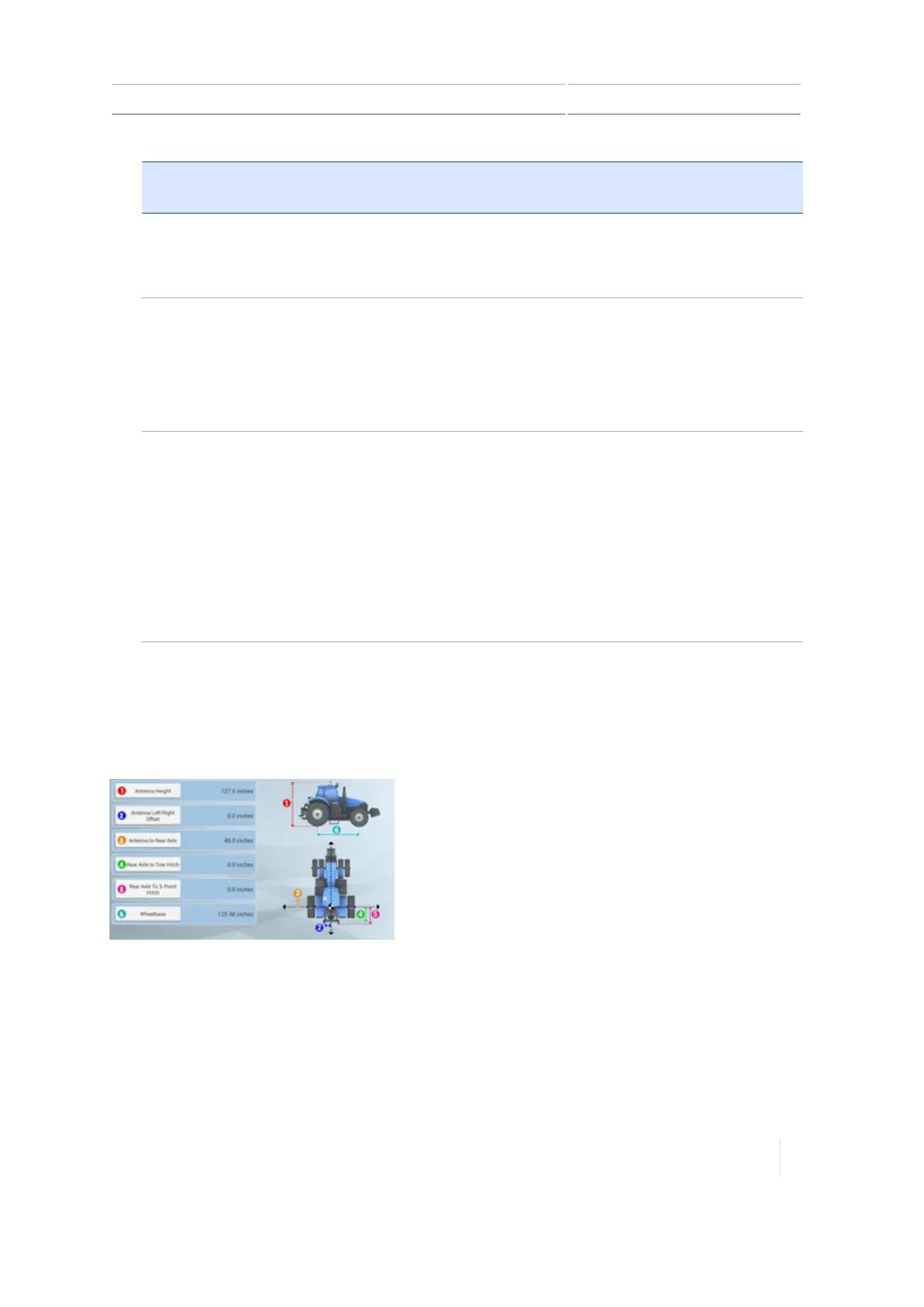
Vehicle measurements for EZ-Steer system
At MEASUREMENTS, you can enter and access the measurements that apply to the vehicle type you
selected. In addition to measurements of the vehicle itself, measurements related to the antenna
location are important for accuracy.
To enter measurements, tap each measurement button and enter the appropriate number.
Before you take measurements:
l Park the vehicle on level ground.
l
Make sure the vehicle is straight, with the center line of the body parallel to the wheels.
Version 1.075, Revision C TMX-2050 Display User Guide 175



 To Next Page