MAINTENANCE AND SERVICING
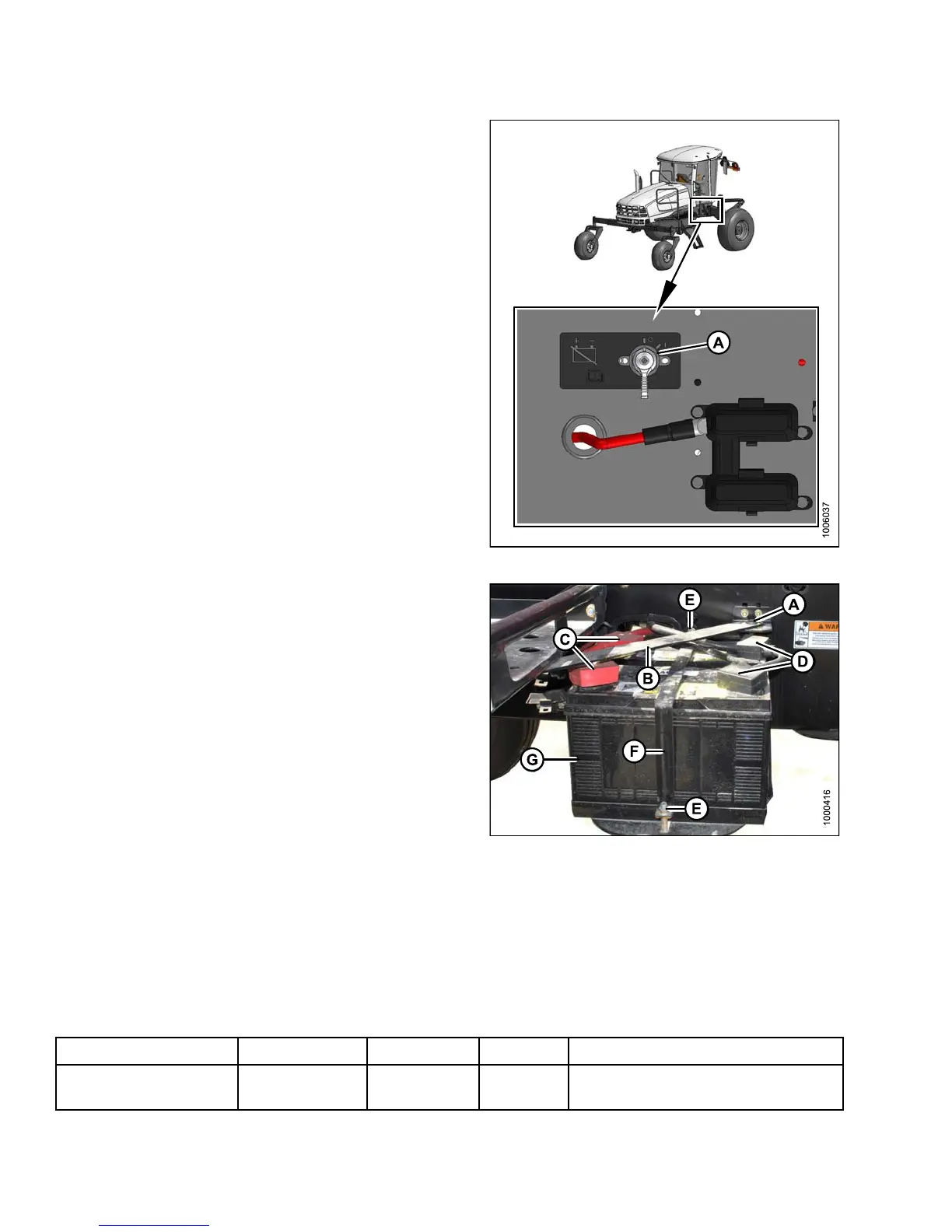
3. The battery main disconnect switch (A) is located on
the right cab-forward frame ra il beside the batteries.
Ensure battery switch (A) is switched to POWER OFF
position.
Figure 5.
125: Battery Switch
4. Remove the bolt (A) that secures the platform arm to
theplatform. Swingarm(B)outoftheway.
5. Remove the black plastic cover from the negative
cable clamps (D). L oosen clamps and remove cable
from batteries.
6. Remove the red plastic cover from positive cable
clamps (C). Loosen the clamps and remove cable
from batteries.
7. Remove bolts (E) securing strap (F) to frame, and
remove strap.
8. Lift batteries off holder (G).
NOTE:
Dual b
attery support can be removed from frame
by si
mply lifting su pport, and pulling it away from
fram
e.
Figur
e 5.126: Battery
Installing Batteries
Replaceme
nt batt eries must meet the specifications shown in the following table:
Table 5.2 B
attery Specification
Rating
Group CCA (min)
Volt Maximum Di
mension
Heavy dut
y, off-road,
vibratio
nresistant
BCI 2 9H or
31A 650 12
13.25 x 7.37 x 9.44 in.
(334 x 188 x 232 mm)
147649 374 Revision A



 To Next Page