• Internet Key Exchange: To set time interval at which the IKE key renews, select a time
unit (day, hour, or minute) from the drop-down list, and then type a number in the box. To
disable IKE rekey, select the Disable check box.
• Encapsulating Security Payload: To set time interval at which the ESP key renews,
select a time unit (day, hour, or minute) from the drop-down list, and then type a number
in the box. To disable ESP rekey, select the Disable check box.
8. In Certificate Management Protocol, configure the following:
• DHCP Option 43 Sub Code for CA/RA Address: Set the DHCP Option 43 subcode that
will be used to discover the address of the CA/RA server on the network. The default
subcode is 8.
• CA/RA Address: Type the IP address or FQDN of the CA/RA server. If you use the IP
address, the IP address format that you must enter will depend on the IP mode that is
configured on the controller.
• Server Path: Type the path to the X.509 certificate on the CA/RA server.
• DHCP Option 43 Sub Code for Subject Name of CA/RA: Set the DHCP Option 43
subcode that will be used to discover the subject name of the CA/RA server on the network.
The default subcode is 5.
• Subject Name of CA/RA: Type an ASCII string that represents the subject name of the
CA/RA server.
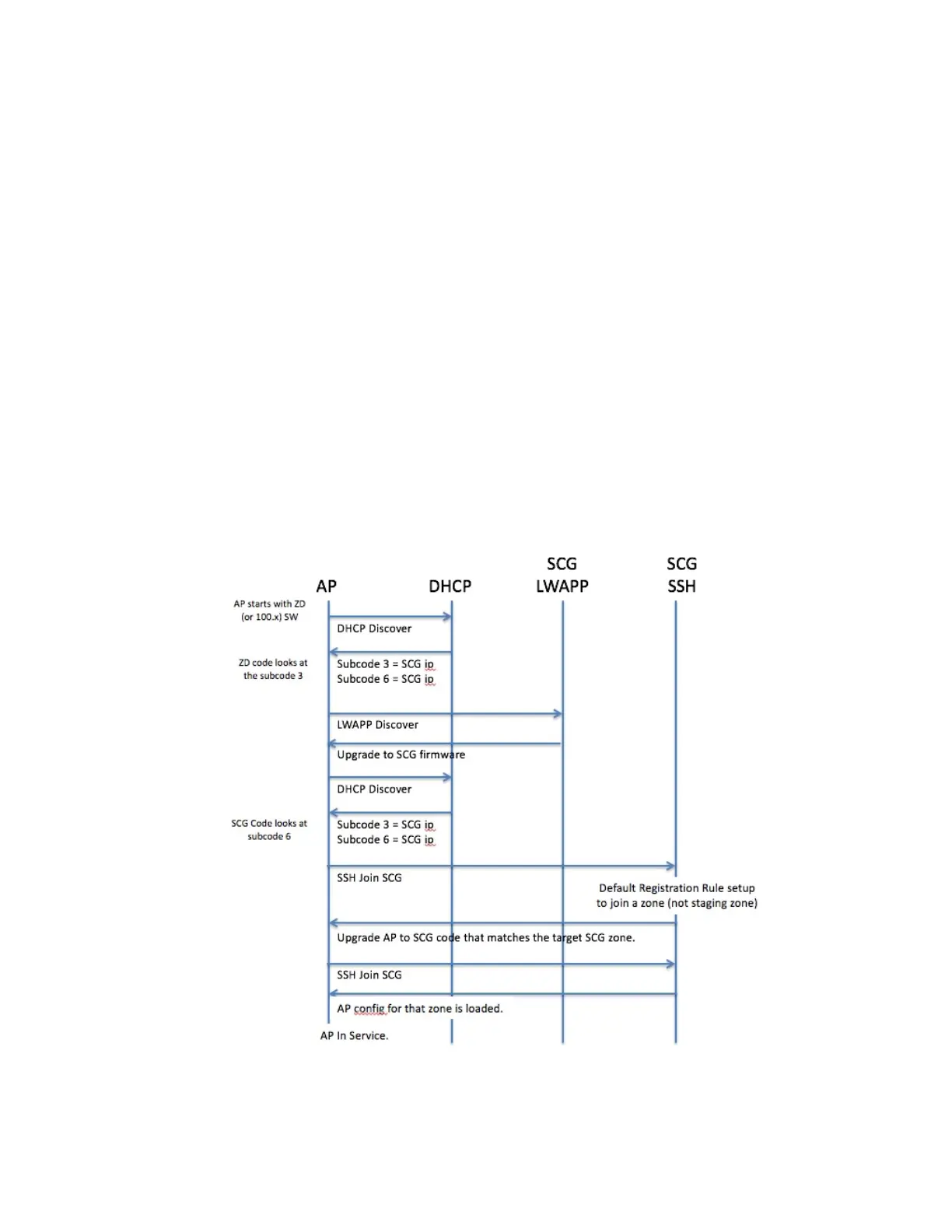
Figure 43: AP discovery with DHCP Option 43 Sub Codes
SmartCell Gateway 200/Virtual SmartZone High-Scale for Release 3.4.1 Administrator Guide
106
Managing Global Configuration, AP Tunnel Profiles, Templates, and AP Registration Rules
Creating AP Tunnel Profiles



 To Next Page