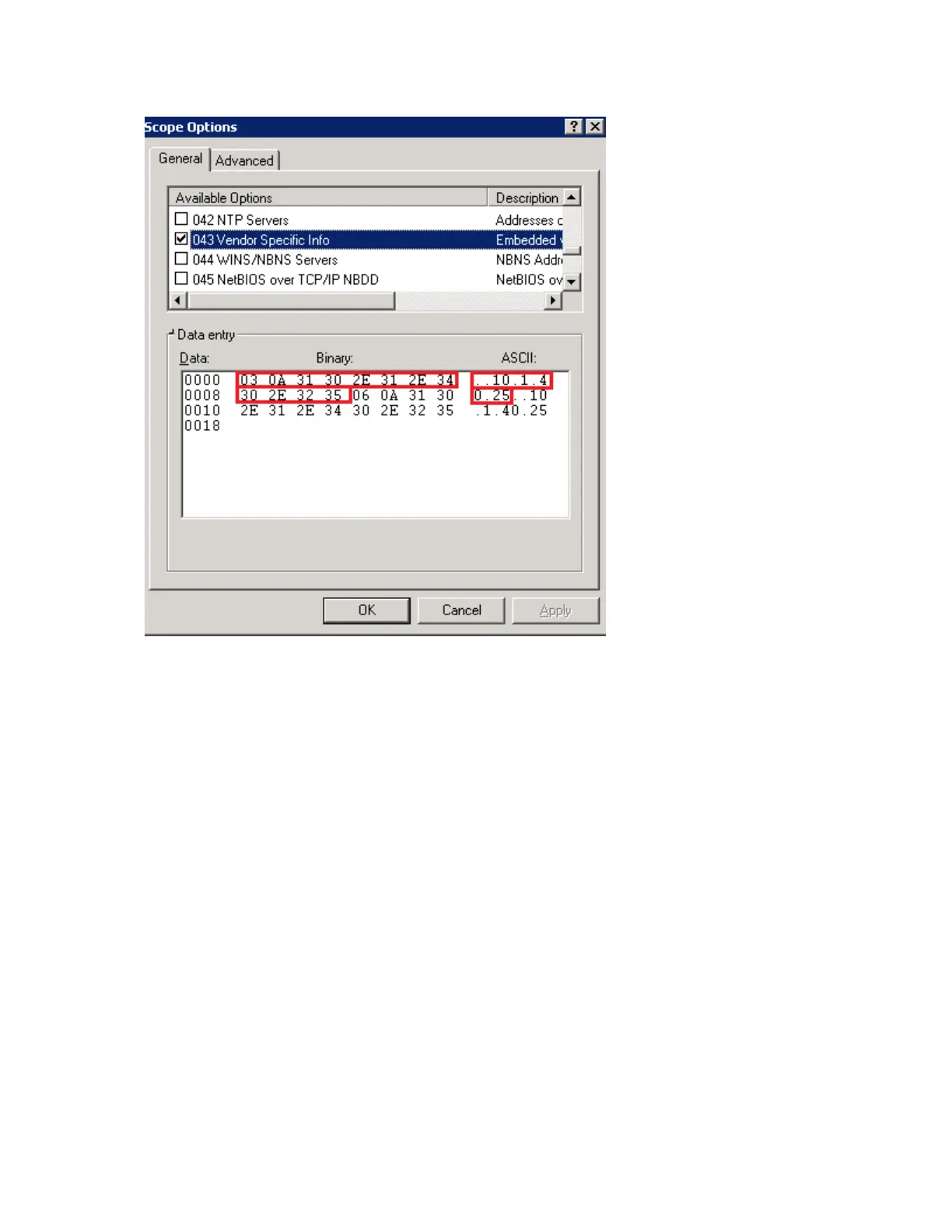
In the figure, the values within the reb box pertain to sub type 03. The TLV for the sub type is
the binary value, where 03 is the Type and 0A is the Length (length is 10). The rest of the values
pertain to the server IP address.
The second set of numbers (outside the red box) pertain to sub type 06. The TLV for the sub
type is the binary value, where 06 is the Type and 0A is the Length (length is 10). The rest of the
values pertain to the server IP address.
Figure 45: Sample DHCP43 option in a Windows server
Working with Zone Templates
A zone template contains configuration settings (radio, AP GRE tunnel, channel mode, and
background scanning) that you can apply to all access points that belong to a particular AP
zone. Applying a zone template to an AP zone will overwrite all settings on all access points that
belong that the AP zone.
This section describes the following topics:
SmartCell Gateway 200/Virtual SmartZone High-Scale for Release 3.4.1 Administrator Guide
110
Managing Global Configuration, AP Tunnel Profiles, Templates, and AP Registration Rules
Working with Zone Templates



 To Next Page