expiration time. This license is embedded into the controller and is non-transferable. The controller
comes with one default support license.
Viewing Installed Licenses
You can view the details of all the licenses that you have uploaded to the controller.
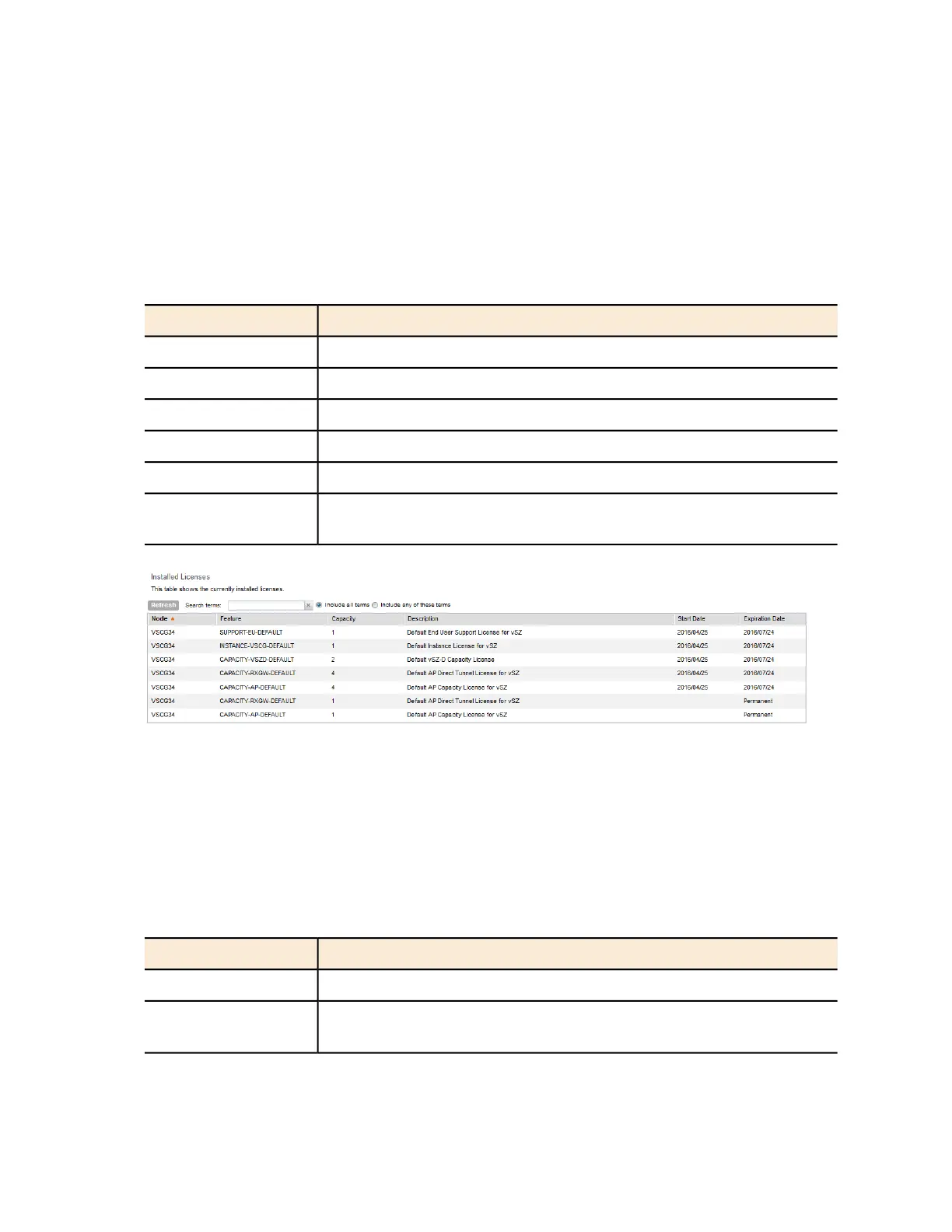
The following table lists the different columns that appear in the Installed Licenses section.
Table 24: Information in the Installed License section
DescriptionColumn Name
The name of the node to which the license was uploadedNode
The stock-keeping unit (SKU) code of the license fileFeature
The number of units or license seats that the license file providesCapacity
The type of licenseDescription
The date when the license file was activatedStart Date
For time-bound licenses, this column shows the date when the license
file expires. For permanent licenses, this column shows Permanent
Expiration Date
Figure 242: The Installed Licenses section
Viewing License Summary
You can view a summary of total, consumed, and available licenses for the different license
types.
The following table lists the different columns that appear in the License Summary section.
Table 25: Information in the License Summary section
DescriptionColumn Name
The type of license fileLicense Type
The maximum number of access points that can be supported by all
the licenses that have been uploaded to the controller.
Total
SmartCell Gateway 200/Virtual SmartZone High-Scale for Release 3.4.1 Administrator Guide
381
Performing Administrative Tasks
Managing Licenses



 To Next Page