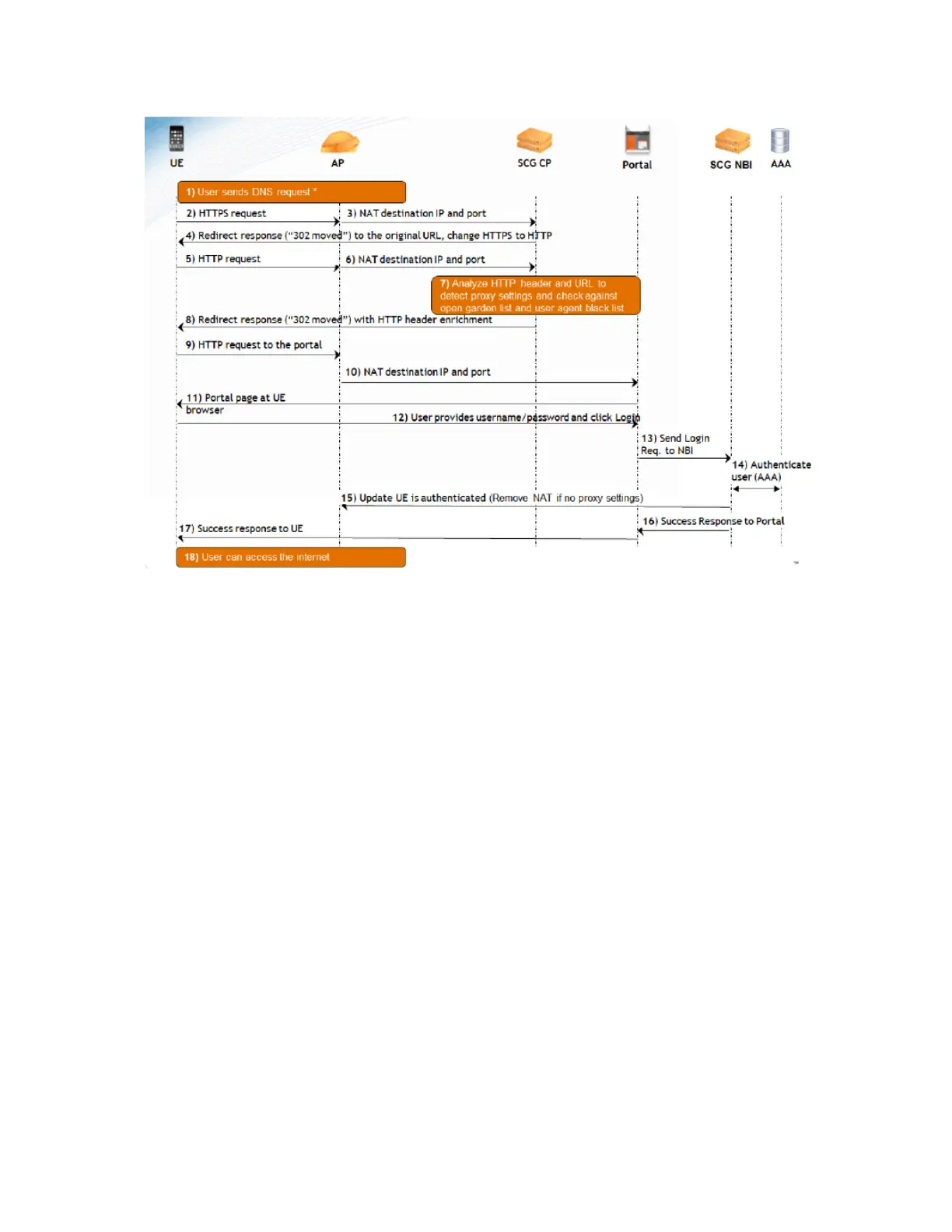
Figure 142: Basic flow of the hotspot authentication process for an HTTPS-based request
(double-redirect approach)
Call Flow for Devices That Use a Web Proxy
If a user device is configured to use a Web proxy server to gain access to the Internet, the call
flow for the hotspot authentication process is different.
This is because the AP needs to perform network address translation (NAT) on the HTTP or
HTTPS request from the user device and the Captive Portal functions as a proxy between the
user device and Web server on which the requested URL is hosted.
Figure 143: Basic flow of the hotspot authentication process for an HTTP proxy-based request
on page 272 illustrates that call flow for the hotspot authentication process if the user device is
using a Web proxy server to connect to the Internet.
There are two types of proxies - Transparent and Non-Transparent.
Transparent proxy is an in-line proxy in which the user device or its browser need not be
configured, as requests are transparently intercepted by the proxy.
Non-Transparent proxy is an out-of-line proxy where the user device or browser (depending on
the device OS) must be configured with the proxy settings for the proxy to receive requests.
The call flow described in this section relates to Non-Transparent proxy deployments.
SmartCell Gateway 200/Virtual SmartZone High-Scale for Release 3.4.1 Administrator Guide
271
Creating and Managing Hotspots
Call Flow for Devices That Use a Web Proxy



 To Next Page