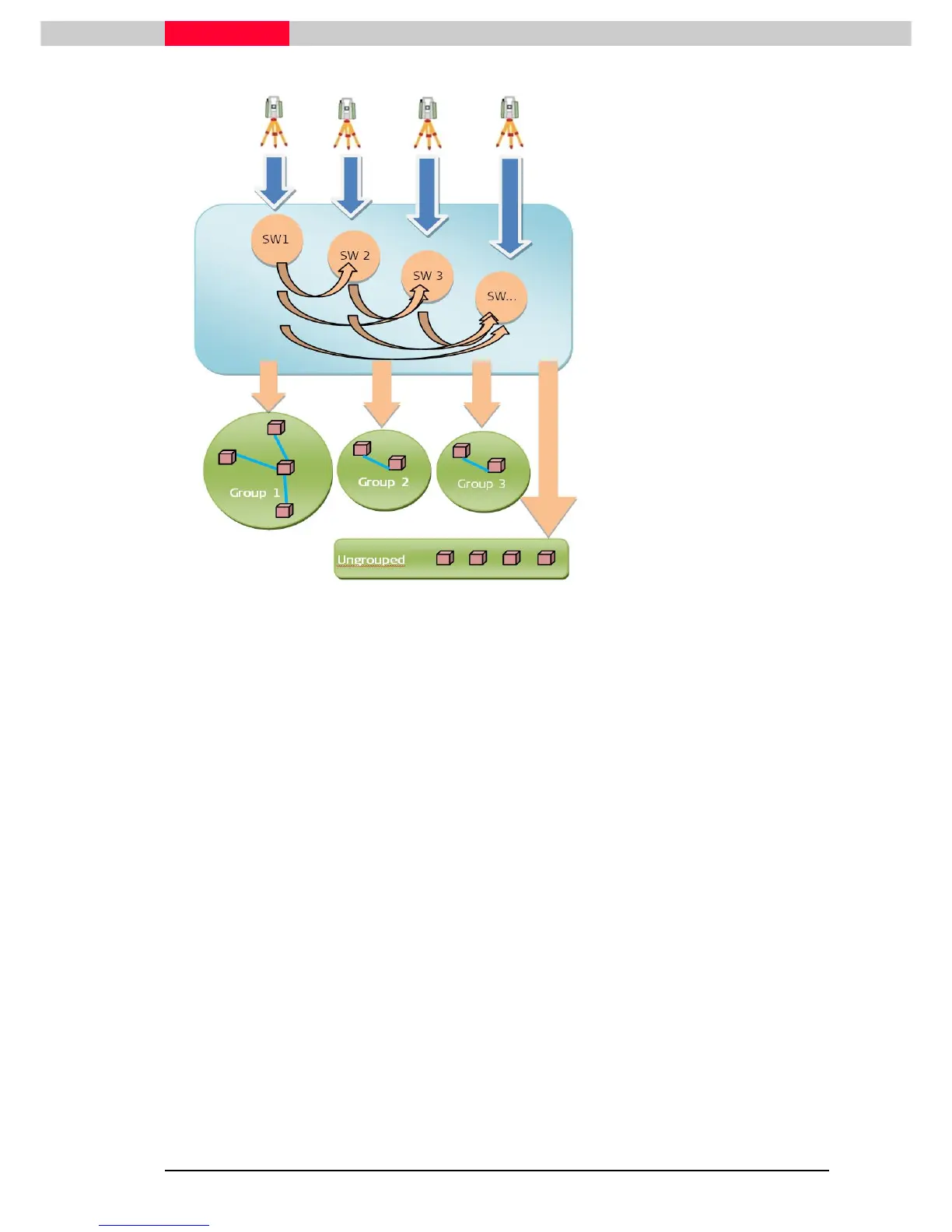
Different ScanWorlds from
different scanner locations
ScanWorlds are compared pairwise
with different algorithms during
Cyclone import with Auto-Align
Scans checked ON.
Different Groups are created and
collected in the Cyclone
Registration window.
Not aligned ScanWorlds are placed
in the “Ungrouped” category as
independent ScanWorlds without
any cloud to cloud constraints or
pre-alignments
Figure 67
Create ScanWorld Groups from Auto Alignment
Using this command the Groups can be regenerated (e.g. in a new registration) using the files
created during the
Auto Align Scans
import process. This command requires cube images stored
in a Scene.hds.files folder next to the database files (see also
Module 3- Registration
and
Module 2.1- Point Cloud import
).
Create ScanWorld groups with targets
This command only works with targets and will form groups based on how well the targets are
placed in the ScanWorlds. All scans in the registration will be considered for Group creation.
Create ScanWorld groups from selection with targets
Same as above but only on selected Groups.
Remember: ScanWorlds that cannot be aligned to another ScanWorld will be
placed in a group called
Ungroup
. This is also valid for grouping based on target
constraints.
This is the grouping theory in general. Basically there are several ways how to organize the
scanning project. It is an option to work with groups. A Registration can still be performed in the
classical way without creating Groups.



 To Next Page