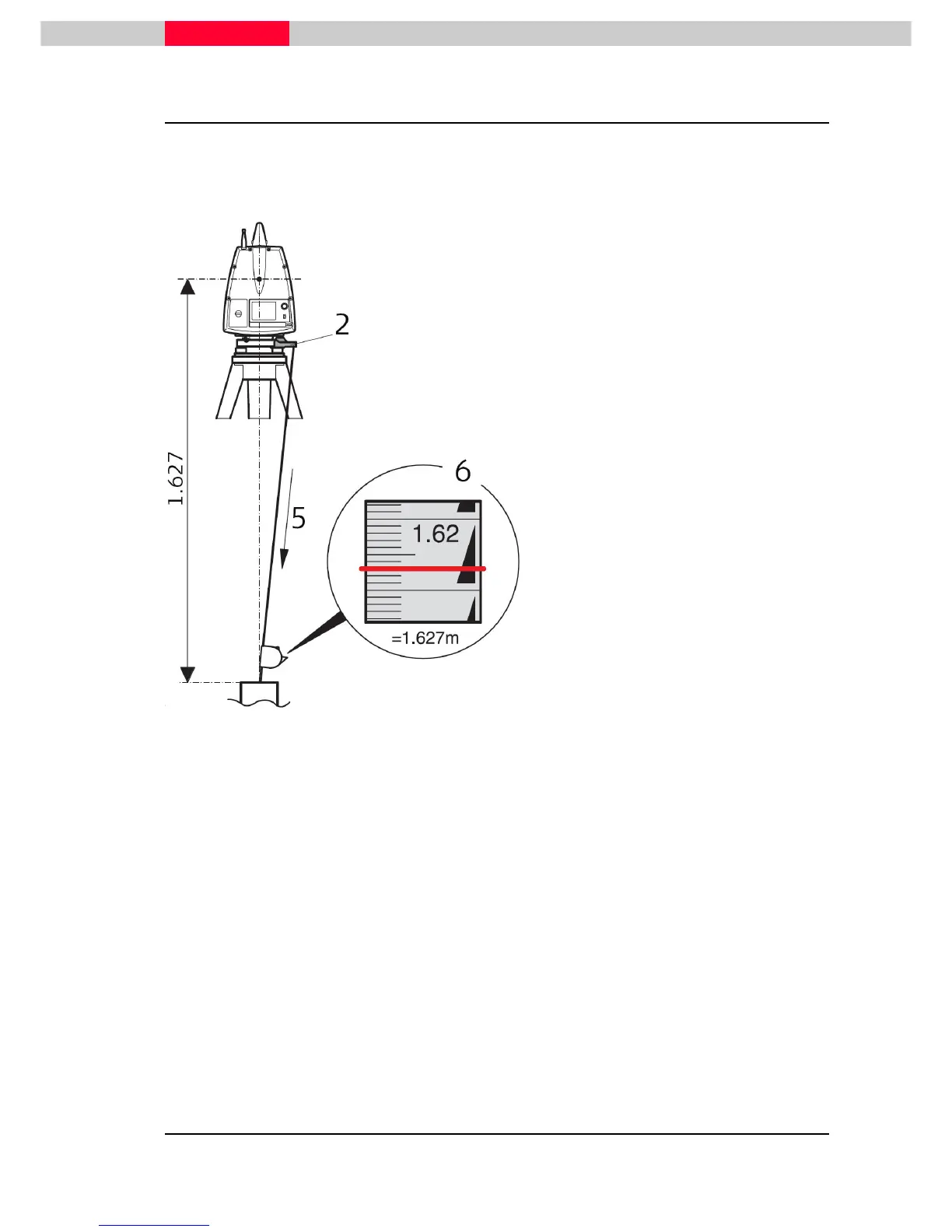
2.4 Determine the Instrument’s Height
To get an accurate height measurement use the GHM008 instrument height meter in conjunction
with the GHT196 distance holder that are both included in the scanner’s delivery.
Figure 8
1. Place tripod centrally over the ground
point, level instrument.
2. Click GHT196 distance holder to
tribrach. It must "snap" onto the
cover
3. Unfold measuring tongue, pull out
tape measure a little.
4. Insert GHM008 instrument height
meter in the distance holder and
attach.
5.
ground point, pull out until the tip of
the measuring tongue touches the
point on the ground, keep under
tension and do not allow to sag,
clamp if necessary.
6. Read height of the instrument
(ground - tilt axis) in the reading
window at the red marking (in the
example 1.627 m).
The tilt axis height of the ScanStation P30 is 250 mm. Take care to use the
GHM008 which has a special scale to measure the height of instruments with a
tilt axis height of 250 mm. Do not use a tape with any other scale.
Alternatively the instrument height can be measured with a common, 1:1 scaled measuring tape
from the point on the ground to the little notch under the red Leica logo at both side covers of
the scanner. This distance will then be from the ground point to the tilt axis.



 To Next Page