21 - 32
3.2 Elbows
Elbow objects can be fit similarly to the methods used above. It is easier, however, to create
elbows between two modelled cylinders. Once the elbow is inserted the elbow bend ratio can be
adjusted, maintaining the run connectivity. The elbow bend ratio can be thought of as the radius
of an arc, in that it is the distance from the vertex of an arc to the center line of the elbow.
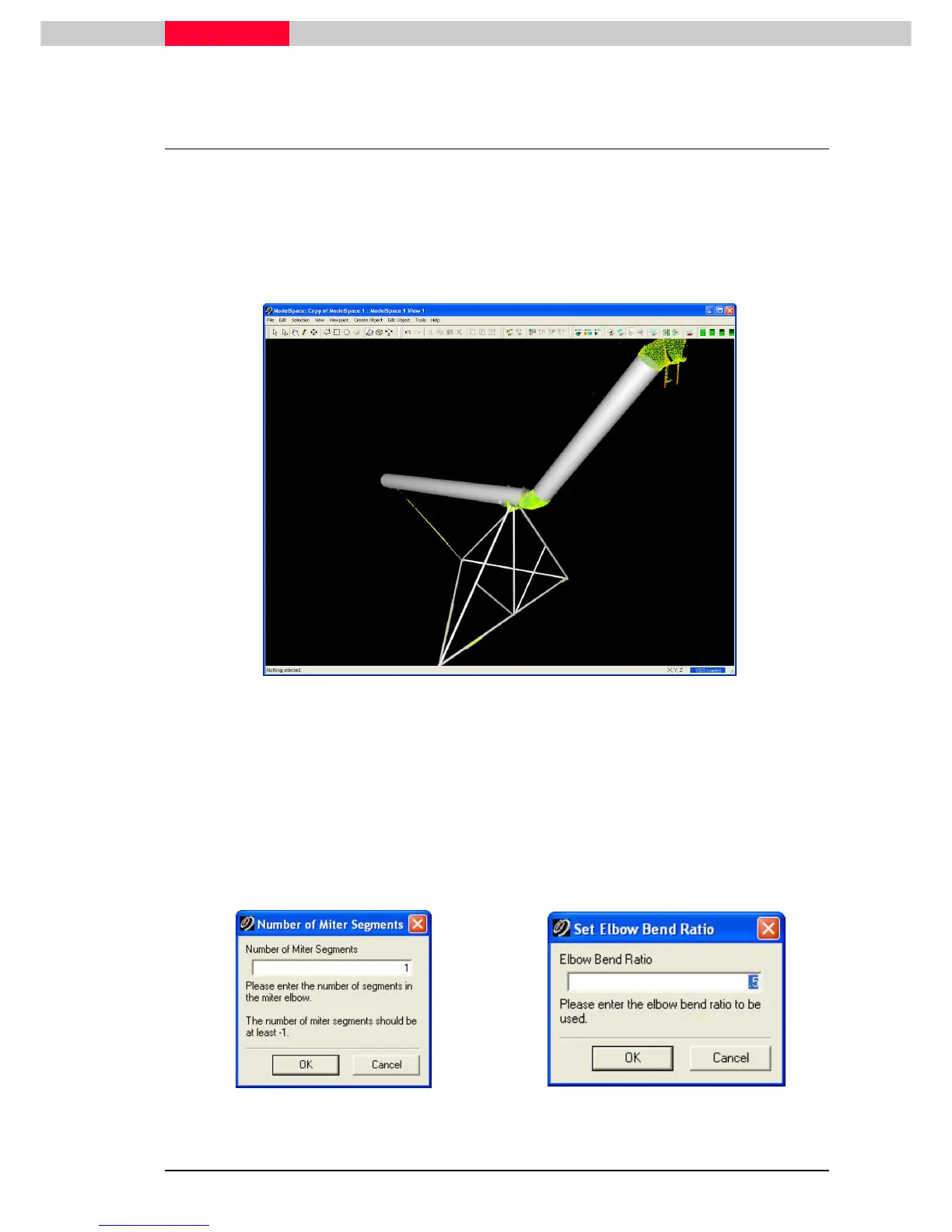
1) Model the two pipe components of the large pipe above the support structure modelled in
the previous section using region grow.
Figure 30
Mitered Elbow
2) Select both of the larger pipes near the ends where the elbow will be created.
3) Click Tools | Piping | Miter Connectors…
| Piping | Miter Connectors…| Piping | Miter Connectors…
| Piping | Miter Connectors… To connect the pipes with a rounded elbow, use
elbow connectors.
4) In the Number of Miter Segments dialog, enter 1, and then click OK.
5) In the Set Elbow Bend Ratio, enter a value of .5, and then click OK.
Figure 31
Figure 32



 To Next Page