5 - 8
3 Edit and Save Measurements
Save the measurement to the database by:
•
Selecting Tools | Measure |
Tools | Measure |Tools | Measure |
Tools | Measure |
Edit Measure
Edit MeasureEdit Measure
Edit Measurements
mentsments
ments
•
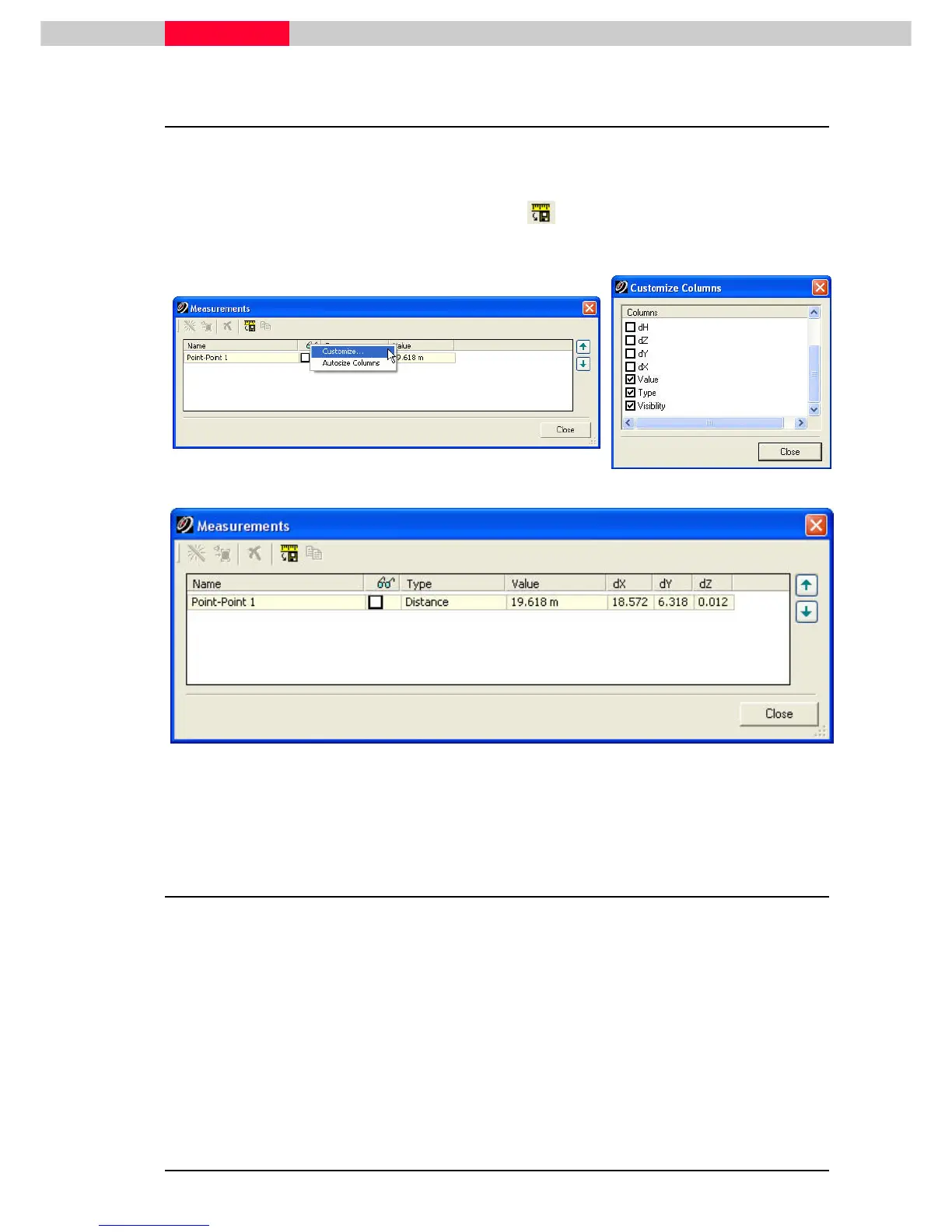
Pressing the “Toggle save measurements” button at the top of the resulting dialog.
•
Right-Click on the Type heading to indicate the other type fields to appear. (See below)
Figure 8
Enabling the “Save Measurements” button saves all measurements that are
queried in this scene to the database.
3.1 Point-to-Centerline Distance
In order to get a better measurement of the closest line-to-line distance:
•
Pick one of the modeled lines anywhere.
•
Multi-select its opposite line, using Shift.
•
This time select Tools | Measure | Distance | Point to C
Tools | Measure | Distance | Point to CTools | Measure | Distance | Point to C
Tools | Measure | Distance | Point to Center
enterenter
enter-
--
-Line/Point
Line/PointLine/Point
Line/Point.
This is the measurement that we’re interested in, because it is the shortest distance from the
first picked point to the axis of the line. Or in other words it is the distance from the first picked
point perpendicular to the other line.



 To Next Page