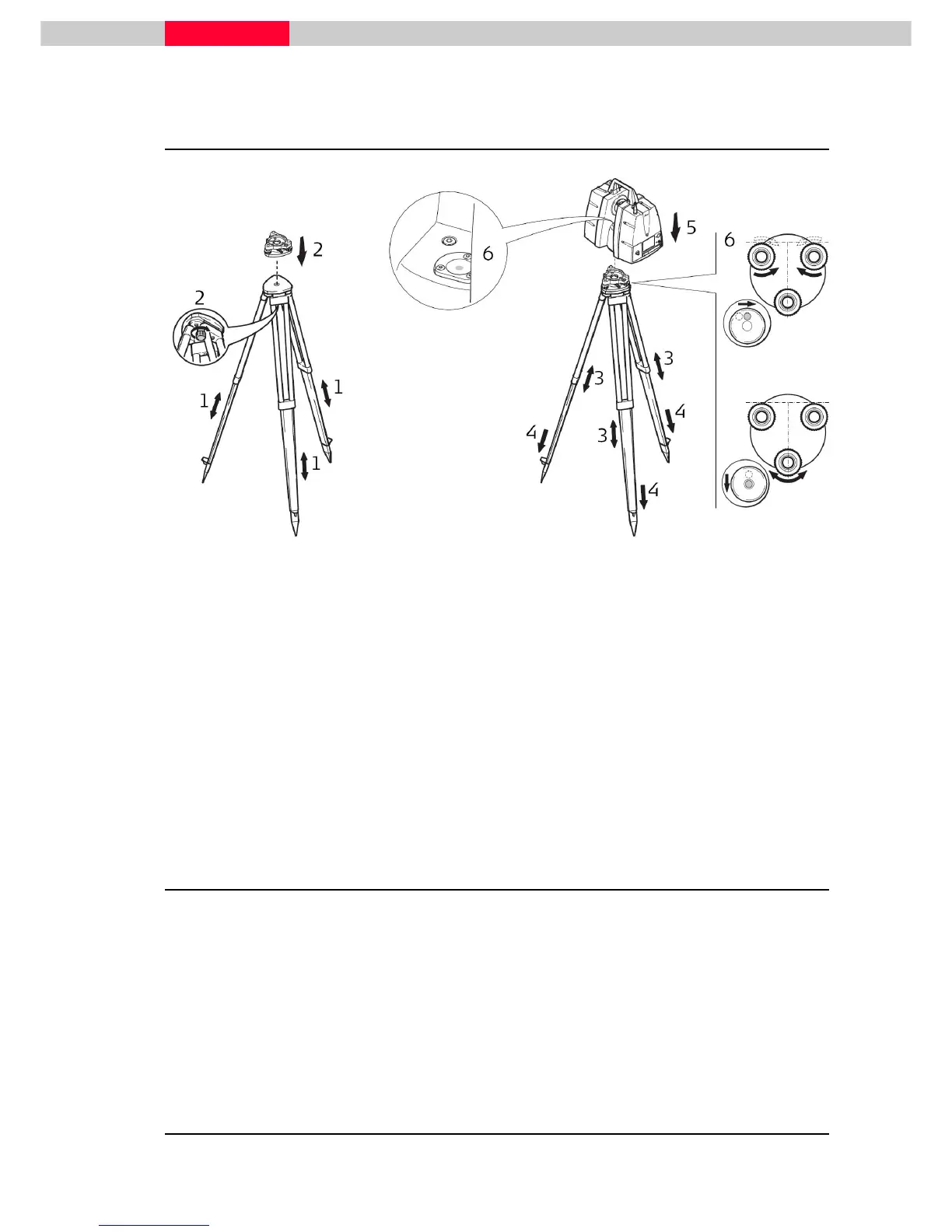
Figure 6
1. Extend the tripod legs to allow for a comfortable working posture. Tighten the screws at the
bottom of the legs.
2. Place the tribrach on the tripod and secure it with the central fixing screw.
3. Set up the tripod so that the tripod plate is as horizontal as possible.
4. Push the tripod legs firmly into the ground.
5. Place the instrument on the tribrach and secure it with the tribrach’s locking knob.
6. Level up the instrument using the instrument’s circular level. Turn two of the foot screws
together in opposite directions. The index finger of your right hand indicates the direction in
which the bubble should move. Now use the third foot screw to center the bubble.
2.3 Setup over a Benchmark using the Internal Laser Plummet
This topic describes an instrument setup over a marked ground point using the laser plummet.
Geo-referencing of the ScanStation P30 is established by setting up over a known or assumed
control point, with optional target extraction to set the azimuth direction, and establishing a
local or global coordinate system. The ScanStation P30 allows you to execute a traverse,
resection or free stationing. Known azimuth or known backsight measurements can be
observed.



 To Next Page