Organization/Visualization point clouds Module 4.0 – Point cloud Modifying
23 - 34
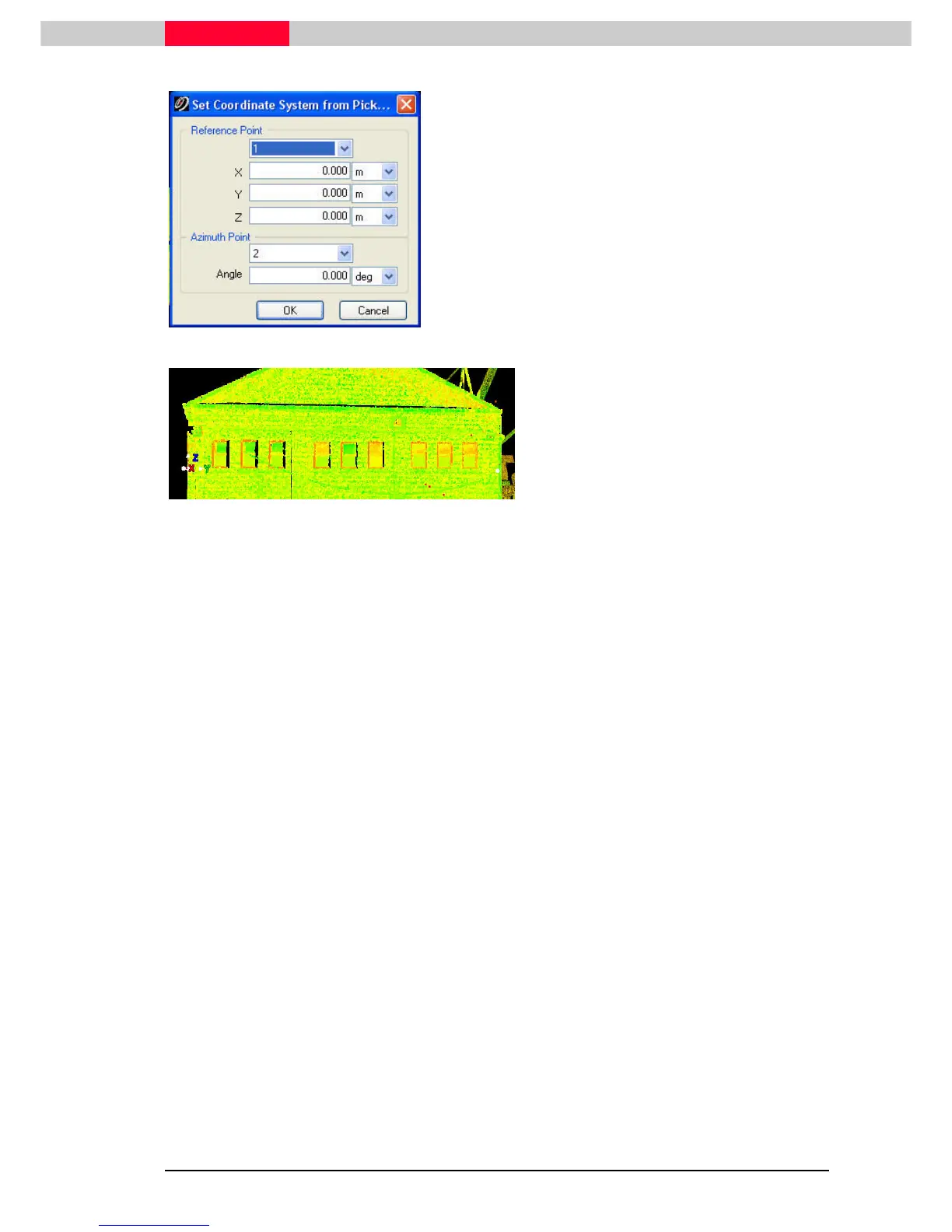
Figure 30
•
Specify pick point 1 as Reference Point and
leave the coordinate values at 0 to define
this point as the coordinate origin.
•
Specify pick point 2 as the Azimuth Point
and leave the Angle at 0 to have the y-axis
aligned from the origin to this point
(horizontal rotation only)
Figure 31
•
Press OK
OKOK
OK
The coordinate system origin has changed to
the 1
st
pick point with the y axis being rotated
around the z-axis towards the second pick
point. The up direction (Z) has not changed
through the scanner setup
on ScanWorld 1 - which has been set up with
compensator enabled).
•
Switch to a view directed straight onto the
façade via Viewpoint | Stan
Viewpoint | StanViewpoint | Stan
Viewpoint | Standard Viewpoint |
dard Viewpoint | dard Viewpoint |
dard Viewpoint |
Right View
Right ViewRight View
Right View.
..
.
This command can also be used with 3 picked points to set:
1st a reference point.
2nd the azimuth (horizontal orientation).
3rd the “up” direction (vertical orientation).



 To Next Page