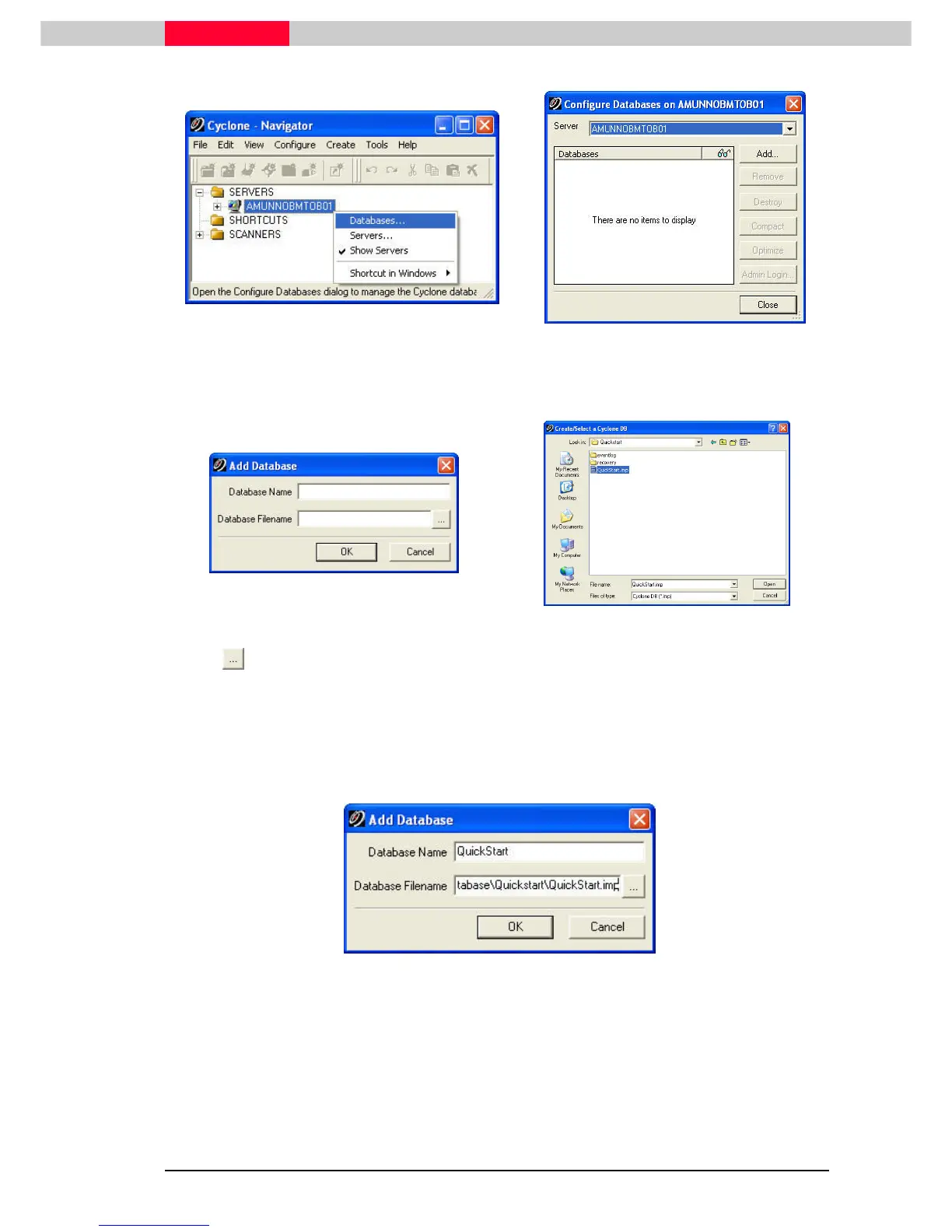
Figure 12
Figure 13
The
Configure Databases
dialog appears (
Figure 13
). Pick the Add
AddAdd
Add…
……
… button. The
Add Databases
dialog appears (
Figure 14
).
Figure 14
Figure 15
Pick the icon to the right of the Database Filename field (
Figure 14
) to open the
Create/Select a Cyclone DB
dialog (
Figure 15
).
Browse to your Training Folder or to a file location directed by your instructor to locate the
database called QuickStart.imp (
Figure 15
).
Select QuickStart.imp
Select QuickStart.impSelect QuickStart.imp
Select QuickStart.imp, and then click on Open
OpenOpen
Open. Finish by selecting the OK
OKOK
OK button. The database is
now linked to and can be accessed through Cyclone. (
Figure 16
)
Figure 16
Continue in this manner to add the additional databases as you are directed by your instructor.
Now click on the Close
CloseClose
Close button to return to the
Navigator
window.



 To Next Page