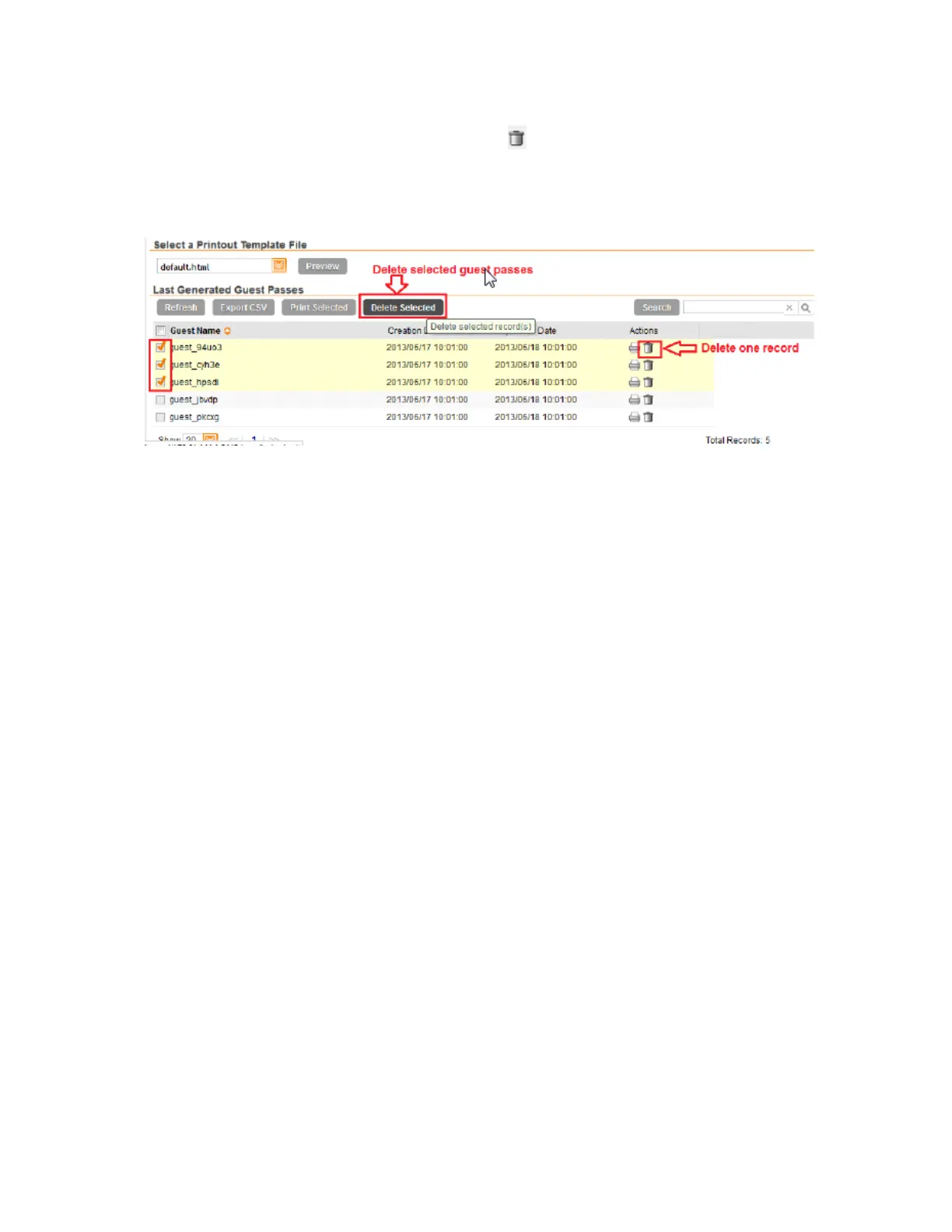
NOTE: To delete a single guest pass, click the (delete) icon that is in the same row as the
guest pass name.
You have completed deleting a guest pass or guest passes.
Figure 189: Deleting a single guest pass or multiple guest passes
Creating a Guest Pass Printout Template
A guest pass printout template contains variables for the information that guest users need to
connect to the controller hotspots (for example, guest name, key, and WLAN name), as well as
the actual instructions for connecting to the WLAN.
A default printout template exists in the controller. If you want to create your own printout template,
follow these steps.
1. Go to Configuration > Identity > Users.
2. Click Guest Pass > Manage Templates.
The Manage Guest Instruction Templates page appears.
3. Using an HTML editor, create a new HTML or text file.
4. Add content to the file.
Typically, a printout template contains instructions for connecting to the controller hotspot.
See Figure 187 for the content of the default printout template.
SmartCell Gateway 200/Virtual SmartZone High-Scale for Release 3.4.1 Administrator Guide
335
Working with Local, Guest, and Remote Users
Working with Local, Guest, and Remote Users



 To Next Page