FRONT PANEL PAGE 11
4. FRONT PANEL
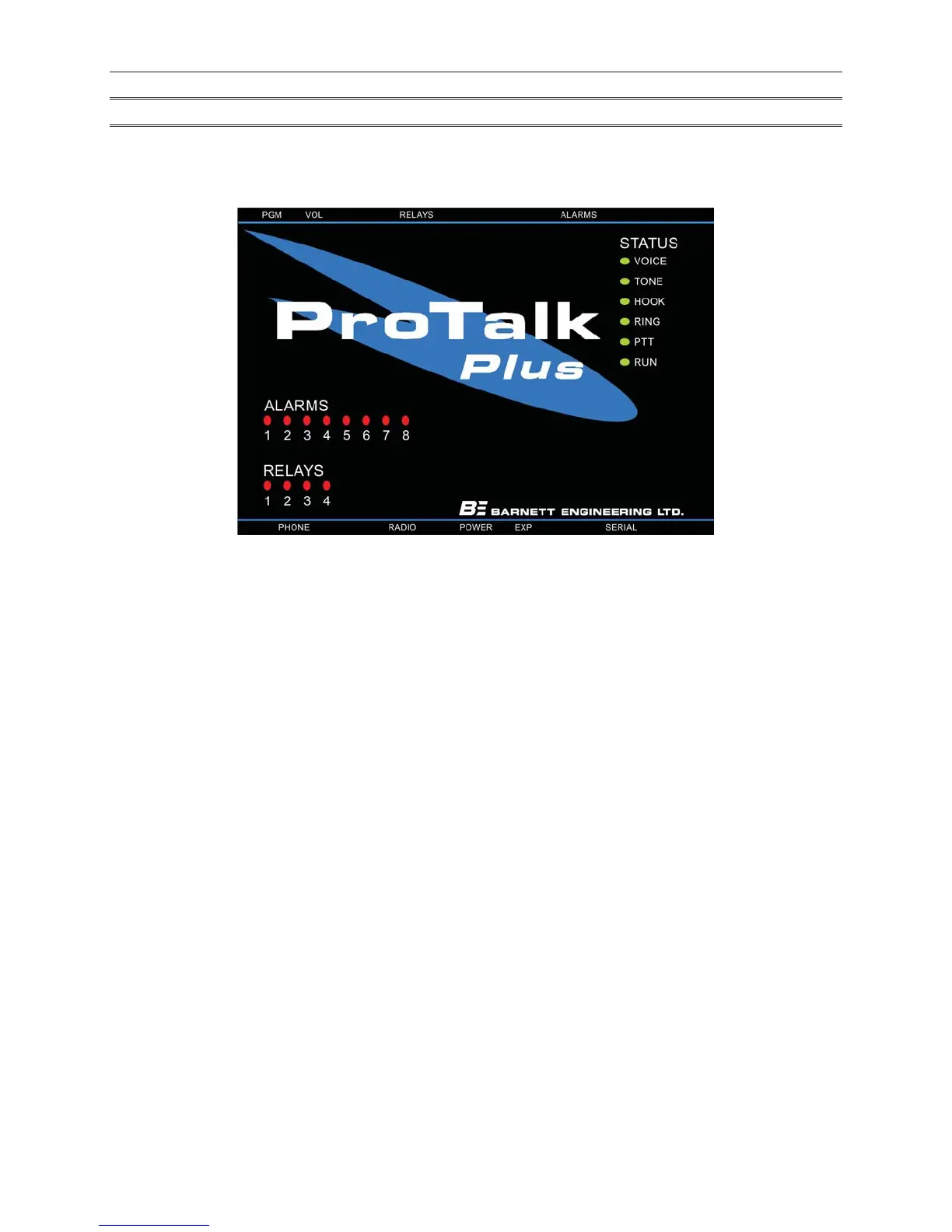
The front panel of the B1290 is shown in Figure 5. The description of the front panel indicators will assist you in
verifying the correct operation of the unit.
Figure 5 ProTalk Plus Front Panel
Alarm LEDs
The Alarm LEDs light when the associated alarm input is in the alarm state. Unacknowledged alarms will be
flashing and any that have been acknowledged will be on solid.
Relay LEDs
The Relay LEDs light whenever the associated relay is on.
Voice
The Voice LED is on whenever the B1290 is recording or playing user messages. It flashes when vocabulary
messages are being played or when there is an error in the user voices.
Tone
The Tone LED is on for the duration of a transmitted DTMF digit or other generated tone. It will also be on when
call progress tones are detected on the phone line. It will flash once for each received or transmitted DTMF digit.
Hook
The Hook LED comes on whenever the B1290 goes off hook, to dial or answer the telephone. It will flash if a
phone port error is detected (no dial tone or other expected call progress signal). The hook LED will also flash
during pulse dialing.
Run
Version 1: The Run LED will be on steady when the B1290 is operating correctly; it will flash if an error condition
is present.
Version 2: The Run LED will flash when the B1290 is operating correctly.



 To Next Page