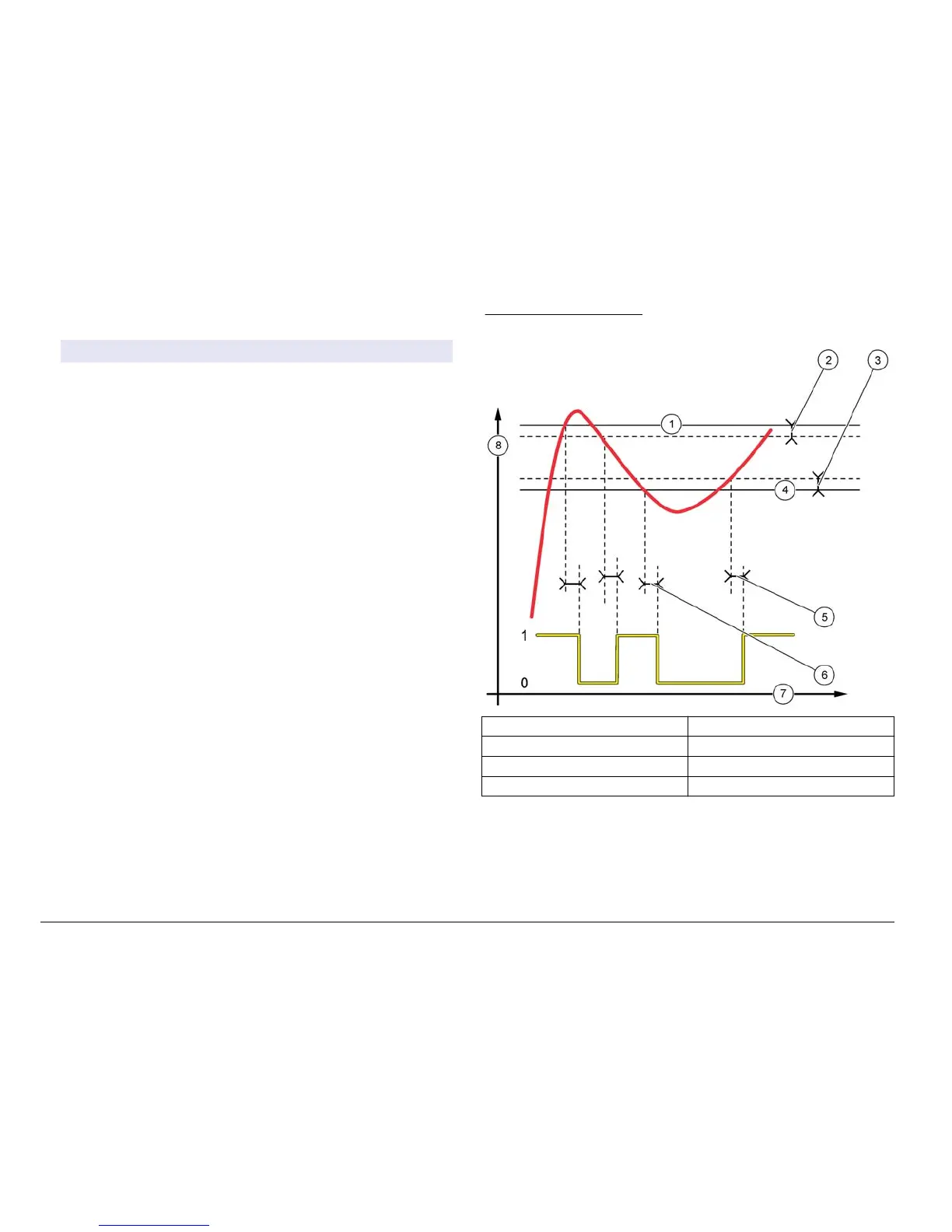
• Alarm Function (refer to Figure 18)
Option Description
Low alarm Sets the value where the relay will turn on in response to
decreasing measured value. For example, if the low alarm is
set for 1.0 and the measured value drops to 0.9, the relay
activates.
High alarm Sets the value where the relay will turn on in response to
increasing measured value. For example, if the high alarm is
set for 1.0 and the measured value increases to 1.1, the
relay activates.
Low
deadband
Sets the range where the relay remains on after the
measured value increases above the low alarm value. For
example, if the low alarm is set for 1.0 and the low
deadband is set for 0.5, the relay remains on between
1.0 and 1.5. Default is 5% of the range.
High
deadband
Sets the range where the relay remains on after the
measured value decreases below the high alarm value. For
example, if the high alarm is set for 4.0 and the high
deadband is set for 0.5, the relay remains on between
3.5 and 4.0. Default is 5% of the range.
Off delay Sets a time (0-300 seconds) to delay the relay from normally
turning off (Default: 0 seconds).
On delay Sets a delay time for the relay to turn on (Default:
0 seconds).
Figure 18 Alarm function
1 High alarm 5 ON delay
2 High deadband 6 OFF delay
3 Low deadband 7 Time (x-axis)
4 Low alarm 8 Source (y-axis)
30 (nglisK



 To Next Page