17
Installation
3.3.2 Mounting the Digital Gateway
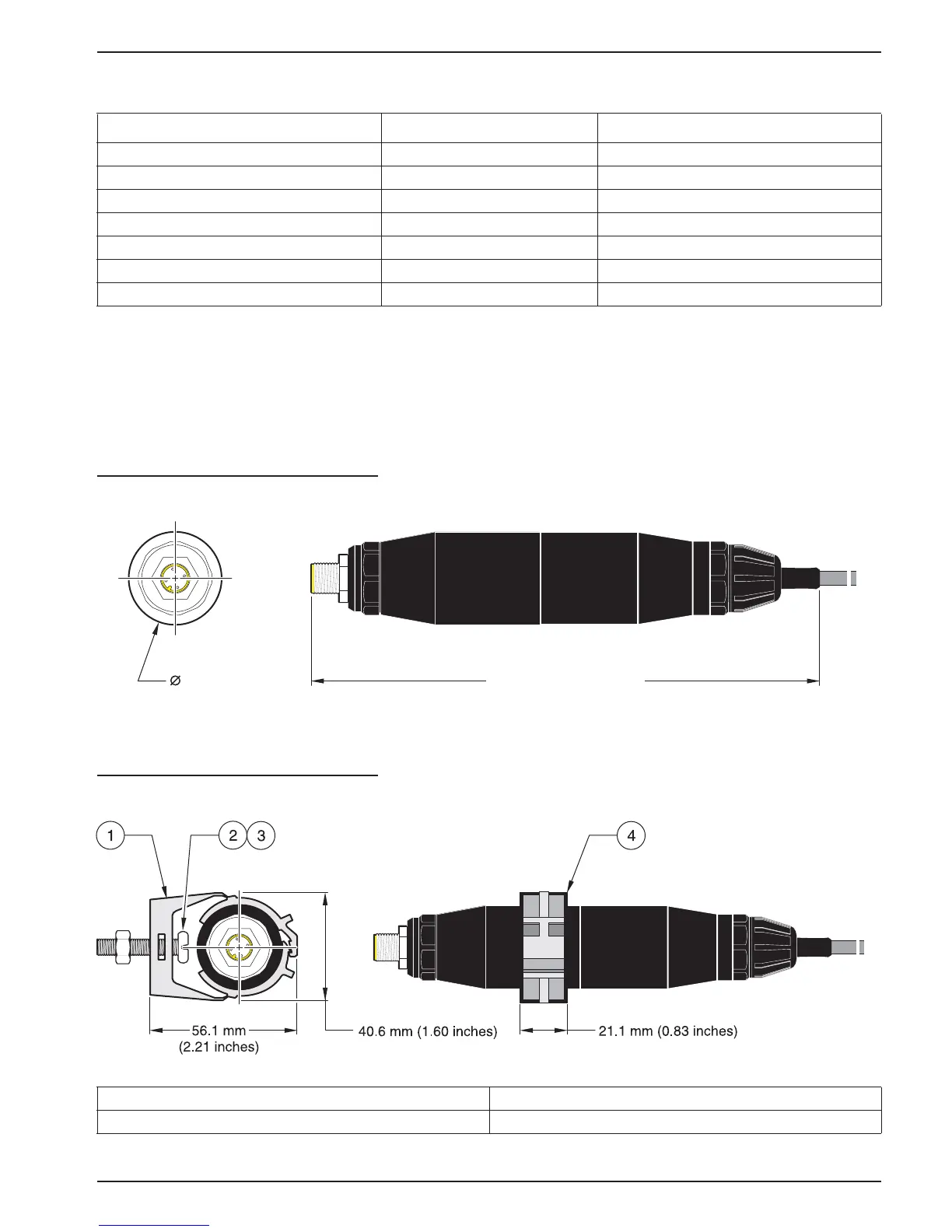
The digital gateway is supplied with a mounting clip for mounting to a wall or other flat
surface. See Figure 10 for dimensions. Use an appropriate fastener to secure it to the
wall, see Figure 11. After the sensor is wired to the digital gateway and the two halves are
threaded together, place the mounting clip over the center of the digital gateway and
squeeze the clip together to secure.
Figure 10 Digital Gateway Dimensions
Figure 11 Mounting the Digital Gateway
Table 4 Wiring the Digital Gateway (Cat. No. 6120500)
Sensor (wire color) Sensor Signal Digital Gateway J1
Green Ref J1-1
Yellow Temp + J1-2
Black Temp – J1-3
White VI J1-4
Red Active J1-5
Clear Shield J1-6
Clear w/shrink wrap Shield J1-6
1. Mounting Clip 14. Hex Nut, ¼-28
13. Screw, pan head, ¼-28 x 1.25-in. 15. Mount clip, insert digital gateway, squeeze clip closed.
184.15 mm (7.25 inches)
34.29 mm
(1.35 inches)



 To Next Page