790
Overdrive, Amp models, and Mic models
027: OD/Hi-Gain Wah
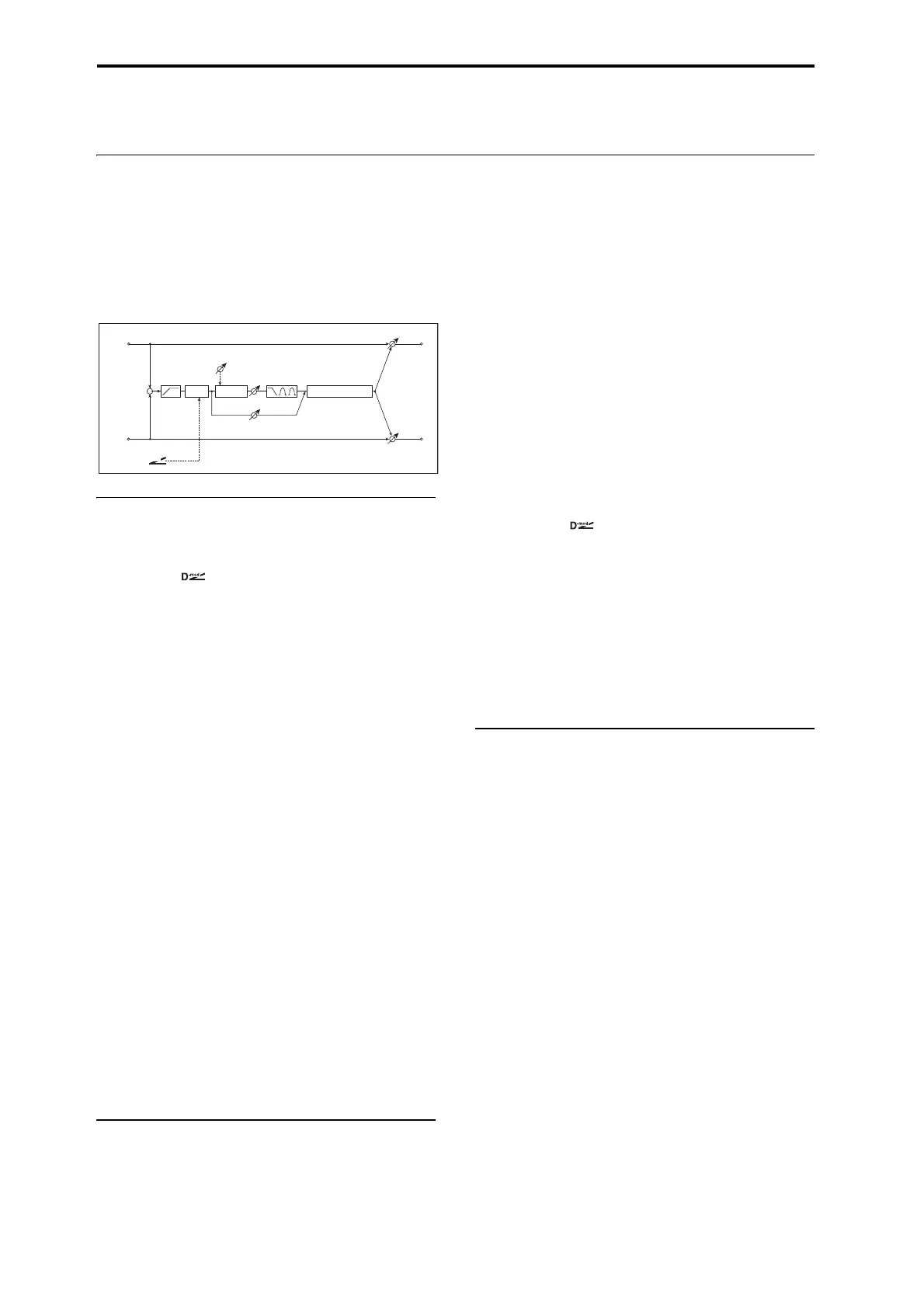
This versatile effect offers two different-sounding distortion
modes (Overdrive and Hi-Gain), a modulatable wah-wah
filter, a speaker simulation, and 3-band EQ. It’s suitable for
guitars, organs, and general sonic mayhem.
For a description of the on-screen EQ graphic, see “011:
Stereo Parametric 4EQ” on page 774.
WAH
Wah Switch
Wah Switch [Off, On]
This turns the Wah effect on and off.
Source [Off…Tempo]
Selects the modulation source that switches the Wah on and
off.
Mode [Toggle, Moment]
This parameter controls how the modulation source switches
the overdrive on and off.
When Mode = Toggle, the overdrive turns on or off each
time you press the pedal or move the joystick. Via MIDI,
overdrive turns on or off each time the modulation amount
exceeds 64.
When Mode = Moment (short for Momentary), the
overdrive is normally off, and turns on only when you press
the pedal or move the joystick. Via MIDI, modulation values
above 64 turn it on, and values below 64 turn it off.
Wah Sweep
Sweep Range [–10…+10]
This controls the width of the Wah’s sweep, from the
minimum to maximum values of the modulation Source
selected below.
Negative values reverse the sweep’s direction, from high to
low instead of low to high.
Source [Off…Tempo]
This selects a modulation source to control the Wah.
DRIVE
Pre Low-cut [0…10]
This attenuates low frequencies before the signal enters the
distortion. Use this to create a sharper tone.
Drive Mode [Overdrive, Hi-Gain]
This switches between two different distortion timbres:
overdrive and hi-gain distortion.
Drive [1…100]
The amount of distortion is determined by the combination
of the input level and the Drive setting. Higher input levels,
and/or higher Drive settings, mean more distortion.
Raising the Drive setting will also increase the volume; you
can compensate for this by lowering the Output Level
parameter, below.
Direct Mix [0…50]
Sets the amount of the dry sound mixed to the distortion.
Speaker Simulation [Check-box]
Switches the speaker simulation on/off.
Output Level [0…50]
This controls the output volume from the Drive section into
the 3-band EQ. You can use this to reduce the volume to
compensate for high Drive settings, or to prevent clipping in
the EQ.
Source [Off…Tempo]
Selects the modulation source for the output level.
Amount [–50…+50]
Sets the modulation amount for the output level.
EQ
Low Fc [Hz] [20…1.00k]
Sets the center frequency for Low EQ (shelving type).
Gain [dB] [–18…+18]
Sets the gain of the Low EQ.
Mid1 Fc [Hz] [300…10.00k]
Sets the center frequency for Mid EQ 1 (peaking type).
Q [0.5…10.0]
Sets the band width of Mid EQ 1. p.774.
Gain [dB] [–18…+18]
Sets the gain of Mid EQ 1.
Mid2 Fc [Hz] [500…20.00k]
Sets the center frequency for Mid EQ 2 (peaking type).
Q [0.5…10.0]
Sets the band width of Mid EQ 2. See “Q” on page 774.
Gain [dB] [–18…+18]
Sets the gain of Mid EQ 2.
Left
Right
Wet / Dry
Wet / Dry
Wet: Mono In - Mono Out / Dry: Stereo In - Stereo Out
+
Amp Simulation
3 Band PEQ
Output Level
Direct Mix
Pre Low-cut
D
-mod
Wah
Mode: Overdrive / Hi-Gain
Drive
Driver



 To Next Page
 Loading...