SAMPLING mode
572
Sampling features
Sampling on the NAUTILUS
The NAUTILUS features Korg’s Open Sampling System.
This lets you use sampling and resampling not only in
SAMPLING mode but also in PROGRAM,
COMBINATION, and SEQUENCER modes, with
optimized features for each mode.
• You can perform 48 kHz 16-bit linear mono or stereo
sampling (or 24-bit, when sampling to drive).
• A maximum of 4,000 multisamples and 16,000 samples
can be created.
• In MEDIA mode, you can load multisample/sample data
from various types of media.
• You can load several different sample formats, including
Korg’s own format, Akai S1000/3000 and SoundFont
2.0 samples and program data, and AIFF or WAVE
samples.
• You can export samples created on the NAUTILUS as
AIFF or WAVE files.
• You can use all of the Insert, Master, and Total effects to
process signals before sampling, from either internal or
external sources. For instance, you can use compression,
EQ, decimation, etc. You can also use tempo-based LFO
or delay effects, which can be very useful when sampling
rhythmic loops.
• Sampling can be initiated by the front-panel SAMPLING
or SEQUENCER START/STOP buttons, note-on, or
threshold. (The available methods will depend on the
mode.) Threshold allows you to start sampling when the
input signal exceeds a specified level. In SAMPLING
mode, you can also capture sound before the trigger.
• The analog audio inputs support mic and line level
signals. The USB digital audio input supports the 48 kHz
sample rate.
• Sampled data can be automatically converted into an
HD-1 Program. It can then be edited and played just like
any other Program, including processing with filters and
effects. You could even re-sample that Program, and
start all over again…
• Multisamples can be used in Wave Sequences.
• Individual samples can also be used in drum kits.
When you turn off the power, all multisample and sample
data in RAM memory will be lost. Before you turn off the
power, be sure to save important data to drive. You can
use the KSC Auto-Load feature to automatically load sets
of samples at startup; for more information, see “0–3:
KSC Auto-Load” on page 640.
If Auto Optimize RAM (GLOBAL 0–1d) is on, and the
writing destination for sampling data is RAM, the RAM
memory will automatically be optimized after the data
has been written. This is turned on by default, but you
may switch it on/off as necessary. For more information,
see “Auto Optimize RAM” on page 635, and “Optimize
RAM” on page 610.
Editing in SAMPLING mode
• In SAMPLING mode, the sample data you sampled or
loaded from various media (including WAVE and AIFF
formats) can be assigned to an index (zone) to create a
multisample.
• The waveform can be viewed in the LCD screen, and
edited by a variety commands including rate conversion
(down-sampling) and reverse playback.
• Start, loop start, and end addresses can be specified in
single-sample units. Loop tune, reverse playback, and
loop lock functions are also supported.
• The Use Zero function automatically searches for zero-
cross points, making it easy to find the beginning or end
of the waveform, or locations that will not produce noise
when the sample is played back.
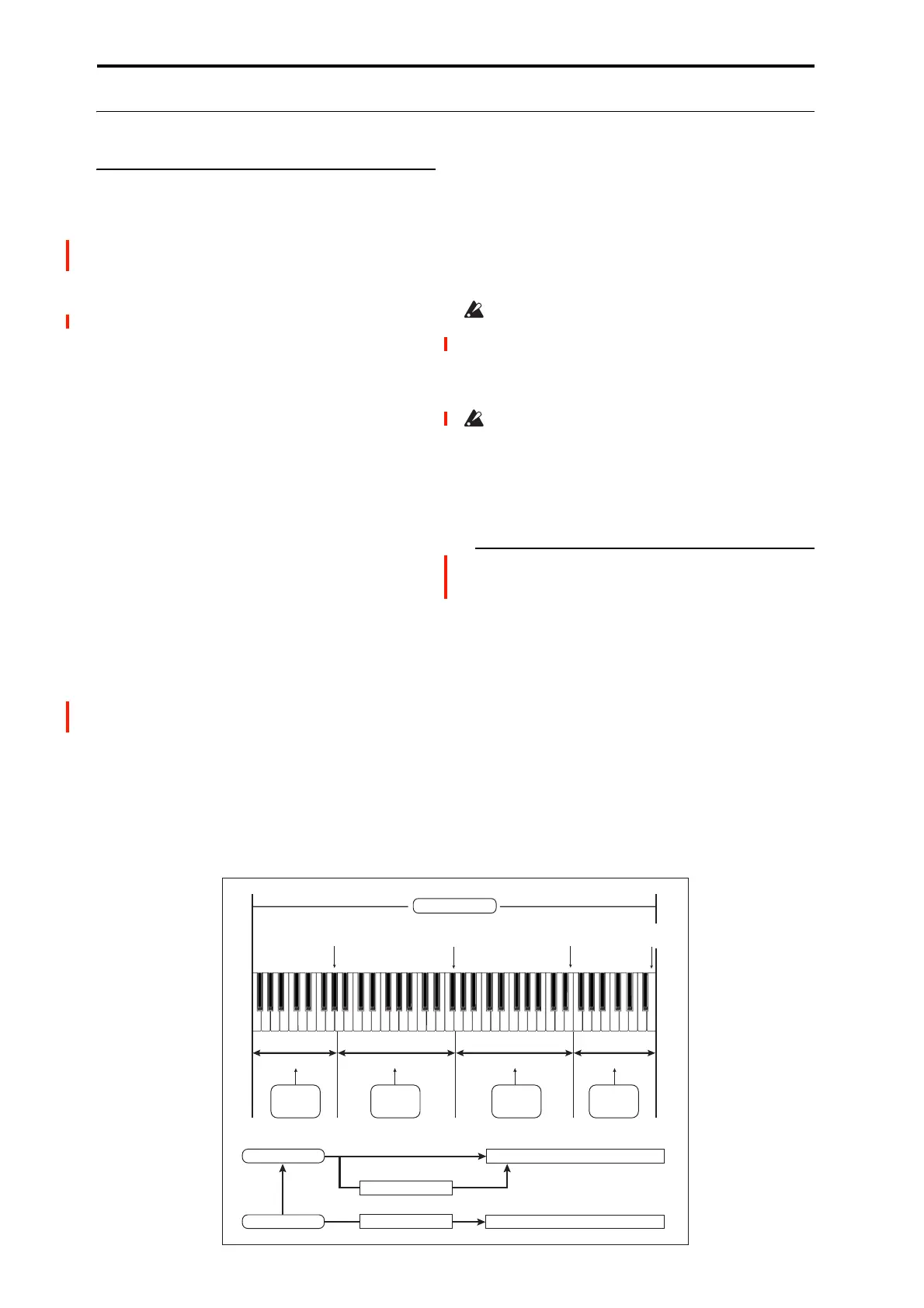
Multisample
Index 001
Index 002
Index 003
Index 004
Index001
Top Key
Index002
Top Key
Index003
Top Key
Index004
Top Key
0000:
Sample A
0001:
Sample B
0002:
Sample C
0003:
Sample D
Program OSC (Single/Double)
Multisample
Drum Kit
Sample
Program OSC (Drums/Double Drums)
Wave Sequence


 To Next Page
 Loading...