812
Modulation and Pitch Shift
055: Stereo Vibrato
This effect modulates the pitch of the input signal to create a
shimmering timbre. AutoFade allows you to increase or
decrease the vibrato speed.
AUTOFADE
Autofade lets you modulate the LFO Frequency via a simple
envelope, triggered by a Dmod source. This is enabled by
setting LFO Frequency Mod to AUTOFADE, and can only
be used when BPM/Tempo Sync is Off.
The intensity of the autofade’s effect is controlled by the
normal Amount parameter, under Frequency.
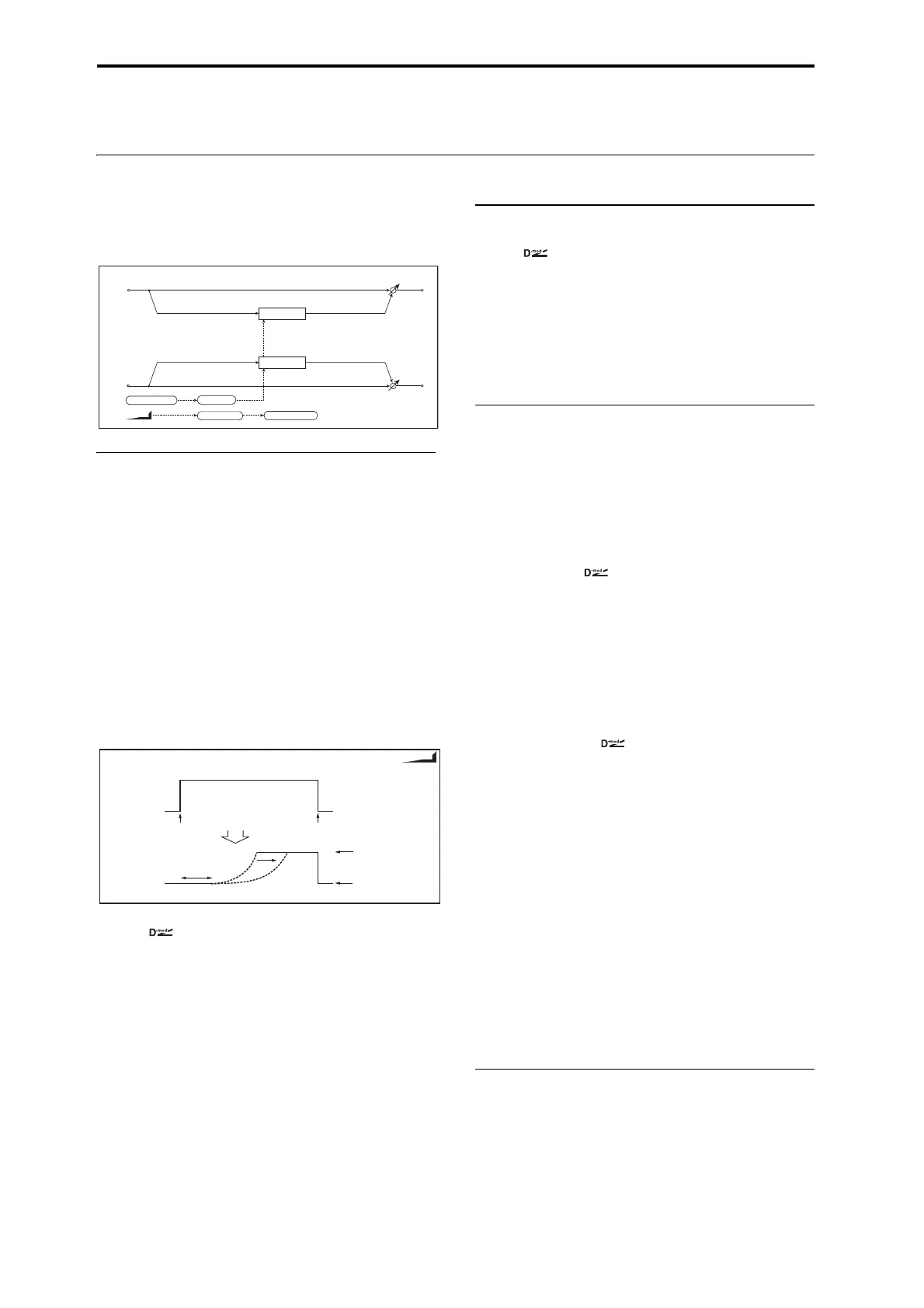
Autofade example
The diagram below shows a setup with note-ons triggering
the autofade, causing the LFO to speed up from 1.0Hz to
4.0Hz.
The AUTOFADE Source is set to Gate1, LFO Frequency
Mod is set to AUTOFADE, LFO Frequency [Hz] is set to
1.0, and the modulation Amount is set to 3.0.
Source [Off…Tempo]
Selects the trigger source for the Autofade.
Autofade is triggered when the Dmod value changes from 63
or smaller to 64 or higher, and turns off again when the
Dmod value goes below 64.
Rate [1…100]
Sets the speed of the fade-in. Higher values are faster.
Fade-In Delay [msec] [00…2000]
This sets the time from the trigger source turning on (going
above a value of 63) until the fade-in starts.
LFO Frequency Mod [Dmod, AUTOFADE]
This selects whether the LFO will be modulated by the
normal Frequency Dmod source, or by the Autofade
envelope.
VIBRATO
Depth [0…100]
Sets the depth of LFO modulation
Source [Off…Tempo]
Selects the modulation source of the LFO modulation depth.
Amount [+/–100]
Sets the modulation amount of the LFO modulation depth.
LFO
Waveform [Triangle, Sine]
Selects the LFO Waveform.
Shape [+/–100]
Changes the curvature of the LFO Waveform. For more
information, see “Shape” on page 782.
Frequency [Hz] [0.02…20.00]
This sets the LFO speed, in Hz. It applies only when
MIDI/Tempo Sync, below, is Off.
Source [Off…Tempo]
This selects a modulation source for the Frequency.
Amount [–20.00…+20.00]
This sets the Frequency modulation amount, in Hz.
MIDI/Tempo Sync [Check-box]
BPM [MIDI, 40.00…300.00]
Base Note [ … ]
Times [x1…x32]
When MIDI/Tempo Sync is on, the LFO speed is set by
BPM, Base Note, and Times, instead of Frequency. For
more information, see “MIDI/Tempo Sync” on page 779.
Type [Individual, Common1, Common2]
This controls whether the effect uses its individual LFO, or
one of the Common FX LFOs. For more information, see
“LFO Type” on page 779.
Common LFO Phase Offset [degrees] [+/–180]
When Type is set to Common FX LFO 1 or 2, this lets you
offset the phase from the master LFO.
OUTPUT
This is the standard effects output section, with modulatable
control over wet/dry balance. For more information, see
“OUTPUT” on page 762.
Vibrato
Vibrato
Left
Right
Wet / Dry
Wet / Dry
Stereo In - Stereo Out
LFO: Tri / Sine LFO Shape
Fade-In Delay LFO Frequency
AutoFade
AUTOFADE
AutoFade
Note On
All Note O
Fade-In Rate
Source=Gate1
LFO Freq. Mod=AUTOFADE
LFO Frequency[Hz]=1.0
Amount=+3.0
LFO Frequency
=1.0+3.0=4.0Hz
LFO Frequency
=1.0Hz
Gate1 Signal
AUTOFADE
Fade-In Dealy


 To Next Page
 Loading...