GLOBAL mode
676
5–3: Voice/Mixer
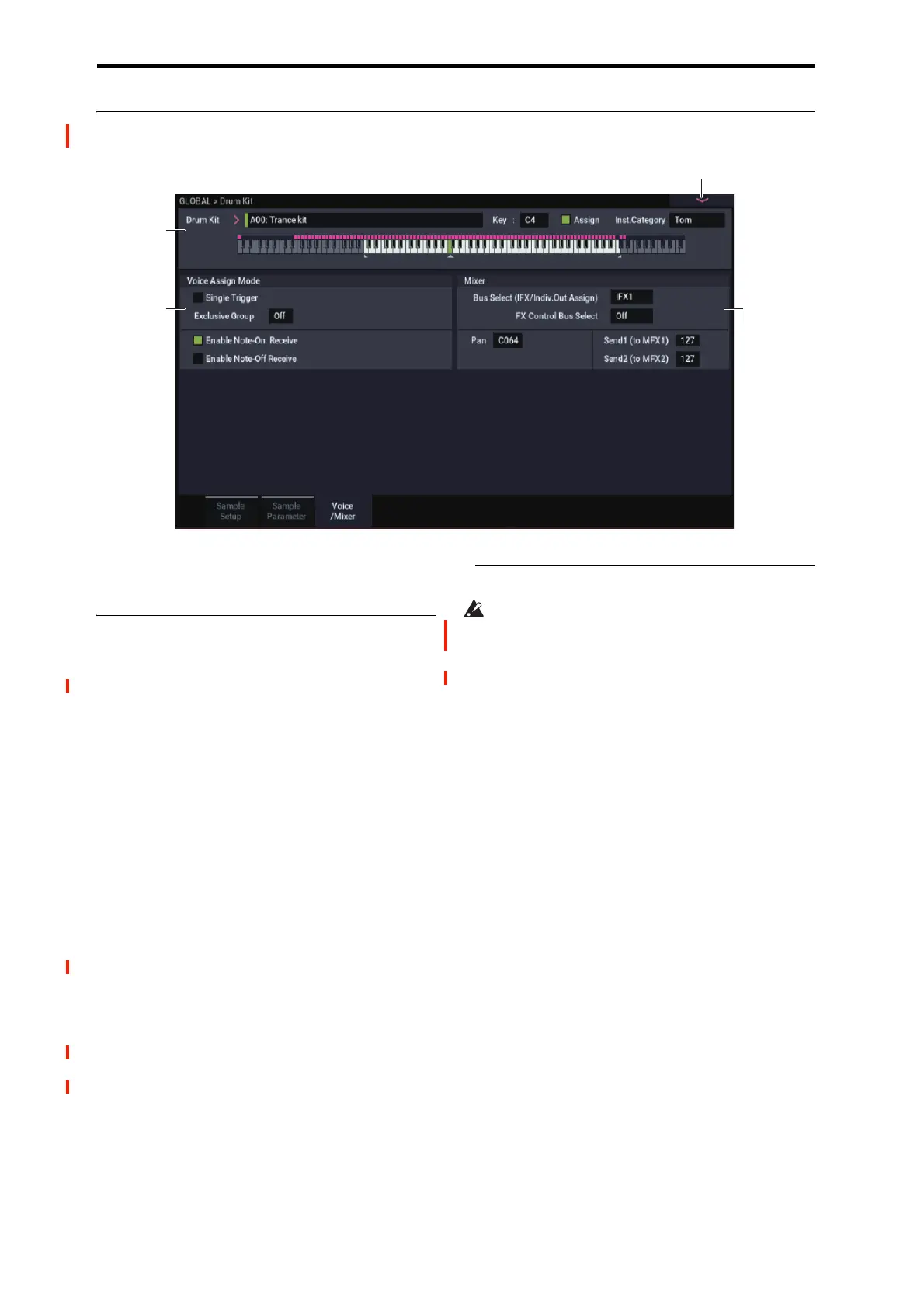
Specify the voice assign, pan, and effect routing etc. for each
key of the drum kit.
5–3a: Voice Assign Mode
Single Trigger [Off, On]
On (checked): Even when the same key (note) is played
repeatedly, the previous note will be halted before the new
note is begun, so that the notes will not overlap. Normally
you will leave this unchecked.
Exclusive Group (Exclusive Assign) [Off,
001…127]
001–127: This allows you to assign keys to any of 127
groups. Keys assigned to the same group will be treated as a
single group, and will be played monophonically with last-
note priority. For example you might assign closed and open
hi-hat sounds to the same group so that two or more hi-hat
sounds can not sound simultaneously.
Off: Keys will not be grouped. This is the default setting.
Enable Note On Receive [Off, On]
On (checked): Note-on messages will be received.
Normally you will check this, but you can uncheck it if you
do not want specific notes to sound.
Enable Note Off Receive [Off, On]
On (checked): Note-off messages will be received.
Normally you will uncheck this. This parameter is valid
when “Hold” (PROGRAM 1–1d) is checked (Hold On). In
the case of a drum program, you will normally select Hold
On. In this case if “Enable Note Off Receive” is checked,
note-off messages will be received, and the sound will stop
(the release segment of the EG will begin) when the key is
released.
5–3b: Mixer
Drum kits will sound using the settings of the program
that is selected in PROGRAM mode. Pan is valid if “Use
DKit Setting” (PROGRAM 4–1c) is checked. Bus Select,
FX Control Bus, and “Send 1/2” are valid if “Use DKit
Setting” (PROGRAM 8–1b) is checked. Be aware that
while editing a drum kit, the edited results will not be
reflected unless these settings have been made.
Bus Select (IFX/Indiv.Out Assign)
[L/R, IFX1…12, 1…4, 1/2…3/4, Off]
For each key, you can specify the bus to which the sound
will be sent.
For example, you might send Snare sounds to IFX1 and Kick
sounds to IFX2 to apply separate insert effects, and send the
remaining sounds to L/R without applying insert effects.
Tip: In most of the preloaded drum kits, the following types
of drum instrument have the same Bus Select settings.
Tip: Most of the preloaded drum kits use the same basic Bus
Select settings, as shown below:
Snares → IFX1
Kicks → IFX2
Toms → IFX3
Cymbals → IFX4
Percussion etc. → IFX5
FX Control Bus [Off, 1, 2]
For each key, you can select whether the signal will be sent
to FX Control bus (stereo two-channel) FX Ctrl1 or 2.
Normally you will leave this off, but you can use this setting
if you want to control an effect by playing a specific key.
You can use this with the following effects:
Vocoders:
• 026: Vocoder


 To Next Page
 Loading...