836
Tap2 Time [msec] [0.0…1360.0]
Sets the Tap2 delay time.
Feedback (Tap2) [+/–100]
Sets the Tap2 feedback amount.
Source [Off…Tempo]
Selects the modulation source of the Tap2 feedback amount.
Amount [+/–100]
Sets the modulation amount of the Tap2 feedback amount.
Tap1 Level [0…100]
This lets you adjust the relative volume of Tap1, compared
to Tap2 (which is always at the maximum volume). Setting a
lower volume for Tap1 can help to create interesting accent
patterns.
High Damp [%] [0…100]
This controls the high-frequency attenuation in the feedback
loop.
Low Damp [%] [0…100]
This controls the low-frequency damping in the feedback
loop. See “Low Damp [%]” on page 833.
Spread [+/–100]
This controls the stereo width of the effect. The stereo image
is widest with a value of 50, and narrows to mono with a
value of 0.
Source [Off…Tempo]
Selects the modulation source for Spread.
Amount [+/–100]
Sets the modulation amount for Spread.
OUTPUT
This is the standard effects output section, with modulatable
control over wet/dry balance. For more information, see
“OUTPUT” on page 762.
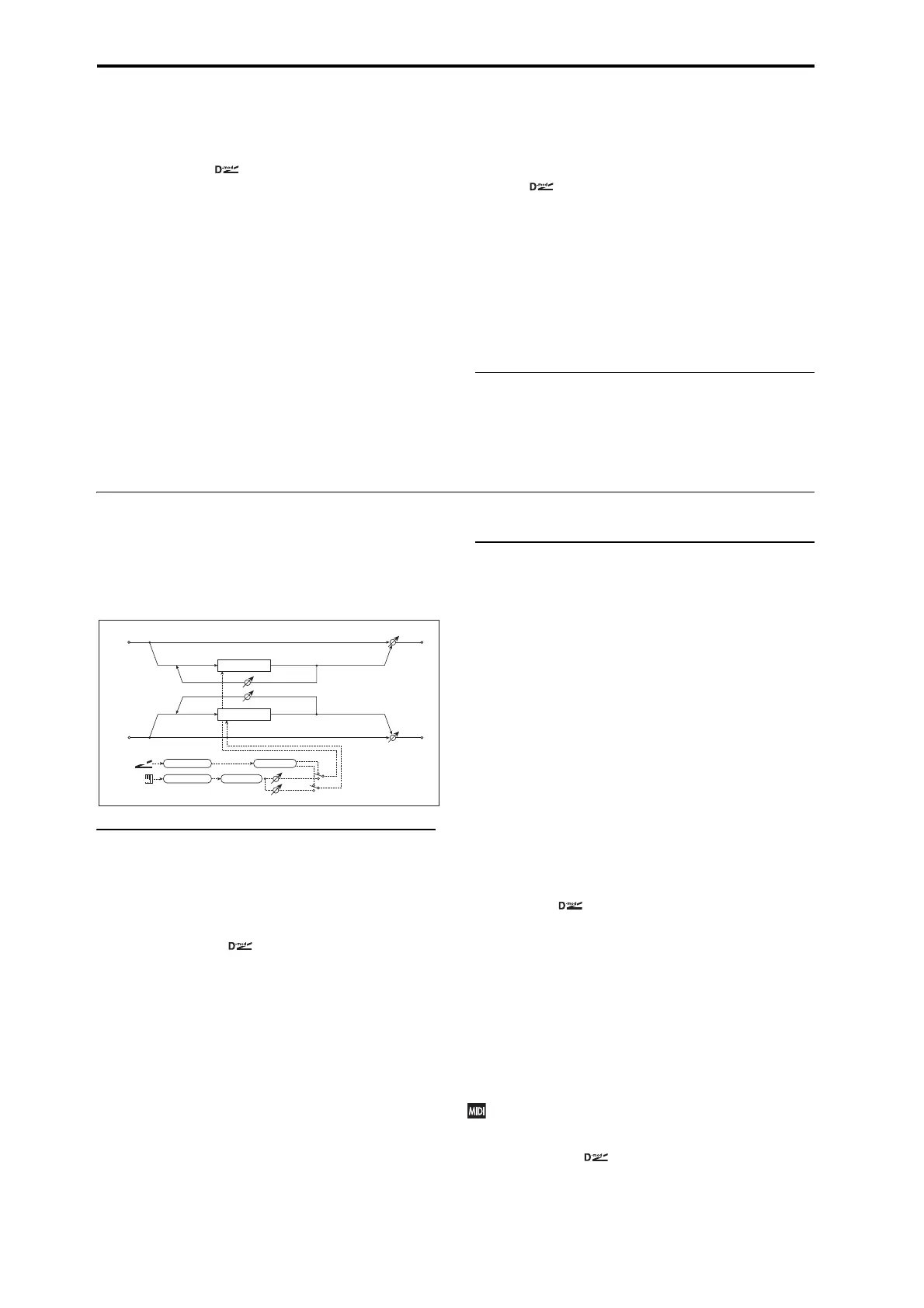
082: Stereo Modulation Delay
This stereo delay uses either an LFO or a Dmod source to
modulate the delay time. This causes the delay’s pitch to
vary, creating an effect which swells and shimmers like a
cross between an echo and a chorus.
CONTROL
Modulation Mode [LFO, Dmod]
This selects whether the delay time will be swept by the LFO
or by the selected Dmod source.
Dmod Modulation [L/R:+/+, L/R:+/–]
This applies only if Modulation Mode is set to Dmod.
L/R:+/+: the Dmod source modulates both left and right
delays equally.
L/R:+/–: the Dmod source modulates left and right
inversely, for a deeper stereo effect.
Source [Off…Tempo]
Selects a modulation source to control the delay time. This
applies only if Modulation Mode is set to Dmod.
Response [0…30]
This controls how quickly the delay times change in
response to the modulation source. Higher values mean
faster response times.
LFO
All of the LFO controls apply only when the Modulation
Mode is set to LFO.
Waveform [Triangle, Sine]
Selects the LFO Waveform.
Shape [-100…+100]
Changes the curvature of the LFO Waveform. For more
information, see “Shape” on page 782.
L LFO Phase [degrees] [–180…+180]
This sets the initial phase of the left LFO. The relationship
between this and the R LFO Phase controls the depth of the
stereo effect and the richness of the pitch changes. As a start,
try setting one to +90 and the other to -90.
R LFO Phase [degrees] [–180…+180]
This sets the initial phase of the right LFO.
Dmod Sync [Check-box]
This enables reset of the LFOs from a Dmod source, as
selected below.
Source [Off…Tempo]
If Dmod Sync is On, this selects the modulation source to
reset the LFOs, using the initial phases set by L LFO Phase
and R LFO Phase above.
For example, if you set the Source to Gate 2, playing on the
keyboard will reset the LFOs so that the modulation sounds
the same at the start of each phrase.
The LFOs are reset when the modulation value changes
from 63 or smaller to 64 or higher.
Frequency [Hz] [0.02…20.00]
This sets the LFO speed, in Hz.
Left
Right
Feedback
LFO Phase
Wet / Dry
Wet / Dry
Stereo In - Stereo Out
LFO: Tri / Sine
Modulation Mode
D-mod
LFO
D
-mod
Delay
Delay
L/R: +/+ +/–
LFO Shape
Response
LFO Sync


 To Next Page
 Loading...