31 - 32
•
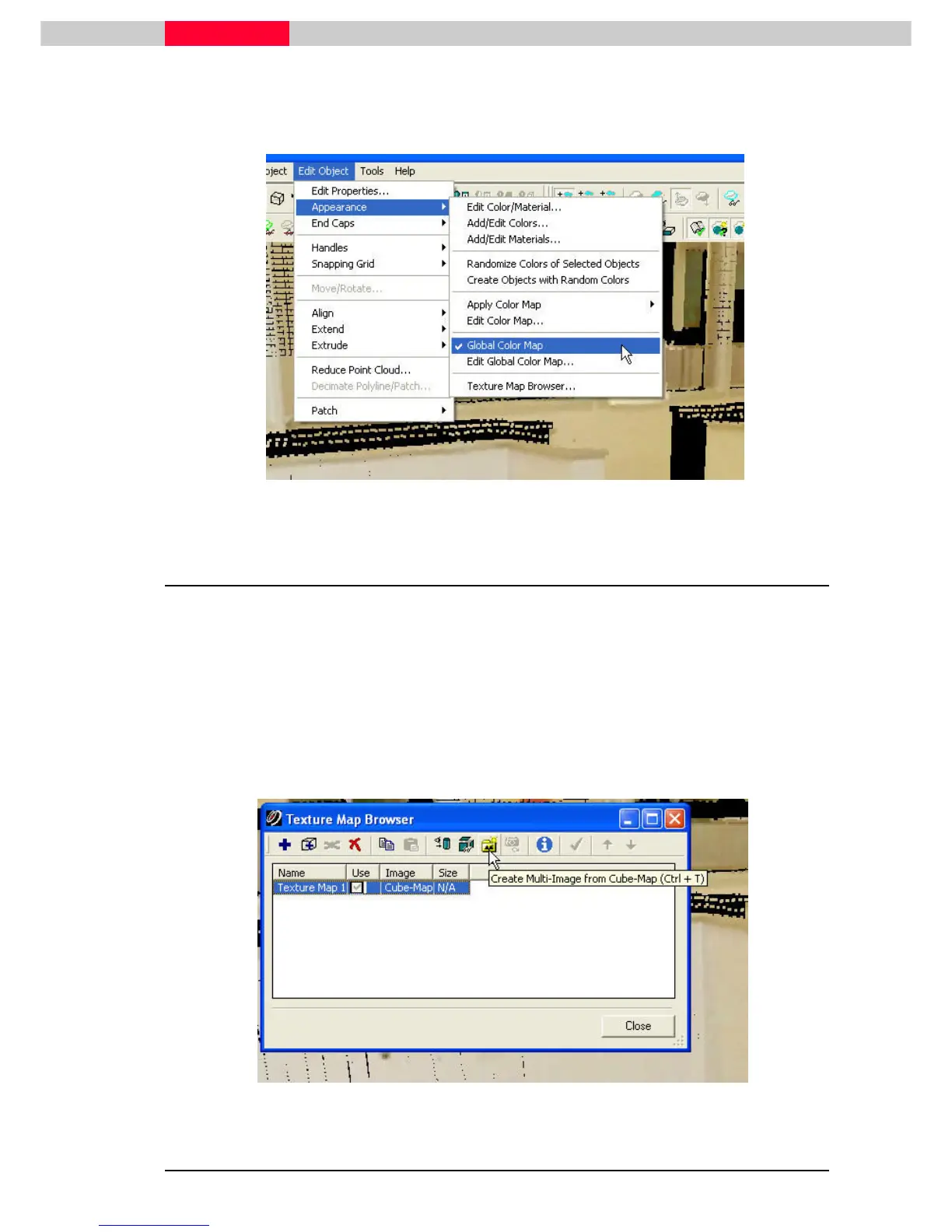
If you do not see the Cube-Map colors go to Edit Object
Edit ObjectEdit Object
Edit Object-
--
-| Appearance
| Appearance| Appearance
| Appearance-
--
-|
| |
| Global Color Ma
Global Color MaGlobal Color Ma
Global Color Map
pp
p.
..
.
•
Make sure it is checked.
Figure 59
2.12 Create Multi-Image from Cube-Map
You can create a Multi-Image from
the Texture Map Browser
dialog. This enables the ability to
create a TruView/ TruSpace and have the new imagery available in the TruView/TruSpace.
•
Open the
Texture Map Browser
again by clicking Edit Object | Appearance | Texture Map
Edit Object | Appearance | Texture Map Edit Object | Appearance | Texture Map
Edit Object | Appearance | Texture Map
Browser...
Browser...Browser...
Browser...
•
Select
SelectSelect
Select the point cloud
•
Highlight
HighlightHighlight
Highlight the Texture Map
•
Click the C
CC
Create Multi
reate Multireate Multi
reate Multi-
--
-Image
ImageImage
Image from Cube
from Cube from Cube
from Cube-
--
-Map
MapMap
Map button
Figure 60



 To Next Page