Debug Support
PowerPC e500 Core Family Reference Manual, Rev. 1
Freescale Semiconductor 8-5
8.3.1 TAP Interface Signals
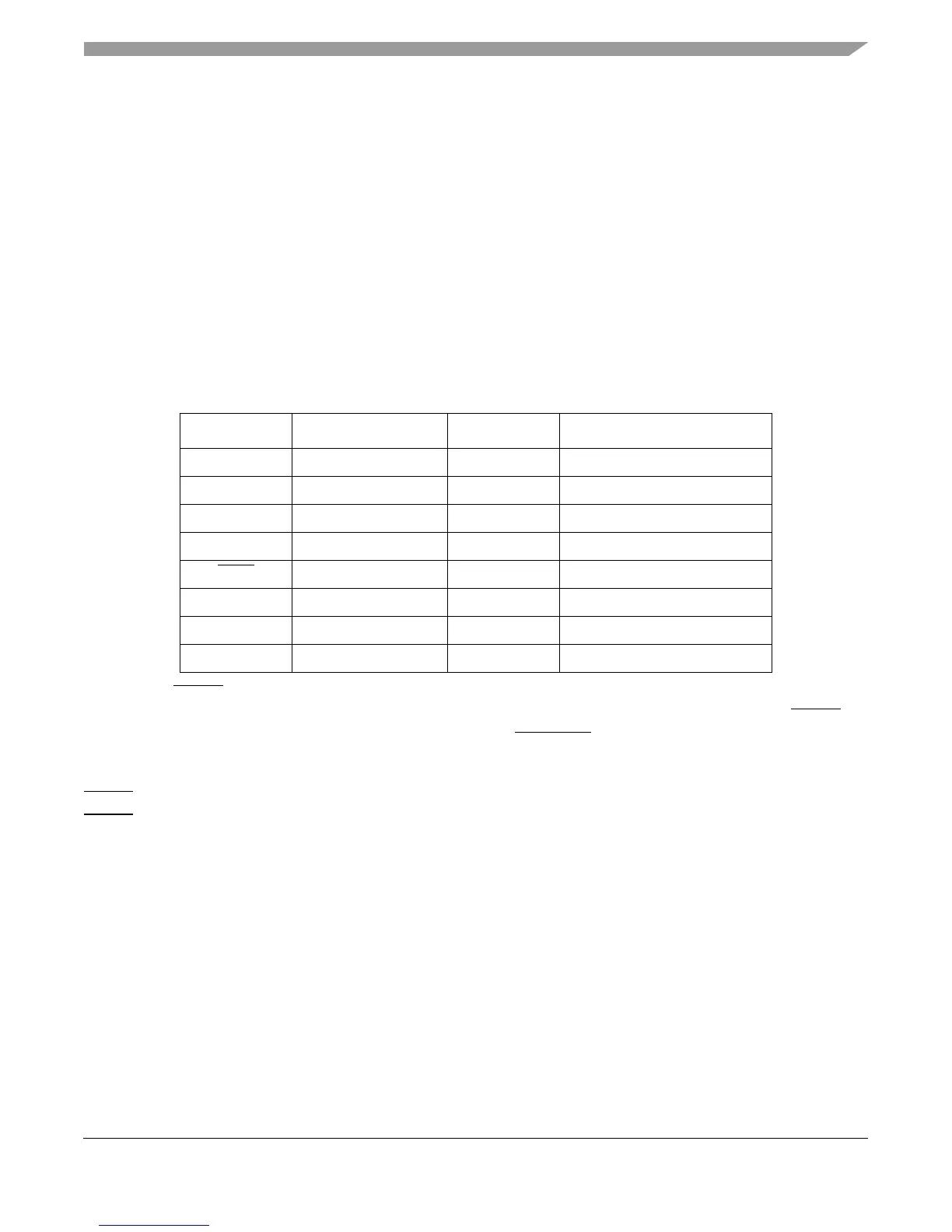
The TAP interface signals are summarized in Table 8-4 and discussed briefly in the following
sections. The test data input (TDI) and test data output (TDO) scan ports are used to scan
instructions and data into the various scan registers for JTAG operations. The scan operation is
controlled by the TAP controller, which in turn is controlled by the test mode select (TMS) input
sequence. The scan data is latched at the rising edge of test clock (TCK).
The TAP and boundary-scan logic are not used under typical operating conditions. Detailed
discussion of all e500 test functions is beyond the scope of this document. However, sufficient
information is provided to allow the system designer to disable test functions that would impede
normal operation.
Test reset (TRST
) is an optional JTAG signal used in the e500 to reset the TAP controller
asynchronously. This signal is not used during normal operation. It is recommended that TRST
be
asserted and negated coincident with the assertion of HRESET
to ensure that the test logic does
not affect normal operation of the core complex.
TRST
must be asserted sometime during power-up for JTAG logic initialization. Note that if
TRST
is connected low, unnecessary power is consumed.
Table 8-4. TAP/IEEE/JTAG Interface Signal Summary
Signal Name Description Input/Output IEEE 1149.1a Function
TCK Test clock In Scan clock
TDI Test data input In Serial scan input signal
TDO Test data output Out Serial scan output signal
TMS Test mode select In TAP controller mode signal
TRST
Test reset In TAP controller reset
TAP_EN TAP enable In N/A
TDO_EN Test data output enable Out N/A
TLMSEL TLM selected Out N/A



 To Next Page