C
HAPTER
17
| Multicast Filtering
Layer 2 IGMP (Snooping and Query for IPv4)
– 625 –
WEB INTERFACE
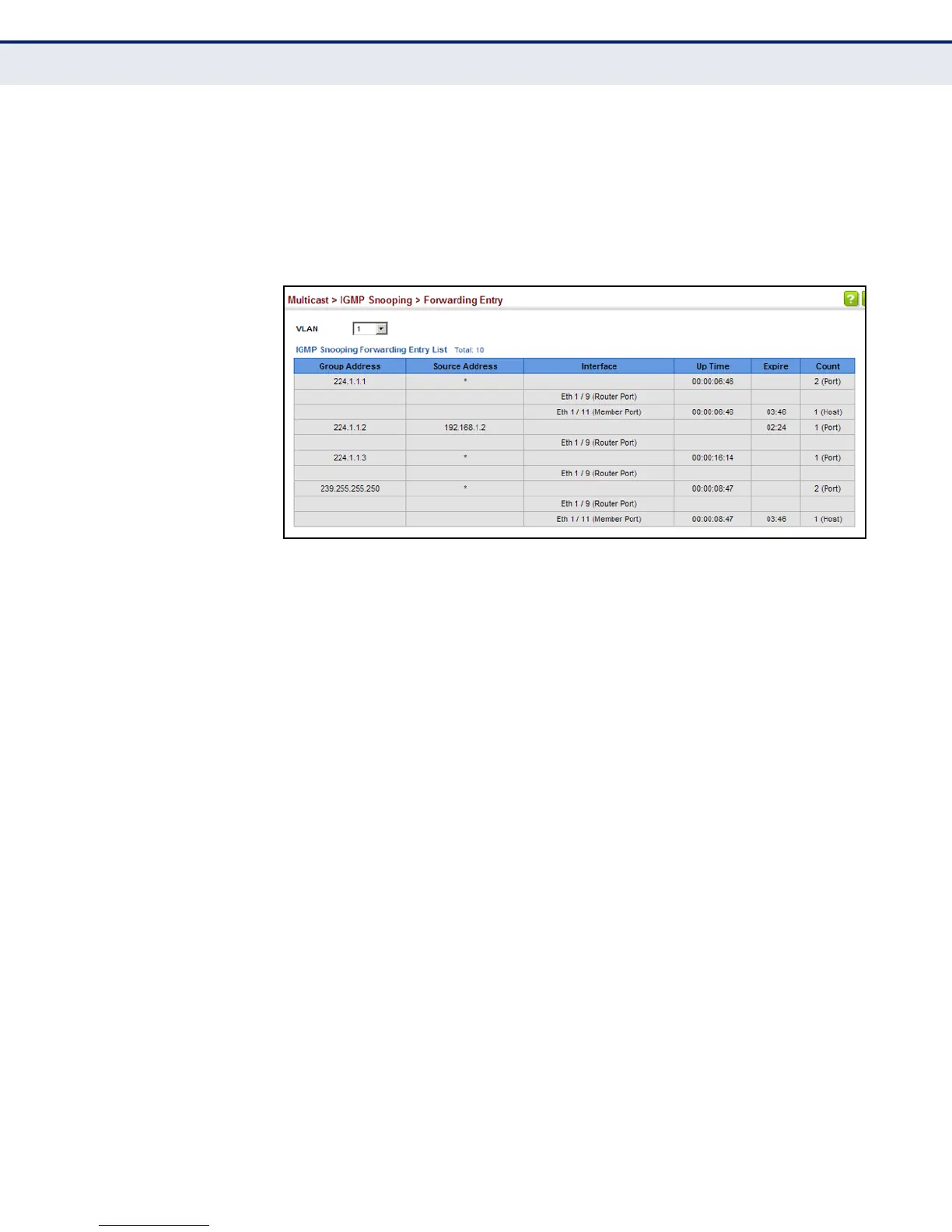
To show multicast groups learned through IGMP snooping:
1. Click Multicast, IGMP Snooping, Forwarding Entry.
2. Select the VLAN for which to display this information.
Figure 367: Showing Multicast Groups Learned by IGMP Snooping
DISPLAYING IGMP
SNOOPING STATISTICS
Use the Multicast > IGMP Snooping > Statistics pages to display IGMP
snooping protocol-related statistics for the specified interface.
CLI REFERENCES
◆ "show ip igmp snooping statistics" on page 1224
PARAMETERS
These parameters are displayed:
◆ VLAN – VLAN identifier. (Range: 1-4094)
◆ Port – Port identifier. (Range: 1-28)
◆ Trunk – Trunk identifier. (Range: 1-12)
Query Statistics
◆ Querier IP Address – The IP address of the querier on this interface.
◆ Querier Expire Time – The time after which this querier is assumed to
have expired.
◆ General Query Received – The number of general queries received
on this interface.
◆ General Query Sent – The number of general queries sent from this
interface.














 To Next Page