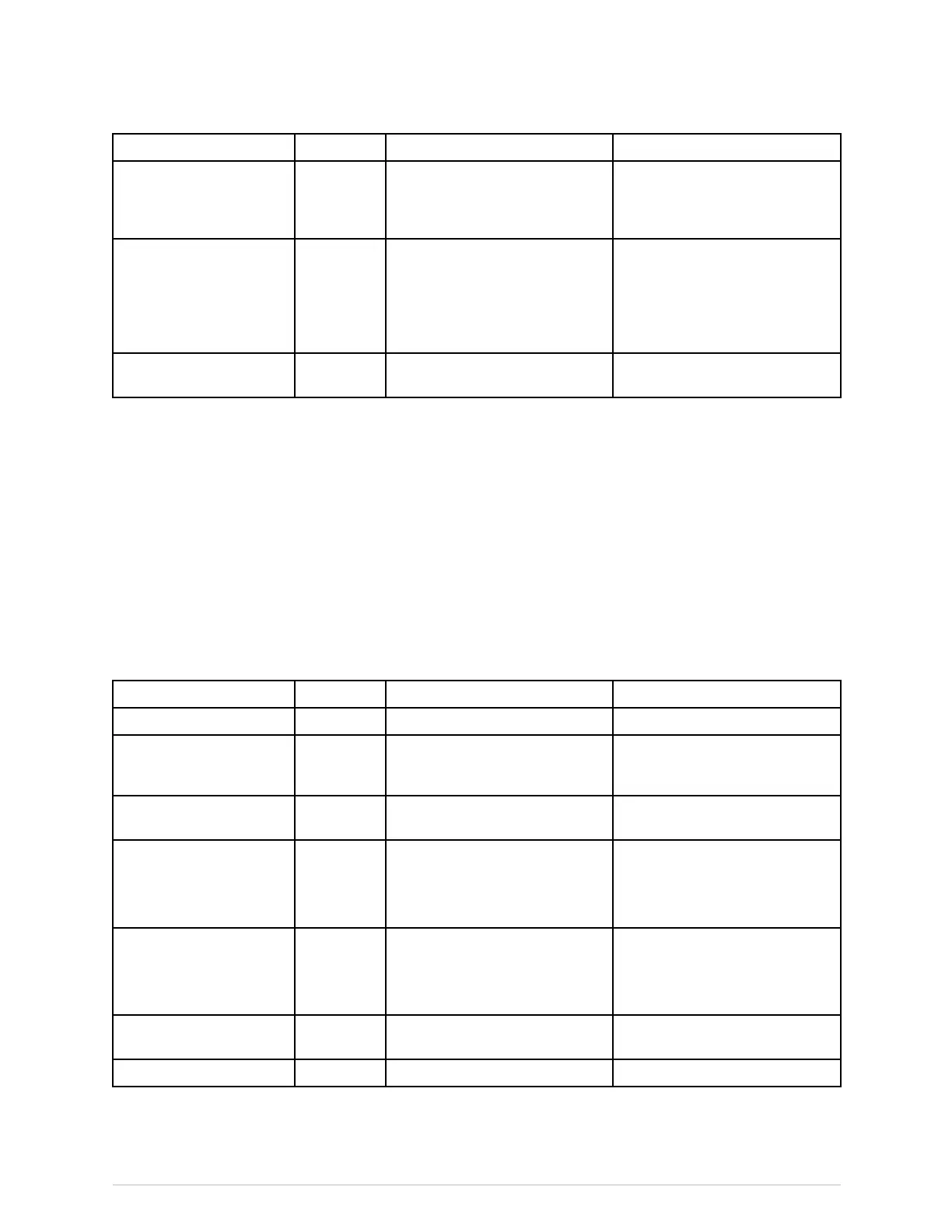
Messages
Message
Location
ExplanationWhattodo
●Replacesensor
●param.
Thesensordatehasexpired,the
sensorhasbeenusedtoomany
times,orthevaliditytimeforthe
sensorcannotbedetermined.
●Replacethesensor.
●Sensorcheckfailed
●param.,
wavef.
Thesensorhasnotpassedthe
impedancecheck.
●Checksensorplacementand
attachment.
●Presseachelectrodeinthe
sensor.
●Replacethesensor.
●TestingDSC
●param.,
wavef.
TheBISxtesthasbeenactivated.●Waituntilthecheckis
completed.
MessagesrelatedtoTCmeasurement
Forinformationregardingalarmprioritiesandescalationtimes,seetheCARESCAPEModular
MonitorsSupplementalInformationManual.
Makesureyouarefamiliarwiththegenericlayoutofthescreen.Thiswillhelpyouidentify
whereonscreenthefollowingmessagesappear.Themessagelocationisindicatedwiththe
followingabbreviations:
●al.area=alarmarea
●param.=parameterwindow
●report=reportview
●wavef.=waveformarea
Message
Location
ExplanationWhattodo
●Calibrating
●param.
Calibrationisinprogress.●Noactionrequired.
●Calibrationerror
●param.
Unsuccessfulcalibration.●Authorizedservicepersonnel
shouldrepeatthecalibration
procedure.
●Connecting
●param.
Connectiontotheinterfaced
deviceisbeingestablished.
●Noactionrequired.
●Extdeviceerror
●param.
Interfaceddeviceshouldbe
checked.
●Checktheinterfaceddevice.
●Iftheproblempersists,
contactauthorizedservice
personnel.
●Noextdevice
●param.
Interfaceddeviceshouldbe
checked.
●Checktheinterfaceddevice.
●Iftheproblempersists,
contactauthorizedservice
personnel.
●Notcalibrated
●param.
Measurementneedstobe
calibrated.
●Performcalibration.
●Ready
●param.
Measurementisready.●Noactionrequired.
2062971-001CARESCAPEModularMonitors503



 To Next Page