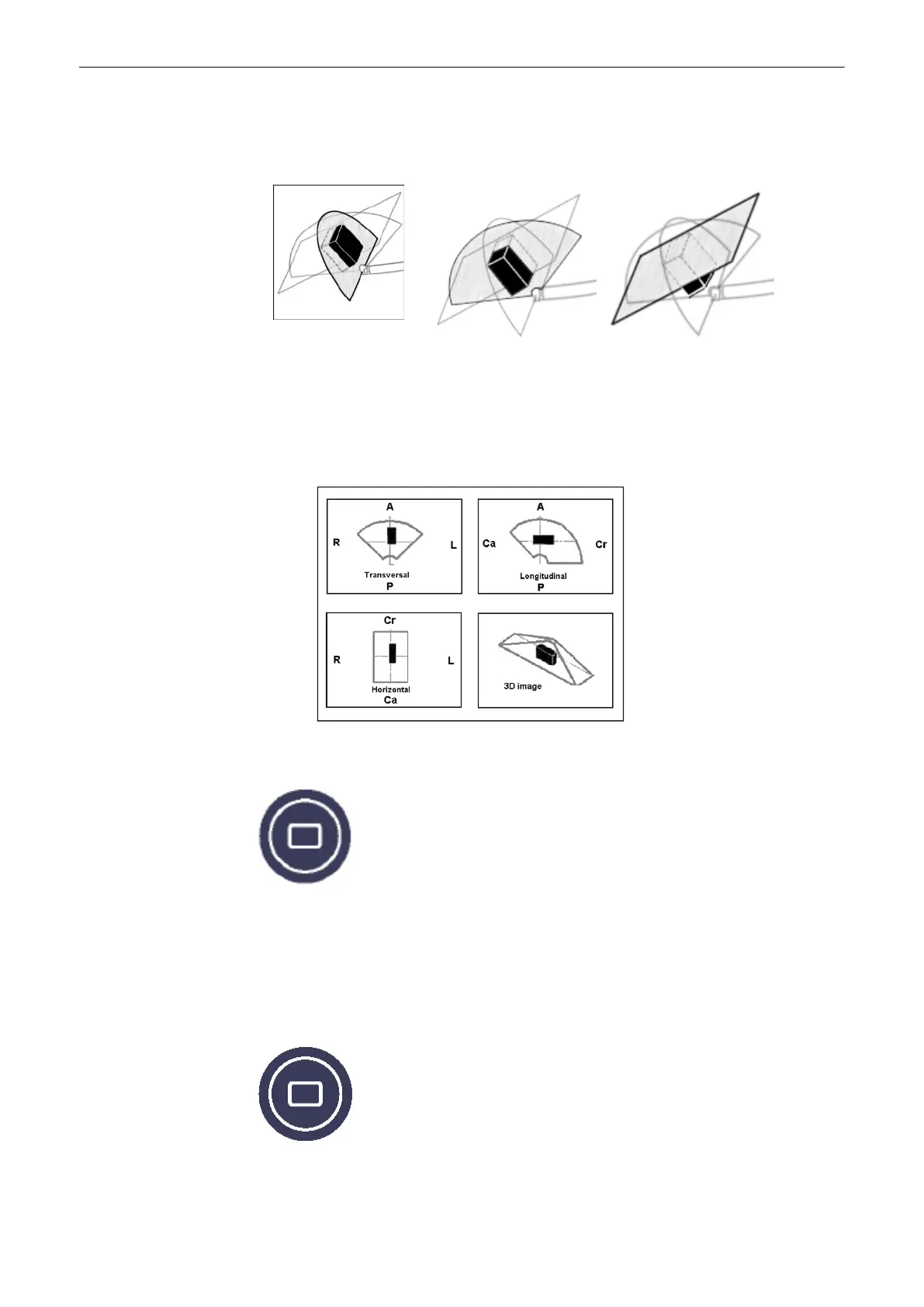
A:
Positioning the Transverse
Section
B: Positioning the
Longitudinal Section
C:
Positioning the Horizontal
Section
The sectional image A represents that 2D image visible in the Vol preparation area. If the
VOL-start image is a transverse section of the prostate (right side of the patient is left side of
the screen), the following Init positions are obtained:
Monitor Display:
9.2.4.5 A,B,C - Sectional Plane Mode
This display mode is active if you press the [Quad] screen format key. The 3 sectional planes
A, B and C are perpendicular to each other. The intersecting lines of the planes are the axes
of the relative coordinate system and they are displayed in colors in the different image planes.
This Sectional Plane mode is the basis for the other display modes.
9.2.4.6 Reference Image Mode
Volume Mode
9-34
Voluson® S6/S8 Basic User Manual
5433669-100 Revision 4



 To Next Page