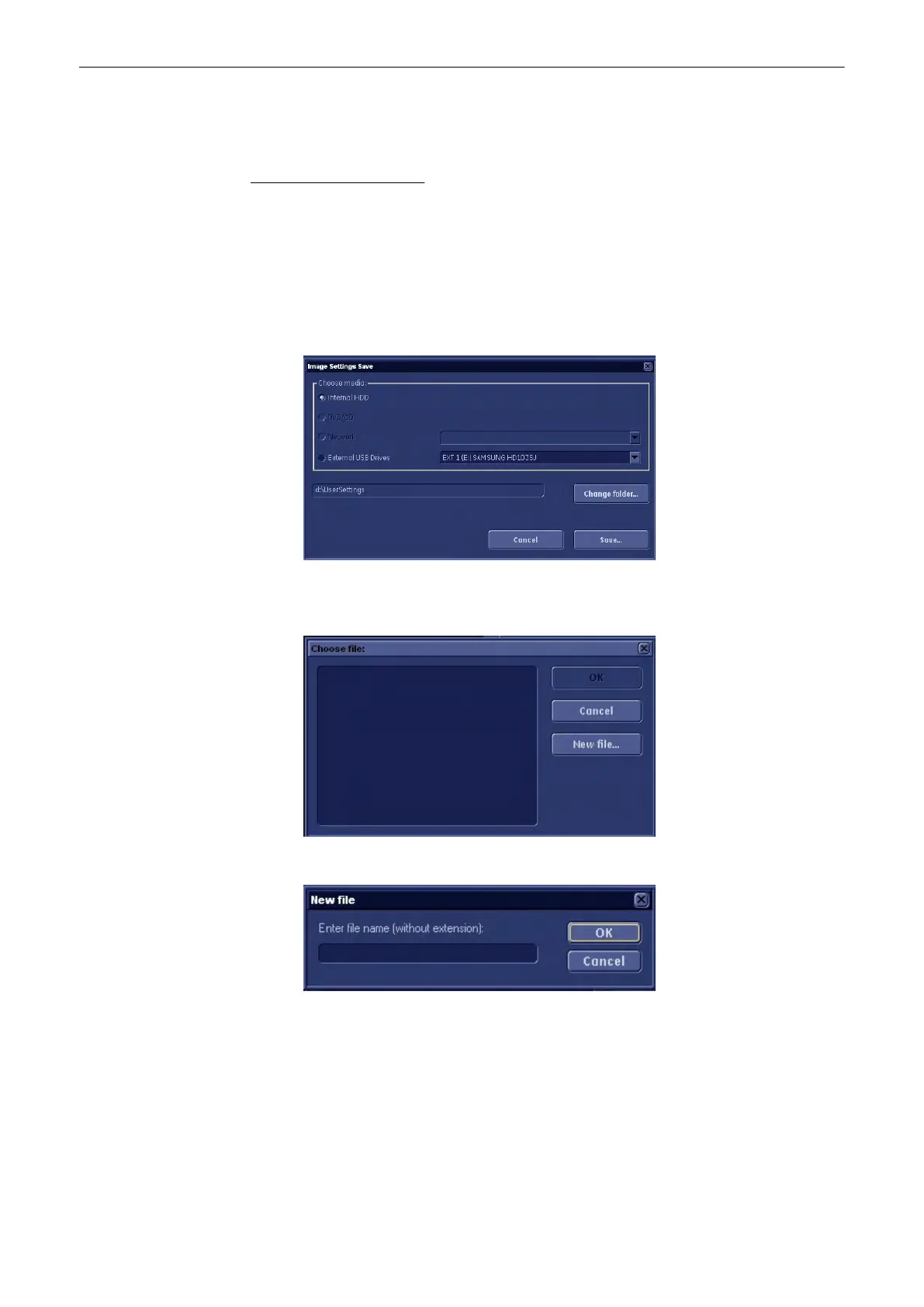
13.2.6.1.1 Save Image Settings
•
With this function the internal database is saved to the selected read/write device.
The Image Settings contain:
•
Image settings
•
Auto Text
•
Setup settings (language, date format, screensaver on/off, etc.)
•
Scan assistant templates
1.
Click on the [Save] button of the “Image Settings Only” group in the System Setup -
Backup page. The Save window is displayed.
2. Choose the media (e.g., DVD/CD+(R)W) and click the [Save] button.
3.
Select an already existing file.
or click the [New File...] button.
and type in the file name.
4.
Click [OK]. The saving procedure begins.
Cancel: Exit without saving.
13.2.6.1.2 Load Image Settings Only
With the Load function the entire Image Settings or parts of it can be loaded into the database
to overwrite, restore, copy, etc... the database into the system.
Utilities and System Setup
13-48
Voluson® S6/S8 Basic User Manual
5433669-100 Revision 4



 To Next Page