Remarks:
•
When the Automatic Optimization function is active, an asterisk (* next to the Gray map
number) is displayed in the B mode Image Info area.
•
The Image Info in 3D/4D Mode depends on the selected Acquisition and Visualization
Mode.
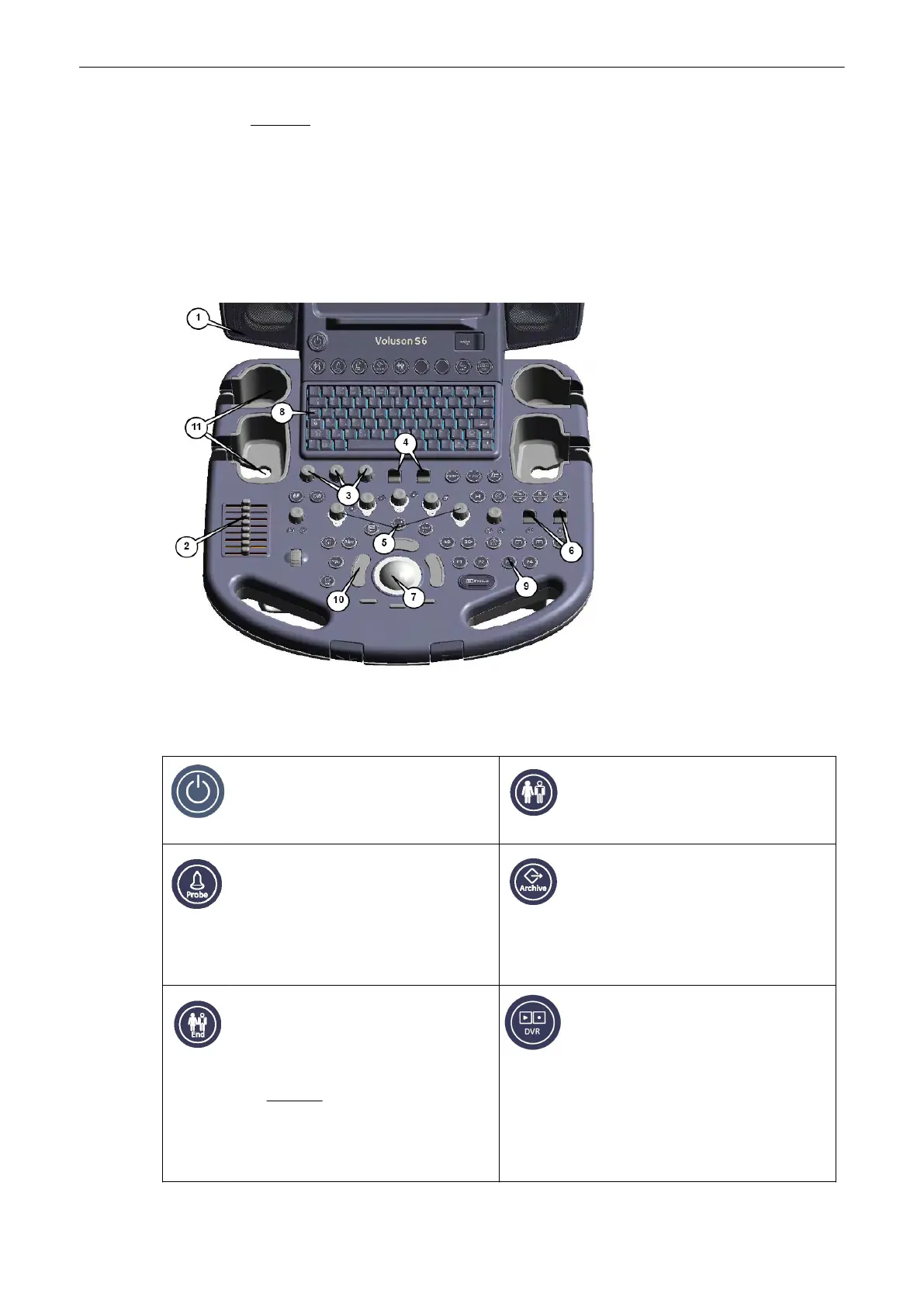
3.5.4 Control Panel
1. Loudspeaker position
2.
TGC Slider controls
3. Menu window digipot controls
4. Menu window flipswitch
controls
5. Mode keys (digipot controls)
6. Toggle switch controls
7. Trackball
8. Alphanumeric Keyboard
9. Hard keys
1
0.
Trackball buttons
1
1.
Probeholders
3.6 Button description
Power
Allows you to turn the system on or off.
Patient Data Entry
Switch to the patient data entry menu (the
previous exam will be closed).
'Entering
Patient Data'
on page 4-10
Probe Program
Switch to the Probe Program menu for
selecting a probe with its related program.
'Probe/Program Selection'
on page 4-7
Review
Switch to the exam review mode,
'Selecting Exams'
on page 12-39
.
Unless no exam has been started, then
pressing the [Review] key opens the
Archive, 'Patient Archive'
on page 12-
10
.
End Exam
Patient and measurement data are stored
in the “Data manager” and all temporary
patient and measurement data are
cleared. Operation:
'End Exam'
on page
4-10
Caution: It is absolutely necessary
to press this key before switching OFF
the system. Otherwise the current Patient
data as well as all the measurements in
the Patient report will be lost.
Play/Record
Press this key once to change the
“DVD/VCR remote control menu”.,
'P-keys'
on page 14-4
Press this key twice to start a recording
on the connected DVD recorder or video
recorder.
Press this key twice to stop the recording.
Description of the System
Voluson® S6/S8 Basic User Manual
5433669-100 Revision 4 3-11



 To Next Page