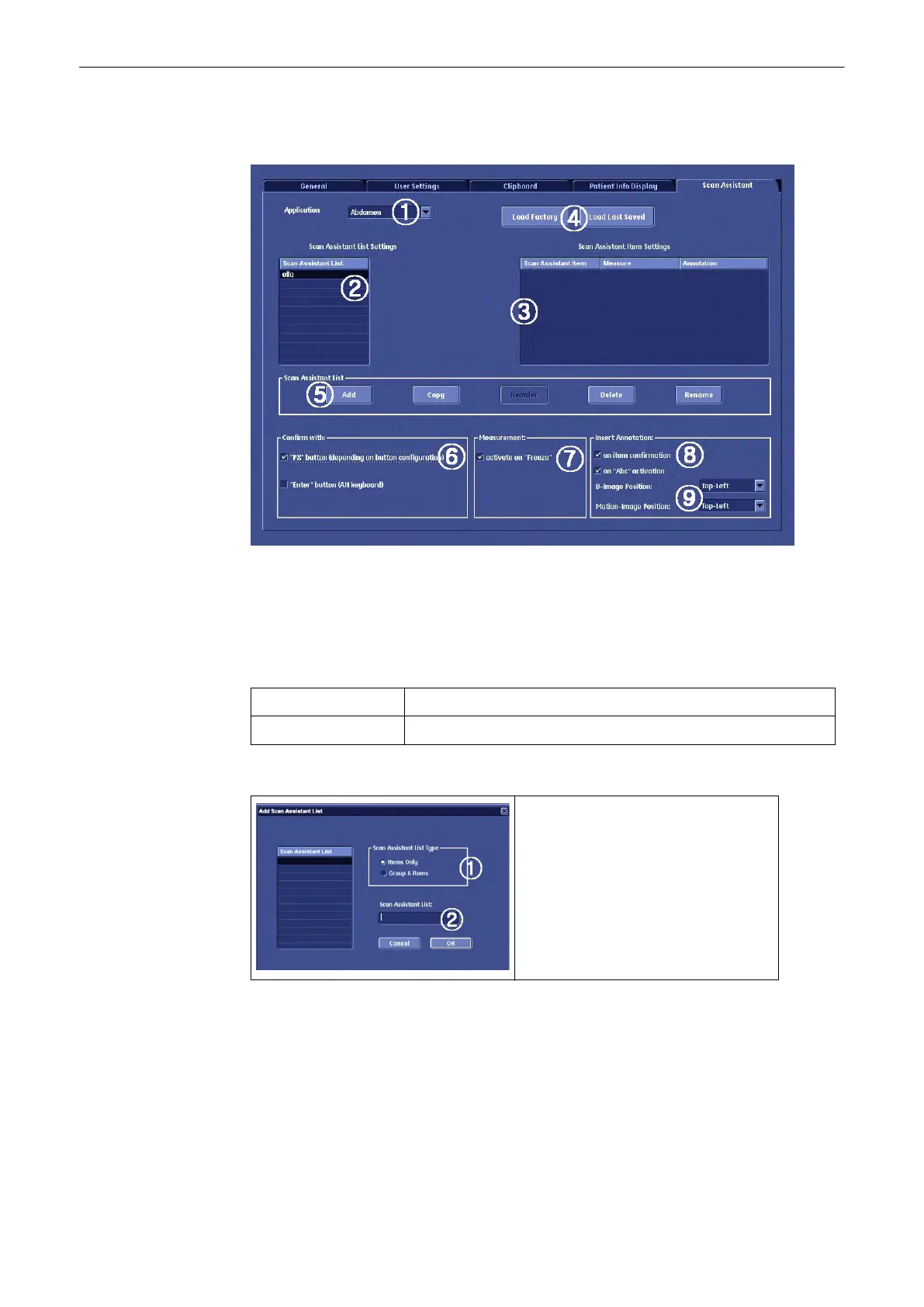
13.2.8 Scan Assistant Settings
1. Choose the application that is required
2. Shows all created Scan Assistant lists. To edit or add Scan Assistant list, see (5)
3. Items in the selected Scan Assistant.
4. Load Factory and Load Last Saved:
Load Factory Load the saved Factory Scan Assistant, see Save Factory
Load Last Saved Load the Last Saved Factory Scan Assistant
5. Add: Add a new Scan Assistant list. Following dialog will appear:
A: Select which items have to be added
to the new Scan Assistant list.
B: Type in a name for the new Scan
Assistant. Confirm with [OK].
6. Confirm with:
PX button: Select this option if you want to confirm the Scan Assistant with a programmable
button. See
Chapter 14
Enter key: Select this option if you want to confirm the Scan Assistant with the [Enter] key on
the keyboard.
7. Activate Measurement with the [Freeze] key.
Utilities and System Setup
13-62
Voluson® S6/S8 Basic User Manual
5433669-100 Revision 4



 To Next Page